This article is part of our complete guide to B2B customer retention.
A CRM improves customer retention by giving you one complete view of every customer (their usage, history, health, and renewal date) and the automation to act on it, so you keep customers engaged and reduce churn instead of reacting after they leave. CRM and customer retention are tightly linked: the customers most businesses lose are the ones nobody was watching. This guide explains how CRM helps with customer retention, the CRM strategies that work, the features to look for, and how to implement a retention strategy using your CRM.
For the bigger picture, start with our B2B customer retention guide.
How Does CRM Help With Customer Retention?
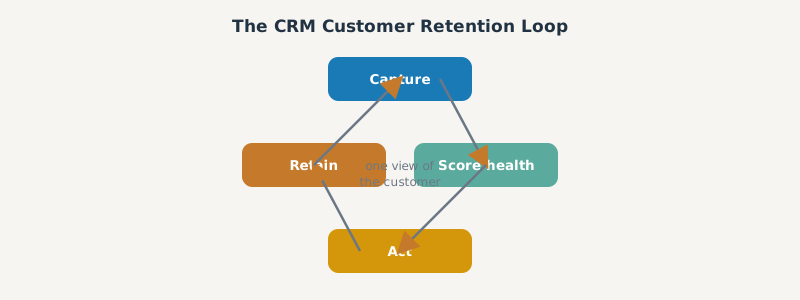
A CRM helps with customer retention in four ways:
- One view of the customer. Every interaction, support ticket, purchase, and renewal date lives on one record, so the whole team understands the customer relationship and nothing slips.
- Early-warning signals. By tracking customer behavior and engagement, a CRM surfaces the accounts cooling off before they churn.
- Automation. A CRM can automate the repetitive retention work, onboarding sequences, renewal reminders, and health-based alerts, so retention happens consistently at scale.
- Personalized engagement. With customer data in one place, you tailor communication to each customer’s needs and lifecycle stage, which keeps customers engaged.
The result is a shift from reactive to proactive: instead of finding out a customer left, you see retention risk early and act.
CRM Strategies for Customer Retention
Owning a CRM does not improve retention; using it deliberately does. The CRM strategies that move retention rates:
- Map the customer lifecycle. Define the stages from onboarding to renewal in your CRM so every customer has a clear path and no one stalls.
- Score customer health. Use CRM data (usage, support, engagement) to build a health or risk score that flags accounts to save.
- Automate the proactive plays. Trigger onboarding help, check-ins, and renewal reminders based on customer behavior, not manual memory.
- Segment and personalize. Group customers by value and need, then tailor retention efforts to each segment.
- Close the feedback loop. Capture customer feedback in the CRM and act on it, so customers see the product respond to their pain points.
These strategies to increase customer retention turn the CRM from a contact database into a retention engine.
What Features to Look For in a CRM for Customer Retention
Not every CRM is built for retention. The features that matter:
| Feature | Why it helps retention |
|---|---|
| Unified customer record | One view of the customer across teams |
| Workflow automation | Repeatable onboarding, renewals, alerts |
| Health/risk scoring | Flags churn risk early |
| Usage and behavior tracking | Surfaces silent disengagement |
| Reporting and analytics | Measures customer retention rate and trends |
| Renewal and deal pipeline | Keeps renewals visible and managed |
The best CRM for customer retention combines these so you can capture customer behavior, score it, act on it, and measure the result in one place.
Why Customer Retention Is Essential (and How CRM Makes It Cheaper)
Customer retention is essential because retained customers tend to spend more over time and cost less than acquiring new customers. A CRM lowers the cost of strong retention by replacing manual effort with engagement strategies that run automatically throughout the customer lifecycle. Instead of hoping reps remember to follow up, the CRM keeps existing customers engaged with timely, relevant customer interactions based on their behavior and customer expectations.
The common challenges in customer retention, poor customer service, missed renewals, unaddressed customer pain points, and disengaged customers slipping away unnoticed, are exactly what a CRM solves. By centralizing customer insights and surfacing customer satisfaction scores, the CRM helps you keep existing customers rather than constantly working to acquire new customers. Most CRM platforms, including HubSpot, bundle the features (workflow automation, reporting, customer engagement tools) that make better customer experience and higher retention repeatable. The payoff is strong retention: a better customer experience, more repeat purchases, and a higher customer lifetime value across your customer base.
How to Implement a Customer Retention Strategy Using CRM
Implementation is where most retention programs succeed or stall. A practical sequence:
- Centralize the data. Get usage, support, and renewal data into the CRM so the customer view is complete.
- Define and score health. Build a health score from the signals that predict churn in your business.
- Automate interventions. Set workflows that trigger the right action when a score drops or a renewal nears.
- Assign ownership. Make sure every at-risk account has an owner and a play.
- Measure and iterate. Track customer retention rate and churn rate, and refine the model over time.
We build exactly this on HubSpot, combining health scores, automation, and renewal pipelines, as detailed in our churn prevention with health scores guide. The CRM is the system; dedicated customer retention software can extend it, and the strategies sit inside the broader B2B customer retention program.
Frequently Asked Questions
How does a CRM help with customer retention? It gives you one complete view of each customer and the automation to act on it, surfacing churn risk early and making proactive retention plays (onboarding, renewals, health alerts) repeatable at scale.
What CRM strategies improve customer retention? Map the customer lifecycle, score customer health, automate proactive interventions, segment and personalize engagement, and close the feedback loop so customers see the product respond.
What features should a CRM have for customer retention? A unified customer record, workflow automation, health and risk scoring, usage tracking, retention analytics, and a renewal pipeline, so you can capture, score, act, and measure in one place.
Why is customer retention important for businesses? Retaining an existing customer is cheaper than acquiring a new one, and retained customers spend more over time, so retention protects and compounds revenue, especially in recurring-revenue B2B.
Can a CRM reduce churn? Yes. By tracking customer behavior and triggering interventions before disengaged customers cancel, a CRM moves retention from reactive to proactive, which is what actually reduces churn.
SWOTBee turns your CRM into a customer retention engine: health scores, automation, and renewal pipelines that keep customers and grow them. We build it on HubSpot, end to end.
Get your 1-page renewal leakage estimate →
No call needed. Prefer to talk it through first? Book a free 30-minute discovery call →