This article is part of our complete guide to HubSpot and NetSuite integration.
A custom NetSuite CRM integration is a purpose-built connection between NetSuite and your CRM, written against NetSuite’s APIs to handle the custom records, line-item logic, and data volume that off-the-shelf connectors cannot. It gives you total control over the data model and the entire customer lifecycle, but you own NetSuite’s API governance, authentication, and technical bottlenecks forever. This guide is the engineering view: how NetSuite CRM integration works under the hood, the limits that break naive builds, and the architecture that holds up at scale.
If you have not yet decided between native, iPaaS, and custom, read our HubSpot NetSuite connector comparison first. For the strategy, see the HubSpot NetSuite integration pillar.
The Case for a Custom NetSuite CRM Integration
Most teams should start with a native connector or an iPaaS platform such as Celigo or Workato. A custom NetSuite CRM integration earns its keep only when those options hit a wall, which they do in predictable ways: custom NetSuite record types that connectors cannot map, internal-ID fields that have to flow, complex CPQ or multi-currency line items, project-based revenue, or data volumes that overwhelm a generic connector. One integrator reports that half its customers arrive after a native integration has already failed.
The benefits of integrating a CRM with NetSuite this way are control and fit: you model exactly the records and workflows your business runs, you decide every sync direction and conflict rule, and you can centralize a complete view of the customer across the entire customer lifecycle. The cost is ownership. You inherit NetSuite’s API limits and a permanent maintenance burden every time those APIs change. Budget for both the build and the long-term upkeep before you commit.
What Is NetSuite CRM and How Is It Used
NetSuite CRM is the customer relationship management capability inside Oracle NetSuite, packaged as part of the NetSuite platform rather than as one of the standalone CRM systems on the market. Because NetSuite has packaged the experience as a module of the ERP, a NetSuite CRM gives sales and service teams a complete view of the customer: contact and customer information, opportunities, order management, support cases, and forecast data all sit on one record beside finance. That single view of the customer is the strength of using NetSuite as a CRM, and it is also why so many teams want to integrate CRM data from another system, most often HubSpot, with NetSuite’s financial truth.
A custom NetSuite CRM integration is one of several integration options. What CRMs integrate with NetSuite? HubSpot, Salesforce, Zoho CRM, and most major CRM software connect to NetSuite, whether through native connectors, an iPaaS, or a custom CRM and ERP integration. The right CRM integration approach depends on your data model, your volume, and how much of the customer experience you want to unify across both systems.
How a NetSuite CRM Integration Works
At its core, a NetSuite CRM integration moves records between systems and keeps them consistent. A CRM event (a new contact, a won deal) calls a NetSuite API to create or update a record; a NetSuite event (an invoice, a shipment) flows back to the CRM. The hard part is not the happy path. It is doing this within NetSuite’s governance, without duplicates, without corrupting line items, and without dropping writes when volume spikes. Everything below is about getting that right.
Navigating NetSuite API Governance and Limits
NetSuite governs API access aggressively, and the limits surprise teams used to modern cloud APIs. Treat governance as the first design constraint, not an afterthought.
Concurrency Caps and SuiteCloud Plus Licenses
The single most important limit is concurrency. Your NetSuite account has a maximum number of simultaneous API requests, and it is shared across every integration and every API type (SOAP, REST, and RESTlets draw from the same pool). The base caps are low: roughly 5 for Standard accounts, 15 for Premium, and 20 for Enterprise. Developer and partner accounts are fixed at 5.
The only way to raise the ceiling is SuiteCloud Plus, which adds 10 concurrent slots per license (Enterprise allows up to 6 licenses, for a maximum well above the base). Two design consequences follow. First, a noisy nightly batch job can starve your real-time CRM sync because they share the pool, so isolate and schedule heavy jobs. Second, SuiteCloud Plus buys throughput, not capability: it unlocks no new API features, only more lanes.
Handling REST and SOAP Rate Limits
Concurrency is not the same as rate. They are separate governors with different windows and different error codes, which trips up debugging. When you exceed them, the error you see depends on the API: SOAP raises an ExceededConcurrentRequestLimitFault and rate breaches return HTTP 403; REST returns HTTP 429; RESTlets return HTTP 400 with SSS_REQUEST_LIMIT_EXCEEDED.
The deeper trap is that, historically, the REST API has no bulk write. Every create or update is one record per request, the classic “chatty API” problem, and the fastest way to exhaust your concurrency. SOAP supports list (batch) operations, which is why high-volume builds have leaned on it despite its age. Recent NetSuite releases have begun adding asynchronous batch operations to REST, so check your version before architecting around the single-record limitation. Either way, design to batch and to back off on 429 and 403 responses.
| Governor | SOAP | REST | RESTlet |
|---|---|---|---|
| Limit error | ExceededConcurrentRequestLimitFault / HTTP 403 | HTTP 429 | HTTP 400 SSS_REQUEST_LIMIT_EXCEEDED |
| Bulk writes | List operations supported | Single-record (batch added recently) | Scriptable |
| Concurrency | Shared account pool | Shared account pool | Shared account pool |
Authentication and Security Protocols
Custom NetSuite integrations authenticate with token-based authentication (TBA) or OAuth 2.0, not a username and password. TBA uses a consumer key and secret plus a token key and secret, signed per request; OAuth 2.0 is supported for REST and is the better choice for new builds. Whichever you use, scope access through a dedicated integration role with only the permissions the sync needs, store secrets in a secrets manager rather than in code, and rotate them on a schedule.
Sessions matter too: NetSuite SOAP sessions expire after about 20 minutes of inactivity, so long-running jobs must handle re-authentication gracefully. Treat the integration role, its permissions, and its tokens as production security surface, because a CRM-to-ERP pipe carries financial data.
Resolving Technical Bottlenecks
Even a correctly authenticated, governance-aware integration hits NetSuite-specific bottlenecks. These are the two that cause the most production incidents.
SOAP Timeouts on Complex Orders
NetSuite aborts any single SOAP web services operation that runs longer than 15 minutes, and the default client-side timeout in many SOAP libraries is just 100 seconds, so connections drop long before NetSuite gives up. Complex sales orders are the classic victim: a SOAP order tops out around 1,000 lines, and recommended batch sizes are small (roughly 20 transactions, 50 entities, or 100 custom records per request). This is exactly why connector-driven sales-order creation fails with timeout errors that cannot be extended. The fix is to increase client timeouts deliberately, keep batches small, and move large or complex orders to asynchronous processing rather than a single synchronous call.
Line Item Array Position Conflicts
The subtlest bug in NetSuite integration is line-item array position. NetSuite assigns the index number for each sublist line itself, developers cannot set it, and crucially the system does not re-index after a line is added or removed. If your code addresses line items by position and a line was deleted upstream, you will silently update the wrong line. The rule is to perform a GET on the current sublist before any UPDATE, and to target lines by a stable key rather than position (keyed sublists with replaceAll set to false). Recent releases make some sublists keyed by default, but never assume position is stable.
A related hazard is concurrent writes to the same record, which produce “record has been changed” race conditions. Make your update operations idempotent so a retry cannot double-apply, and serialize writes to any single record.
Best Practices for Custom Data Sync Architectures
The connectors fail at scale because they are synchronous and chatty. A custom integration should be neither. The best practice for a durable NetSuite data sync is an event-driven, asynchronous architecture that decouples the CRM from NetSuite’s limits.
Utilizing Asynchronous Message Queues
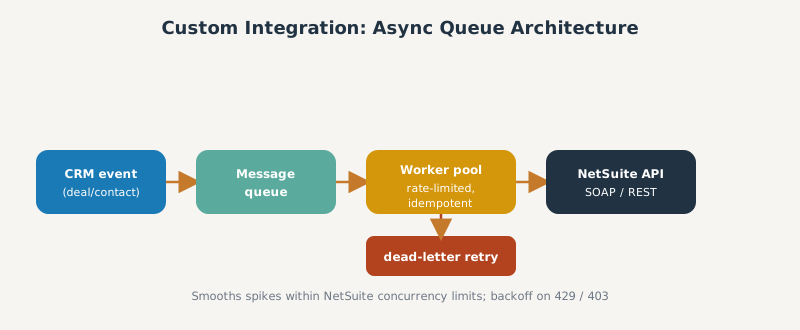
Put a message queue between the two systems. When the CRM emits an event, publish it to a queue; a worker pool consumes from the queue and writes to NetSuite at a rate your concurrency budget allows. This buys you several things at once: throughput smoothing so spikes do not breach the cap, automatic retry with exponential backoff on 429 and 403 responses, a dead-letter queue for records that keep failing, and idempotent processing so replays are safe.
Layer the rest of the architecture on top of the queue:
- Match keys and deduplication. Resolve identity on email, normalized company name, NetSuite internal ID, and CRM record ID before any write, or you will create duplicate customers within the first week.
- Source of truth per object. Assign one owning system per object and let sync direction follow ownership, so two systems never fight over the same field.
- Hybrid sync cadence. Sync fast-moving objects (contacts, deals) in near real time and heavy objects (products, orders, invoices) in scheduled batches to respect API limits.
- Pagination everywhere. NetSuite caps query responses (around 1,000 records per page, and SuiteQL at 100,000 rows per query), so page through results rather than pulling everything at once.
- Observability. Log every sync with a trace key, surface failures on a dashboard, and alert on dead-letter growth, because a silent integration is a broken integration nobody has noticed yet.
Done this way, a custom NetSuite CRM integration delivers the real-time, two-way data sync that the native connector promises but cannot sustain, with a complete view of the customer that survives complex orders, custom records, and volume.
NetSuite CRM Integration Cost and Build Time
A custom build is the most expensive integration option, typically starting in the five figures and rising with the complexity of the data model, plus permanent maintenance. An iPaaS such as Celigo or Workato is cheaper to stand up and far cheaper to maintain, which is why it is the mid-market default. Reserve the custom path for genuinely custom requirements: bespoke NetSuite records, intricate CPQ, project-based revenue, or volumes that no connector handles. How long does a NetSuite CRM integration take? A native connector can be live in days, an iPaaS build in a few weeks, and a custom integration in roughly two to three months depending on scope and testing.
The benefits of a well-built CRM and ERP integration justify the effort: real-time visibility into customer data across both systems, marketing automation in HubSpot tied to financial truth in NetSuite ERP, and order management that no longer depends on manual re-entry. A traditional CRM bolted onto separate ERP systems leaves sales and service teams guessing; a proper CRM integration with ERP gives them current customer information at the point of decision. Whether you connect CRM through an iPaaS or build custom against the NetSuite platform, the goal is the same: one trustworthy view of the customer, kept in sync in real time.
Frequently Asked Questions
What CRMs integrate with NetSuite? HubSpot, Salesforce, Zoho, and most major CRMs integrate with NetSuite through native connectors, iPaaS platforms, or custom API builds against NetSuite’s SOAP and REST APIs.
How does a NetSuite CRM integration work? A CRM event calls a NetSuite API to create or update a record, and NetSuite events flow back to the CRM, with match keys, sync direction, and conflict rules keeping both systems consistent within NetSuite’s API governance.
What are the challenges of NetSuite CRM integration? The main challenges are low shared concurrency limits, the single-record REST write model, SOAP timeouts on complex orders, line-item array-position conflicts, duplicate customers, and the permanent maintenance burden.
How much does a NetSuite CRM integration cost? A native connector is the cheapest, an iPaaS runs a monthly subscription, and a custom build starts in the five figures plus ongoing maintenance. Budget NetSuite-side licensing such as SuiteCloud Plus separately.
What is SuiteCloud Plus and do I need it? SuiteCloud Plus adds 10 concurrent API slots per license. You need it when your integration volume exceeds your account’s base concurrency, which is common for high-volume or multi-integration environments.
Fighting a live sync problem right now? We catalogued the six most-reported HubSpot NetSuite sync failures and their fixes, including which ones a config change can solve and which need an integration layer.
SWOTBee architects custom NetSuite integrations that respect NetSuite’s limits instead of fighting them. We design the queues, match keys, and sync rules so your CRM and ERP stay consistent through complex orders and real volume.
Get your 1-page renewal leakage estimate →
No call needed. Prefer to talk it through first? Book a free 30-minute discovery call →