A HubSpot NetSuite integration connects HubSpot, your front-office CRM, with NetSuite, your back-office ERP, so that customer, deal, and order data sync between the two systems instead of being re-keyed by hand. Done well, it turns a closed-won HubSpot deal into a NetSuite sales order automatically, gives sales teams real-time visibility into invoices and inventory, and gives finance a clean source of truth. Done badly, it silently drops records, rolls back dates, and erodes trust in both systems. This guide covers how the integration works, the three integration methods, where the native connector fails at scale, and when to integrate, migrate, or leave things alone.
This is the pillar for our HubSpot and NetSuite series, the most common real-world example of CRM and ERP integration. It links to the deep-dive guides on each decision: comparison, setup, what data syncs, connectors, migration, and custom builds.
HubSpot vs NetSuite Overview: Aligning Front Office and Back Office
HubSpot and NetSuite solve different halves of the revenue problem. HubSpot is a marketing, sales, and service platform built for high-velocity go-to-market motions. NetSuite is an ERP whose CRM is one module beside finance, inventory, and order management. The question is rarely “which is better” but “how do these two platforms work together.” For a full feature-by-feature breakdown, see our NetSuite CRM vs HubSpot comparison.
High Velocity Lead Generation versus Complex Financial Ledgers
HubSpot excels at lead generation, nurture, sales engagement, and reporting that marketing and sales actually adopt. NetSuite excels at the complex financial ledgers, subscription billing, and inventory that finance depends on. Forcing one tool to do both jobs is where most mid-market RevOps teams get stuck.
The Cost of Fragmented Go To Market Tools
When the front office and back office do not share data, a sales rep quotes from stale pricing, finance re-enters every order, and revenue reporting never reconciles. Fragmented tooling shows up as duplicate data entry, forecast inaccuracy, and a deal-to-cash process that stalls at the handoff. Connecting HubSpot CRM and NetSuite ERP removes that seam, so the data flow between the two systems is automatic rather than manual. This is the case for integrating NetSuite and HubSpot rather than living with the gap.
The RevOps Decision Tree: Integrate, Migrate, or Maintain the Status Quo
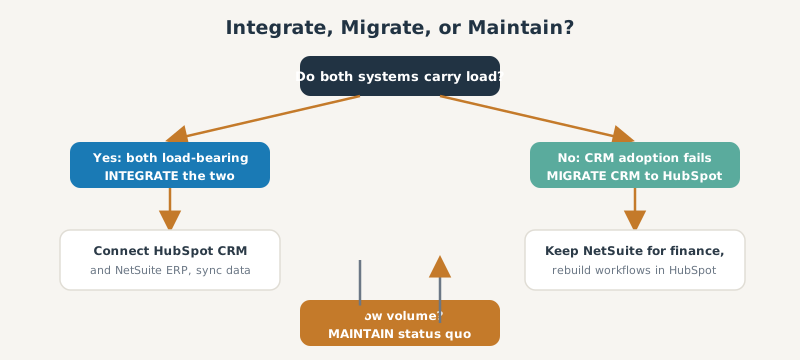
Before any data sync, decide the strategy. There are three paths: integrate (keep both, connect them), migrate (move CRM work off NetSuite into HubSpot), or maintain the status quo.
Identifying the True System of Record
Pick one system of record per object. Customers and financials usually belong to NetSuite; contacts, deals, and marketing activity usually belong to HubSpot. Naming the source of truth for each object up front prevents the bidirectional sync loops that corrupt data later.
Recognizing Signs of Outgrown Tech Stacks
Signs you have outgrown the current setup: reps live in spreadsheets because NetSuite CRM is too heavy, marketing cannot attribute revenue, or finance cannot trust the pipeline. If CRM adoption is the problem, migration to HubSpot may beat integration. If the systems are both load-bearing, integrate.
Architecting the Data Sync: Object Mapping and Source of Truth
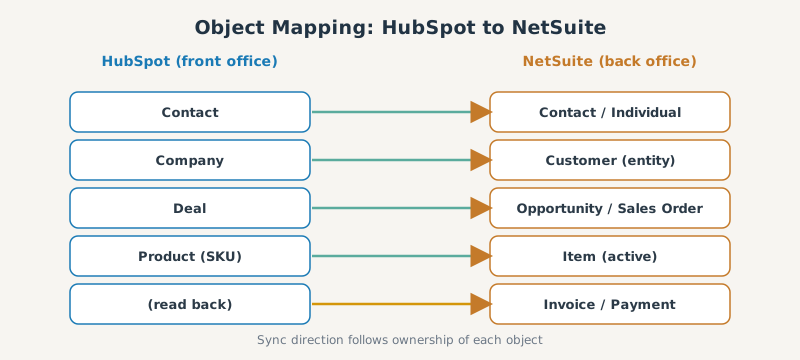
The heart of any integration is object mapping: deciding which HubSpot record maps to which NetSuite record, and in which direction each field flows. Get this layer wrong and you get silent errors, duplicates, and broken workflows, which is why we devote a whole guide to the HubSpot NetSuite data mapping pitfalls.
Aligning HubSpot Deals with NetSuite Sales Orders
The mapping most teams want is the HubSpot Deal to the NetSuite Sales Order. By default the native connector maps a deal to a NetSuite opportunity, and sales-order creation is a separate flow: a manual button on the deal or a deal workflow that fires on closed-won, creating the sales order with the deal’s line items so finance can invoice without re-entry. Line items, quantities, and pricing must map cleanly (products matched by SKU to an active NetSuite item), which is the most common place a sync breaks.
Normalizing Customer Entities and Subsidiary Routing
A HubSpot company and HubSpot contact map to NetSuite customers and contacts. In a multi-subsidiary NetSuite account, each customer must route to the correct subsidiary, and entity records must be normalized and deduplicated so you do not create a second NetSuite customer for an account that already exists. Decide each field’s sync direction here too, so the data between HubSpot and NetSuite flows from whichever system owns it.
Integration Methods: Native, iPaaS, and Custom API
There are three main integration methods, and choosing the right one is the single biggest decision in the project:
| Method | Best for | Trade-off |
|---|---|---|
| Native connector | Simple, single-subsidiary, standard objects | Limited field mapping, breaks at scale |
| iPaaS (Celigo, Workato) | Most mid-market RevOps | Subscription cost, some learning curve |
| Custom API | Complex schemas, high volume | Build time and long-term maintenance |
For the full breakdown of connectors and middleware, see our HubSpot NetSuite connector comparison. For automation-platform recipes, see the Workato HubSpot integration playbook. To bypass API limitations with a build, see our custom NetSuite CRM integration guide.
Evaluating Build Time and Long Term Maintenance
A native connector is fast to turn on but expensive to outgrow. An iPaaS recipe takes longer to configure but is far easier to maintain than a custom integration. A custom API build gives total control but you own every NetSuite API change forever. Weigh build time against the maintenance you can sustain.
Where the Native Connector Fails at Scale
The native HubSpot NetSuite connector works for simple cases, but mid-market teams hit its ceiling fast.
The Risk of the Company Should Exist Sync Block
A well-known failure is the “Company should be present” error: the connector refuses to sync a deal as a NetSuite opportunity because the associated company has not successfully synced yet. Attaching a company in HubSpot is not the same as that company existing in NetSuite, which is what the error is really telling you. The records silently fail, and because the connector polls rather than re-checking failures, the common workaround is to edit any field to exclude the record from the sync, then revert it to force re-evaluation. At volume, these gaps go unnoticed until finance asks where an order went.
Unintended Date Rollbacks and Midnight UTC Defaults
HubSpot stores date-picker fields as timestamps at midnight UTC, so a date arrives in NetSuite a day early for any time zone behind UTC (11/01 becomes 10/31), surfacing as the error “Invalid date, time is not at midnight UTC.” Small on one record, this distorts reporting across thousands. The fix is to use DateTime fields or a script that corrects the offset, and it is a classic reason teams move to an iPaaS or custom build.
Step by Step Setup: Connecting HubSpot and NetSuite
At a high level, you install the connection, define field mappings and sync directions, then test. The exact workflow configurations live in our HubSpot to NetSuite integration setup guide.
Establishing Match Keys and Deduplication Rules
Decide the match key (usually email for contacts, a domain or external ID for companies) so the integration updates the right record instead of creating a duplicate. Strong deduplication rules before the first sync save weeks of cleanup.
Designing the Initial Data Load
Plan the initial data load separately from the ongoing real-time sync. Load and reconcile historical data in batches, validate counts, then switch on the live two-way sync so new and existing records stay updated.
The NetSuite CRM to HubSpot Migration Playbook
If the decision is to move CRM off NetSuite, treat it as a migration, not a sync. The exact steps are in our guide to migrate NetSuite CRM to HubSpot.
Safeguarding Historical Activity Data
The biggest migration risk is losing historical activity: emails, calls, and notes tied to records. Map and preserve that history so reps do not lose context on day one.
Rebuilding Quote to Cash Pipelines
Rebuild the quote-to-cash pipeline in HubSpot deal stages, then decide whether NetSuite still owns billing through an ongoing integration. Most teams migrate CRM to HubSpot but keep NetSuite for finance, connected by a sync.
Total Cost of Ownership: Licensing and Integration Costs
The sticker price of a connector is rarely the real cost.
Anticipating SuiteCloud Plus and Third Party Middleware Fees
A high-volume integration often needs a SuiteCloud Plus license for additional API concurrency, plus the subscription fee for any third-party middleware such as Celigo or Workato. Budget for the NetSuite-side licensing and the middleware together, not just the connector.
Anticipating Common Integration Challenges and Technical Bottlenecks
Real-world NetSuite integrations hit predictable technical bottlenecks. We cover the engineering depth in our custom NetSuite CRM integration guide.
Resolving Line Item Array Position Conflicts
NetSuite addresses sales order line items by array position, so inserting or removing a line can shift every subsequent item and overwrite the wrong data. Sync logic has to address line items by a stable key, not position.
Overcoming SOAP Timeouts on Complex Orders
Complex orders with many line items can exceed SOAP (SuiteTalk) timeouts. High-volume or large-order environments often need asynchronous processing or the REST API to avoid dropped writes.
Specialized Use Cases: Industry and Team Applications
The integration pays off differently by industry. Automation platforms expand what is possible, as shown in our Workato HubSpot integration playbook.
B2B Software and Subscription Billing Synchronization
For B2B software, the win is subscription billing synchronization: HubSpot owns the renewal and expansion motion while NetSuite owns recurring invoicing, kept in lockstep by the sync.
Manufacturing Inventory Visibility for Sales Teams
For manufacturing, the win is inventory visibility: reps see real-time stock and pricing from NetSuite inside HubSpot, so they quote what can actually ship.
Frequently Asked Questions About HubSpot and NetSuite
Does HubSpot have a native NetSuite integration? Yes. HubSpot offers a native NetSuite connector in its marketplace for standard objects and single-subsidiary setups, but most mid-market teams outgrow it and move to an iPaaS or custom integration.
How does a HubSpot Deal map to a NetSuite Sales Order? When a deal reaches closed-won, the integration creates a NetSuite sales order with the deal’s line items, quantities, and pricing, so finance can invoice without re-entering data.
Can you do a two-way sync between HubSpot and NetSuite? Yes, but assign one system of record per object first. Real-time two-way sync without a clear source of truth creates loops and duplicate records.
Can historical data be synced between HubSpot and NetSuite? Yes, through a planned initial data load run in batches and reconciled before the live sync is switched on. Treat historical migration separately from ongoing sync.
Do I need HubSpot Operations Hub for a NetSuite integration? Not necessarily. The native connector and iPaaS tools work without it, but Operations Hub helps if you want custom-coded workflow actions on the HubSpot side.
Fighting a live sync problem right now? We catalogued the six most-reported HubSpot NetSuite sync failures and their fixes, including which ones a config change can solve and which need an integration layer.
SWOTBee builds HubSpot and NetSuite integrations that hold up at scale, not demos that break on the first complex order. We map your objects, pick the right method, and own the technical bottlenecks so your front office and back office finally agree.
Get your 1-page renewal leakage estimate →
No call needed. Prefer to talk it through first? Book a free 30-minute discovery call →