This article is part of our complete guide to HubSpot and NetSuite integration.
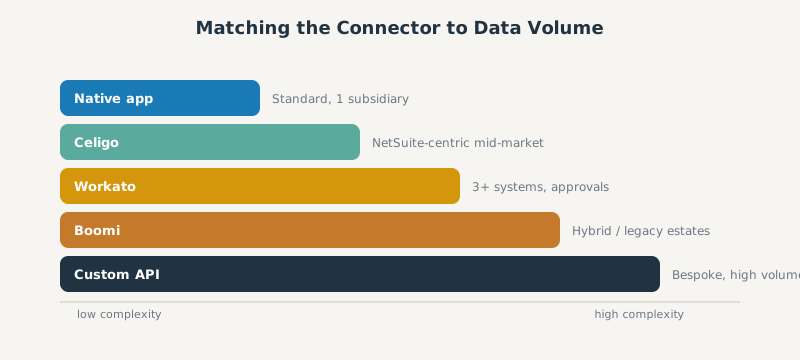
The best HubSpot NetSuite connector depends on your data volume, number of subsidiaries, and how custom your records are: the native marketplace app for simple standard syncs, Celigo or Workato for most mid-market RevOps, Boomi for complex hybrid landscapes, and a custom API build for bespoke schemas. There is no single winner, only the right tool for your tech stack. This comparison breaks down each option so you can match the connector to the job.
For the foundational concepts, start with our HubSpot NetSuite integration pillar. For the deepest builds, see the custom NetSuite CRM integration guide.
Evaluating the Right HubSpot NetSuite Connector for Your Tech Stack
Before comparing tools, score your own requirements: how many records sync per day, whether you run one NetSuite subsidiary or many, whether you use custom records and complex line items, and how much conditional logic you need. Those four factors decide the connector more than price does. A team with standard objects and one subsidiary has very different needs from a OneWorld manufacturer syncing tens of thousands of products.
Whatever you choose, the job is the same: keep a clean data flow between HubSpot and NetSuite. A good connector gives you bi-directional, real-time sync for the records that need it (a new HubSpot contact, a deal record, customer data), and reliable batch sync for the rest. It should connect HubSpot and NetSuite so a deal can create a sales order in NetSuite, sync NetSuite customers and records back into HubSpot, and automate the data sync in both directions (HubSpot to NetSuite and NetSuite to HubSpot). Map your core use cases first, then judge each connector, or a custom integration, on how well it supports the data between HubSpot and NetSuite, plus the error handling and monitoring it brings.
The Native HubSpot Marketplace App: Fast but Limited
The native NetSuite connector installs from the marketplace in a day or two and gives a genuine two-way sync for standard objects: contacts, companies, deals to opportunities, products, and invoices read back into HubSpot. It can also create NetSuite sales orders from a HubSpot deal workflow. It is the fastest way to start and the right choice for small teams with standard data and moderate volume that want HubSpot CRM and NetSuite ERP loosely connected without a project.
Its limits arrive fast. It cannot run IF or THEN logic, cannot map NetSuite internal IDs or custom records, hits a ceiling on line items and multi-currency, requires a paid HubSpot Data Hub subscription for custom field mappings, and frequently fails on complex sales-order creation because of SOAP timeouts. Most scaling B2B teams outgrow it within about six months. We catalog exactly where mapping breaks in our HubSpot NetSuite data mapping guide.
Single Subsidiary Restrictions
The hardest native limit is subsidiaries. The connector is subsidiary-blind: it syncs to a single hardcoded NetSuite subsidiary and cannot run separate parallel syncs for one object type across multiple subsidiaries. For a NetSuite OneWorld business with several legal entities, that alone forces a move to middleware or a custom build.
Celigo: The ERP First iPaaS Solution
Celigo is the practitioner default for NetSuite-centric mid-market companies, built by former NetSuite developers. Its structural advantage is a SuiteApp that runs integration logic inside NetSuite, which conserves API calls and helps you stay within NetSuite’s concurrency limits, something the network-based platforms cannot do as efficiently.
Built In Error Dashboards and Pagination Control
Celigo ships turnkey HubSpot to NetSuite Quickstart flows that branch by deal status (routing a deal to an opportunity or a sales-order flow), plus a strong error dashboard that tracks errors, auto-resolves many of them using trace keys, and auto-retries intermittent failures with a doubling wait. It also handles pagination on its dedicated connectors, which matters because flows pulling more than around 500 records without paging time out intermittently and are painful to diagnose. For multi-system orchestration beyond NetSuite, compare it with the Workato HubSpot integration playbook.
Workato: Enterprise Orchestration and Cross Platform Automation
Workato is the stronger choice when the integration spans more than two systems or needs human approvals in the loop. With over a thousand connectors, it routes one trigger across many systems and supports in-Slack deal and price approvals. It treats NetSuite as an external system over the network rather than running inside it, so it is less API-efficient than Celigo for pure NetSuite workloads but far more flexible for cross-platform automation.
Task Based Pricing and API Wrapper Limitations
Workato bills by task, where each connector action counts as one task and loops multiply tasks by the number of rows. The fix is batch operations, which count as a single task regardless of row count, an up to one-hundred-fold saving. Watch the billing model: there are no automatic overages, no published overage rate, and rerunning failed jobs re-bills every task, which is a common source of renewal sticker shock. Its API platform also caps payloads at 5 MB and requests at 240 seconds, so plan around those wrapper limits for large NetSuite pulls.
Boomi: Complex Hybrid Cloud and On Premises Connections
Boomi suits complex landscapes: multiple ERPs, legacy systems, EDI, and a mix of cloud and on-premises connections. Its NetSuite connector is more generic than Celigo’s, so you often map fields manually and write Groovy, Java, or JavaScript for custom logic, and its consumption-based, per-connection pricing can be unpredictable. Choose Boomi when you have developer resources and an integration estate wider than just HubSpot and NetSuite.
Custom API Development: Total Control for Complex Schemas
A custom build against NetSuite’s SOAP and REST APIs gives total control for complex schemas: bespoke records, intricate CPQ, project-based revenue, and high volume that no connector handles. The trade-off is build time and permanent maintenance, because you own every NetSuite API change. Reserve it for genuinely custom requirements, and see our custom NetSuite CRM integration guide for the engineering detail.
Zapier: Lightweight Automation, Not a Sync Platform
Zapier sits in a different category from the middleware platforms above: it is a general automation tool, not a dedicated HubSpot NetSuite sync engine. For lightweight, low-volume tasks (a Slack ping when a NetSuite invoice posts, or copying a single field on a trigger), it is the fastest and cheapest option, and non-technical teams can build it themselves. But avoid it for production record sync, especially line items: it lacks robust error handling, batch control, and retry logic, so failures are silent and reconciliation falls back on humans. Use Zapier for notifications and one-off automations around the edges, and one of the connectors above for the sync itself.
Final Verdict: Matching the Tool to the Data Volume
| Connector | Best for | Watch out for |
|---|---|---|
| Native app | Standard objects, one subsidiary, low volume | No custom records, no logic, single subsidiary |
| Celigo | NetSuite-centric mid-market, turnkey flows | Page large pulls; flow/endpoint pricing |
| Workato | 3+ systems, approvals, orchestration | Task-based billing, loop costs, overages |
| Boomi | Hybrid, legacy, EDI estates | Generic NetSuite connector, unpredictable cost |
| Zapier | Notifications, one-off low-volume automations | No batch control or retries; silent failures on record sync |
| Custom API | Bespoke records, high volume | Build time and permanent maintenance |
Match the tool to the data volume and complexity, not the brand. Most mid-market teams land on Celigo or Workato, step up to a custom build only for genuinely custom needs, and use the native app only when their data is truly standard.
Frequently Asked Questions
Can HubSpot connect to NetSuite? Yes. HubSpot connects to NetSuite through a native marketplace connector, iPaaS platforms such as Celigo, Workato, and Boomi, or a custom API integration.
What does a HubSpot NetSuite connector do? It syncs records between the two systems: contacts, companies, deals, products, orders, and invoices, so a closed-won HubSpot deal can become a NetSuite sales order without manual re-entry.
Which HubSpot NetSuite connector is best? There is no single best connector. Native suits simple standard syncs, Celigo and Workato suit most mid-market RevOps, Boomi suits complex estates, and custom builds suit bespoke schemas.
Does the native connector support multiple NetSuite subsidiaries? No. The native connector is subsidiary-blind and syncs to a single subsidiary. Multiple subsidiaries require middleware or a custom build.
How much does a HubSpot NetSuite connector cost? The native app is the cheapest, iPaaS platforms run a monthly subscription that scales with flows or tasks, and custom builds start in the five figures plus maintenance.
Fighting a live sync problem right now? We catalogued the six most-reported HubSpot NetSuite sync failures and their fixes, including which ones a config change can solve and which need an integration layer.
SWOTBee picks and implements the right HubSpot NetSuite connector for your volume and subsidiaries, not the one with the biggest logo. We have built on native, Celigo, Workato, and custom, so we match the tool to your data.
Get your 1-page renewal leakage estimate →
No call needed. Prefer to talk it through first? Book a free 30-minute discovery call →