This article is part of our complete guide to HubSpot and NetSuite integration.
A Workato HubSpot integration uses Workato, an enterprise automation platform, to connect HubSpot with NetSuite, Slack, and the rest of your stack through recipes that trigger actions across multiple applications at once. It is the right choice when your integration spans more than two systems or needs human approvals in the loop, and it trades the API efficiency of a NetSuite-native tool for cross-platform orchestration. This guide covers how Workato works, when it beats a native connector, the recipes that matter for RevOps, and how to keep task costs under control.
To see how Workato compares with the native connector, Celigo, and a custom build, read our HubSpot NetSuite connector comparison.
The Strategic Role of a Workato HubSpot Integration
Workato sits above your individual systems as an orchestration layer. Where a point connector links two apps, Workato connects many and runs the business logic between them, which is why it shows up in stacks that have outgrown one-to-one integrations. For a HubSpot and NetSuite pairing specifically, it is most valuable when Slack, a billing tool, or a project system also needs to be in the flow.
Workato Architecture: Recipes and Connectors Explained
The core building block is the recipe: one trigger plus one or more actions. A trigger fires on an event (a new HubSpot deal, a NetSuite sales order), and the actions that follow create or update records in connected apps. Workato offers more than a thousand pre-built connectors plus an SDK, so most apps connect without code, including HubSpot, NetSuite, Salesforce, Slack, and Shopify. As a low-code automation tool, it lets you automate workflows and business processes that span systems, sync data between them, and optimize the flow without engineering each integration by hand. Polling triggers check for new events as often as every five minutes, and each poll can return several events, which matters for cost.
When Workato Outperforms Native Connectors
Native connectors win on simplicity and, for NetSuite, on API efficiency. Workato wins on reach and logic.
Managing Multiple Applications Simultaneously
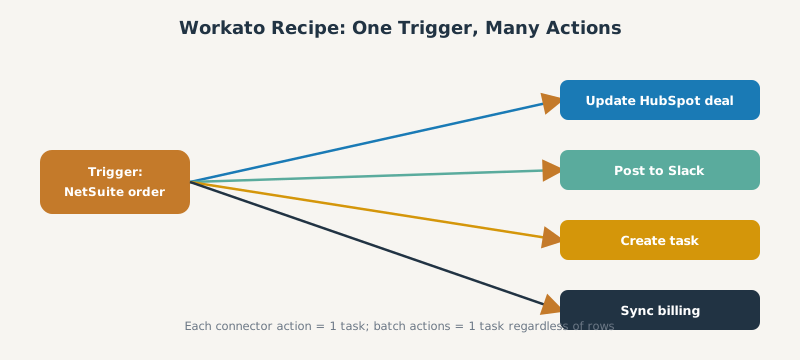
Workato shines when one event must fan out across many systems. A single trigger, when a NetSuite sales order ships, can update HubSpot, post to Slack, and create a task in a project tool at the same time, with conditional routing so the path changes by deal stage, amount, or region. A native HubSpot NetSuite connector cannot orchestrate beyond its two endpoints; Workato is built for exactly that.
Essential Workato Recipes for RevOps Alignment
A few recipes deliver most of the RevOps value.
Multi System Opportunity Routing
Route a HubSpot deal to the right downstream action based on its attributes: create a NetSuite sales order for closed-won deals over a threshold, notify the right owner, and enrich the record from another system, all from one recipe. The same pattern can nurture leads, update Salesforce, or sync data to a billing tool, which is what makes Workato a scalable choice as your stack grows. This keeps sales, finance, and operations working from the same event.
Slack Notifications for Deal Approvals
Workato with Workbot brings deal and price approvals into Slack. A rep submits a request, Workato posts it to a Slack channel with approve and reject buttons, and a verified-user check ensures only authorized managers can approve, so deals move without anyone logging into the CRM.
Managing Workato Costs and Task Volume
Workato bills by task, where each connector action counts as one task. Triggers, conditional statements, and failed actions are free, but actions inside a loop multiply by the number of rows, so a recipe that processes many records can run up tasks fast.
Strategies to Prevent Usage Billing Spikes
The single biggest lever is batch operations, which count as one task regardless of how many records they process, an up to one-hundred-fold reduction. Also lengthen poll intervals where real time is not required, use scheduled batch triggers for heavy objects, and remember that rerunning failed or historical jobs re-bills every task. Workato has no automatic overages and no published overage rate, so negotiate task allowances up front to avoid renewal sticker shock, and watch its API limits (5 MB payloads, a 240-second ceiling) on large NetSuite pulls.
Frequently Asked Questions
Is Workato an integration platform? Yes. Workato is an enterprise integration and automation platform (an iPaaS) that connects apps such as HubSpot, NetSuite, and Slack through recipes built from triggers and actions.
How does a Workato HubSpot integration work? A recipe triggers on a HubSpot or connected-app event, then runs actions across other systems, so one deal update can create a NetSuite order, post to Slack, and update other tools at once.
When should I use Workato instead of the native HubSpot NetSuite connector? Use Workato when the integration spans three or more systems, needs conditional routing, or needs human approvals. Use the native connector or Celigo for a straightforward two-system NetSuite sync.
How is Workato priced? Workato bills by task, where each connector action is one task and loops multiply tasks by rows. Batch operations and longer poll intervals are the main ways to control cost.
Can I trigger HubSpot workflows from Workato events? Yes. Workato can update HubSpot records and properties that in turn enroll contacts or deals in HubSpot workflows, linking Workato orchestration to native HubSpot automation.
SWOTBee builds Workato recipes that orchestrate HubSpot, NetSuite, and Slack without runaway task bills. We design the triggers, routing, and batching so your automation scales predictably.
Get your 1-page renewal leakage estimate →
No call needed. Prefer to talk it through first? Book a free 30-minute discovery call →