This implementation guide is part of our complete guide to contract renewal management software.
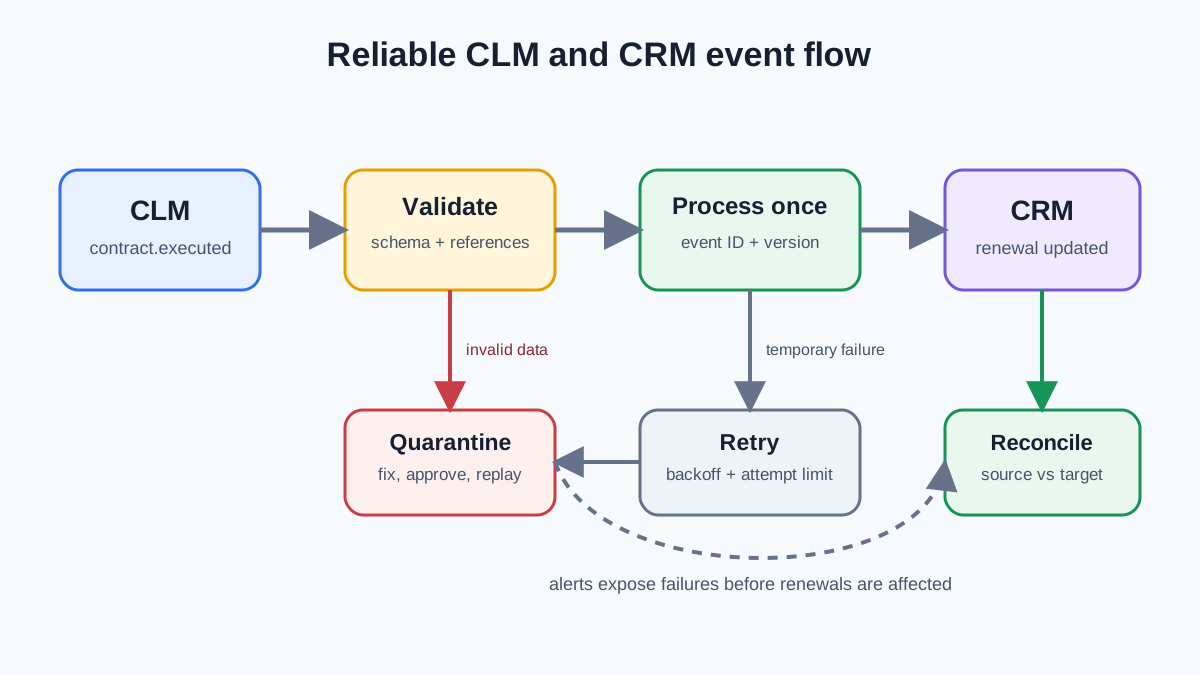
A reliable CLM and CRM integration is not a two-way field mirror. It is a controlled exchange of business events between two systems that remain authoritative for different work. CRM sends customer and commercial context into the contract process. CLM returns governed contract status, dates, value and obligations. Every exchange needs a stable identity, a validation rule and a visible recovery path.
This guide begins after the system-ownership decision. If that decision is still open, read CLM vs CRM: Contract Dates Are Not Renewal Deals first. If the boundary is settled, use the field matrix, event envelope, error policy and SWOTBee TRACE control loop below to design an integration that does not quietly lose renewals.
Here, CLM means contract lifecycle management, not customer lifecycle management. The same integration controls apply whether your CRM system is Salesforce, Microsoft Dynamics or HubSpot and whether you use an enterprise CLM solution or lighter contract management software. Vendor connectors can streamline setup, but they cannot choose field authority or make conflicting updates safe. The goal is not to integrate every field. Integrate only authoritative contract data that the receiving team needs to act.
For a HubSpot-specific document workflow, use our contract document integration guide to compare PandaDoc and DocuSign creation, approval, signature and CRM writeback checks.
What should a CLM and CRM integration accomplish?
The integration should turn approved commercial intent into a governed agreement, then turn governed contract events into owned customer and revenue work. It should not make each application a backup copy of the other.
A practical flow has four outcomes:
- A qualified CRM opportunity creates a contract request with the correct customer, products, pricing and owner.
- CLM status changes remain visible to sales without moving negotiation or approval into CRM.
- An executed contract updates CRM with reviewed dates, value, status and a link to the governed document.
- A renewal or obligation event creates an owned action before the contractual deadline.
Define those outcomes before choosing middleware, native connectors or custom code. Technology affects delivery, but it does not decide what a contract event means or which system may overwrite a field. A seamless integration should reduce data entry and contract bottlenecks, shorten the sales cycle and help the sales team close deals faster without weakening approval or procurement controls. Our contract management automation guide covers which business steps are worth automating. This guide covers how to move their data safely.
What Is the SWOTBee TRACE Control Loop for CLM Integration?
The SWOTBee-developed TRACE control loop is a five-part method for designing and operating a reliable CLM CRM integration: Truth, References, Actions, Containment and Evidence. It connects data governance with technical delivery, so each contract event has an authority, an identity, a purpose, a recovery path and proof that the intended business outcome occurred.
| TRACE control | Question it must answer | Artifact to produce |
|---|---|---|
| T: Truth | Which system may create or correct each shared field? | Field authority matrix |
| R: References | Which stable IDs preserve contract, customer and deal lineage? | Cross-system ID map |
| A: Actions | Which business events should create downstream work? | Versioned event catalog |
| C: Containment | Which failures retry, quarantine, alert or require approval? | Error and replay policy |
| E: Evidence | How will we prove that records and renewal actions agree? | Monitoring and reconciliation report |
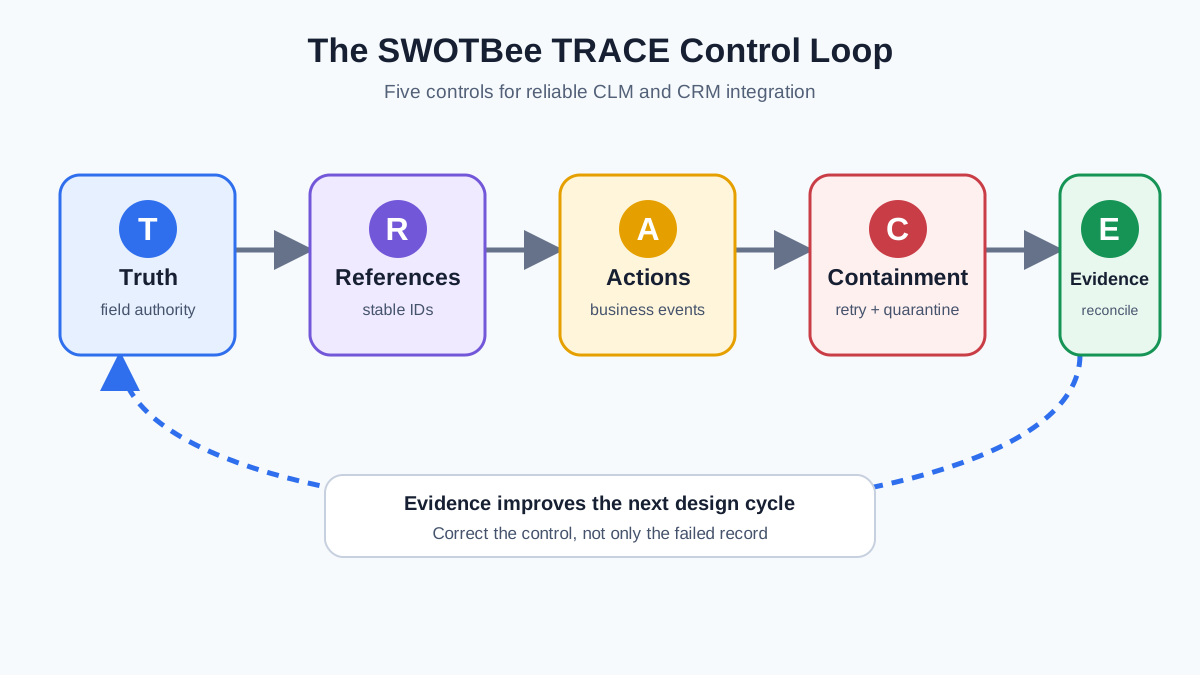
TRACE is a loop rather than a one-time checklist. Reconciliation evidence can expose a missing reference, a noisy event or an incorrect authority rule. The team then corrects that upstream control instead of repeatedly repairing CRM records by hand.
Score each control from 0 to 2: 0 means absent, 1 means documented but untested, and 2 means tested with a named owner. A score of 8 to 10 is ready for controlled production rollout. A score of 5 to 7 is suitable for a limited pilot. A score below 5 means the integration should stay in design or sandbox.
Which Contract and Customer Data Objects Should You Connect?
Start with the smallest object model that can preserve customer, commercial and contract lineage. Most implementations need Account, Contact, Opportunity, Contract and Contract Version. Renewal Opportunity and Obligation may be separate objects or governed records attached to them.
| Domain object | Primary system | Cross-system key | Important relationship |
|---|---|---|---|
| Account or company | CRM | crm_account_id | One account can have many contracts |
| Opportunity | CRM | crm_opportunity_id | Commercial request that initiated the contract |
| Contract | CLM | clm_contract_id | Governing agreement record |
| Contract version | CLM | clm_version_id | Draft, approved or executed document version |
| Renewal opportunity | CRM | crm_renewal_id | Commercial work for the next term |
| Obligation | CLM | clm_obligation_id | Requirement linked to a contract and responsible team |
Do not use customer name, document filename or contract title as a key. Those values change and may not be unique. Keep both systems’ IDs on the integration record so an operator can trace a failed event without searching manually.
Object names vary across tools. A CLM system may call the governed record an agreement while a CRM system calls it a contract. Normalize identifiers in the integration layer. Keep pre-approved contract templates and the signed repository inside the contract management software; expose only the references and fields needed to manage contracts in CRM. This centralizes governance without copying the entire lifecycle into both systems.
How do you build a CLM CRM field mapping matrix?
For every shared field, document meaning, format, authority, direction, trigger and failure behavior. A spreadsheet that only lists source and destination columns is incomplete because it cannot answer what happens after an amendment or conflicting edit.
| Business field | Authority | Direction | Trigger | Validation or transformation |
|---|---|---|---|---|
| Account ID | CRM | CRM -> CLM | Contract request | Must resolve to one active account |
| Opportunity ID | CRM | CRM -> CLM | Contract request | Required for sales-originated contracts |
| Legal entity | CRM or ERP | CRM -> CLM | Request or approved correction | Map to controlled CLM entity code |
| Proposed amount | CRM or CPQ | CRM -> CLM | Request or approved quote | Currency and decimal precision required |
| Contract ID | CLM | CLM -> CRM | Contract created | Immutable and unique |
| Contract status | CLM | CLM -> CRM | Governed status change | Translate to a controlled CRM status set |
| Effective date | CLM | CLM -> CRM | Contract executed or amended | ISO date, reviewed value only |
| End date | CLM | CLM -> CRM | Contract executed or amended | Cannot precede effective date |
| Notice date | CLM | CLM -> CRM | Contract executed or amended | Must reflect reviewed notice terms |
| Auto-renew status | CLM | CLM -> CRM | Contract executed or amended | Boolean plus renewal mechanism if needed |
| Signed value | CLM | CLM -> CRM and ERP | Contract executed or amended | Currency must match the signed agreement |
| Renewal owner | CRM | CRM only | Renewal record created | Active user or owned queue required |
| Renewal stage | CRM | CRM only | Commercial activity | CLM cannot overwrite it |
| Executed document URL | CLM | CLM -> CRM | Contract executed | Permission-aware link, not a copied file |
Separate proposed values from signed values. Make derived fields reproducible. If notice_date is calculated, retain the governed end date and notice period that produced it. Never allow both systems to originate changes to the same field without an explicit conflict rule.
What CLM and CRM integration problems do users report?
Practitioner discussions repeatedly point to lost identity, duplicate delivery, missing associations, overwrite conflicts and weak recovery controls. These are qualitative reports, not vendor failure-rate statistics. Their value is that they expose the edge cases teams encounter after a simple demo works.
| Reported problem | What users experienced | Design response |
|---|---|---|
| No machine-readable contract-to-deal key | A Docusign-to-HubSpot user could see the association in the interface but could not reliably match the completed envelope to a deal in automation. | Create the contract reference before signature and carry it through envelope metadata. |
| Duplicate webhook processing | HubSpot Community users reported repeated notifications producing duplicate records. | Use an event ID, idempotency store and upsert rather than blind create. |
| Two-way overwrite drift | A two-way integration discussion describes unexpected overwrites, broken associations and the need for field-level ownership. | Make sync directional at field level, even when the overall integration is bidirectional. |
| Association changes missed by polling | A HubSpot developer found that changing a deal association did not update the deal timestamp used for incremental polling. | Treat associations as first-class data and reconcile them separately. |
| Retry behavior differs from assumptions | A 2025 HubSpot Community thread reports retries for response codes the implementer expected to be final. | Assume redelivery, acknowledge safely and test observed behavior in a sandbox. |
| Authentication uses the wrong execution identity | A Salesforce and Docusign integration returned INVALID_SESSION_ID when the action inherited the customer-facing user context. | Use dedicated integration credentials and test every invocation context. |
| Pricing cannot be corrected coherently | In a Salesforce CLM discussion, sales and legal lacked a clear path for keeping pricing consistent between the document and CRM. | Separate proposed and signed pricing, then publish governed amendments. |
One subtle failure deserves special attention: a target create may return success while losing a relationship. In a HubSpot Community example, serialization dropped the associations property, so the deal existed without its company link. Integration tests must verify business postconditions, not only HTTP status.
Which Contract Workflow Events Should Cross the CLM and CRM Boundary?
Publish business events, not every database change. A property update such as updated_at has no useful meaning by itself. An event such as contract.executed describes something the receiving system can act on.
| Event | Producer | Consumer action |
|---|---|---|
contract.requested | CRM | Create a CLM request from approved commercial inputs |
contract.status_changed | CLM | Update visible status and sales task rules |
contract.executed | CLM | Upsert the summary, trigger billing handoff and schedule renewal work |
contract.amended | CLM | Replace affected signed fields and retain amendment lineage |
contract.terminated | CLM | Stop renewal automation and notify revenue and billing owners |
renewal.window_opened | Integration service or CLM | Create or update one CRM renewal opportunity |
obligation.at_risk | CLM | Create a customer-success task with due date and context |
renewal.closed | CRM | Start the next governed contract or amendment process |
Use real-time delivery for events that change work now. Use scheduled synchronization for reference data and analytics that can tolerate delay. Official HubSpot webhook documentation describes event subscriptions as an alternative to repeatedly polling CRM changes. Docusign likewise describes webhook notifications for agreement progress.
What Should Every CLM Integration Event Payload Contain?
An event needs enough context to identify the occurrence, validate its schema, find the affected contract and decide whether it is newer than the last accepted change. Keep the envelope consistent even when the business data varies by event type.
{
  "event_id": "evt_01J_contract_executed_0042",
  "event_type": "contract.executed.v1",
  "occurred_at": "2026-09-09T10:30:00Z",
  "source": "clm-production",
  "correlation_id": "clm_72814",
  "sequence": 7,
  "data": {
    "clm_contract_id": "clm_72814",
    "crm_account_id": "crm_1830",
    "crm_opportunity_id": "deal_9401",
    "status": "executed",
    "effective_date": "2026-10-01",
    "end_date": "2027-09-30",
    "notice_date": "2027-07-02",
    "auto_renew": true,
    "signed_value": 84000,
    "currency": "USD",
    "document_url": "https://clm.example/contracts/clm_72814"
  }
}
The vendor-neutral CloudEvents specification provides a useful model. Its required attributes include an event ID, source, type and specification version, and the combination of source and ID identifies a distinct event. You do not need to adopt CloudEvents to copy the principle.
Version the event type or schema. Additive changes can remain compatible, but a consumer should not discover that signed_value changed from a number to formatted text during a production deployment.
How Do Automation, Idempotency and Event Ordering Prevent Duplicates?
Assume that the same event can arrive more than once and that related events can arrive out of order. A successful write followed by a lost response is enough to produce a retry, and concurrent consumers can process updates in an unexpected sequence.
For idempotency, store source + event_id before or atomically with the target change. If that key already completed, return success without repeating the side effect. This matters most when the side effect creates a record. Without it, one executed contract can create two renewal opportunities, two owner tasks and two billing requests.
For ordering, maintain a sequence number or source version for each contract. A consumer receiving version 7 after version 8 should acknowledge the older event without restoring stale dates. When strict order is necessary, group messages by clm_contract_id so one contract’s events are processed sequentially while different contracts can run in parallel. Microsoft documents this tradeoff in its sequential convoy pattern.
Idempotency and ordering solve different problems. Event ID prevents duplicate execution. Contract version prevents stale execution. Implement both.
Which CLM CRM Integration Errors Should Retry, Block or Enter Quarantine?
Classify errors by whether another attempt can succeed without changing the data or configuration. Blind retry turns permanent defects into noisy traffic and delays the errors that need a person.
| Error class | Example | Action |
|---|---|---|
| Transient transport | Timeout, temporary DNS failure, HTTP 502 | Retry with backoff and jitter |
| Throttling | HTTP 429 or vendor rate limit | Honor retry guidance and reduce request rate |
| Authentication outage | Expired token with refresh path | Refresh once, retry, then alert |
| Invalid payload | Missing contract ID, wrong date or currency format | Quarantine immediately |
| Missing reference | CRM account does not exist | Quarantine or await an approved dependency |
| Permission or policy | Integration user cannot edit target field | Stop retrying and alert the system owner |
| Business conflict | Executed value conflicts with locked target state | Quarantine for governed resolution |
| Duplicate delivery | Event ID already completed | Acknowledge as success and make no change |
| Stale event | Lower sequence than accepted version | Acknowledge and record as ignored |
Use bounded exponential backoff for transient problems, then stop. Microsoft’s retry pattern guidance warns that retrying a non-idempotent operation can execute it more than once. The retry mechanism therefore depends on the idempotency control described above.
How Should the CLM Integration Error Queue and Replay Process Work?
An error queue must be an operating process, not a storage location. Every failed event needs an understandable reason, an accountable owner, an age target and a controlled way to replay it after correction.
Retain at least:
- Original event ID, type, payload and occurrence time
- Contract, account and opportunity identifiers
- Error class, response code and readable reason
- Attempt count and timestamps
- Last successful processing stage
- Assigned owner and resolution notes
- Replay status and replayed event reference
Do not ask operators to edit raw production messages. Provide an approved correction path in the source system or an integration console, revalidate the data, then replay the original event identity. Replay should pass through the same validation and idempotency controls as first delivery.
Microsoft’s asynchronous messaging guidance describes dead-letter queues for messages a consumer cannot process and notes that duplicate delivery can still occur. In business language, call it an integration exceptions queue if “dead letter” would confuse operations users. The controls matter more than the label.
How Should Contract Amendments and Conflicting CRM Updates Be Handled?
Treat an amendment as a new governed event linked to the original contract, not as an unexplained overwrite. The amendment may change only three fields, but the receiving systems need its effective date, version and relationship to the executed agreement.
When contract.amended arrives:
- Verify that the parent contract exists and the amendment version is newer.
- Identify which authoritative fields changed.
- Apply only those fields to CRM and billing.
- Recalculate dependent dates or amounts.
- Preserve the previous values in the integration audit record.
- Re-evaluate renewal workflows if the notice date, end date or auto-renew rule changed.
Resolve conflicts according to field authority, not “last write wins.” If a CRM user changes an end date owned by CLM, either block the edit or show it as a proposed correction that must be approved in CLM. Last-write-wins logic hides the governance the integration is meant to preserve.
What Monitoring and Reconciliation Does a CLM CRM Integration Need?
Transport monitoring shows whether messages moved. Reconciliation shows whether the business records agree. You need both. An HTTP 200 response cannot prove that every signed contract has the correct renewal opportunity.
Monitor events received, succeeded, retried, quarantined and ignored. Track processing latency, the oldest unresolved exception, error queue depth by cause and owner, duplicate rate, stale-event rate, authentication failures, throttling and contracts missing a CRM account or renewal record.
Run scheduled reconciliation from the authoritative CLM population. For each active executed contract, confirm that CRM has the same contract ID, status, effective date, end date, notice date, auto-renew value and signed value. Then confirm that contracts inside the renewal planning window have exactly one active renewal opportunity with an owner.
This control finds omitted events, disabled subscriptions, mapping regressions and manual changes. Set a tolerance and an owner. “99.5 percent synchronized” still needs a list of the 0.5 percent and their renewal exposure.
How Should You Test and Roll Out CLM CRM Integration?
Test business scenarios and failure recovery, not only successful API calls. Docusign’s CLM API go-live guidance separates development and production setup and requires OAuth for production integrations. Whatever platforms you use, keep credentials, endpoints and mappings environment-specific.
Your minimum test pack should include:
- A standard new contract from an existing account.
- A contract for an account whose external ID is missing.
- A duplicate
contract.executedevent. - An amendment that changes end date and value.
- An older amendment arriving after a newer one.
- An early termination that must stop renewal automation.
- A timeout after the target write succeeds.
- A rate-limit response followed by successful retry.
- An invalid currency or date sent to quarantine.
- A corrected event replayed without creating duplicate work.
- A permission change that prevents a target update.
- A reconciliation run that detects an intentionally omitted record.
Roll out in three stages. First, observe events without writing and compare expected mappings. Second, write to a sandbox or a small pilot cohort with daily reconciliation. Third, expand only after the error queue has owners, alerts and a tested replay process. Keep a rollback switch that pauses consumers without discarding incoming events.
How Do You Apply the SWOTBee TRACE CLM Integration Checklist?
Run TRACE as a scored production gate, then use the detailed checklist to expose the missing control. Give each of the five controls 0, 1 or 2 points. Record the evidence and owner beside the score. Do not award 2 points because a design document exists; the control must have passed a realistic test.
Before production, confirm that:
- Every shared field has one authority and one documented meaning.
- Stable contract, account and opportunity IDs are preserved.
- Events represent business outcomes and have versioned schemas.
- Every event has an ID, timestamp, source, contract key and version.
- Create operations and side effects are idempotent.
- Stale events cannot overwrite newer contract state.
- Retryable and permanent errors follow different paths.
- The exception queue has owners, alerts, age targets and safe replay.
- Amendments retain lineage and trigger dependent recalculation.
- Integration credentials have only the required permissions.
- Dashboards show latency, failures, queue age and renewal exposure.
- Reconciliation compares authoritative contracts with CRM records.
- The full failure test pack passes before rollout expands.
Use this interpretation:
| TRACE score | Release decision |
|---|---|
| 8 to 10 | Controlled production rollout with normal monitoring |
| 5 to 7 | Limited pilot while named gaps are corrected |
| 0 to 4 | Keep the integration in design or sandbox |
The final TRACE test is simple: if the integration is switched off for two hours and then restored, can the team identify what was missed, process it once, and prove that every affected renewal is correct? If the answer is no, the connector is moving data but the operating system is not yet reliable.
Frequently Asked Questions
Should CLM and CRM use a real-time integration?
Use real-time events for execution, termination, renewal-window and material-obligation changes. Use scheduled sync for reference data, reporting and low-urgency enrichment. Real time is not automatically safer; it needs stronger idempotency, monitoring and error recovery.
What is the first event to implement?
Start with contract.executed. It has a clear governed source and a valuable downstream result: update the CRM contract summary, connect the executed document, prepare billing data and schedule renewal work.
Should the signed document be copied into CRM?
Usually no. Keep the governed version in CLM and send a permission-aware URL plus contract and version IDs to CRM. Copying documents makes retention, permissions and amendment history harder to control.
Can native CLM CRM connectors handle this design?
Some can handle much of it, but evaluate behavior rather than connector availability. Confirm field authority, external IDs, event coverage, duplicate handling, retry visibility, replay, amendment behavior and reconciliation access before relying on a native connector.
Who should own integration errors?
Assign technical transport errors to business systems or integration operations. Assign data and business-rule errors to the team that owns the authoritative source. One queue can route to several owners, but no error should remain assigned to “the integration.”
What is the SWOTBee TRACE framework?
SWOTBee TRACE is a five-control method for CLM and CRM integration: Truth, References, Actions, Containment and Evidence. It checks field authority, stable cross-system IDs, meaningful business events, error recovery and source-to-target reconciliation before a production rollout.
Integrating CLM and CRM is ultimately a governance exercise expressed through software. Use the SWOTBee TRACE control loop to keep contract evidence authoritative in CLM, customer and revenue work authoritative in CRM, and every handoff identifiable, repeatable and recoverable.
Need help turning signed contracts into reliable renewal workflow? SWOTBee can map your contract and CRM data, design the event model, and build the controls that keep renewal work visible.


