
This article is part of our complete guide to contract renewal management software.
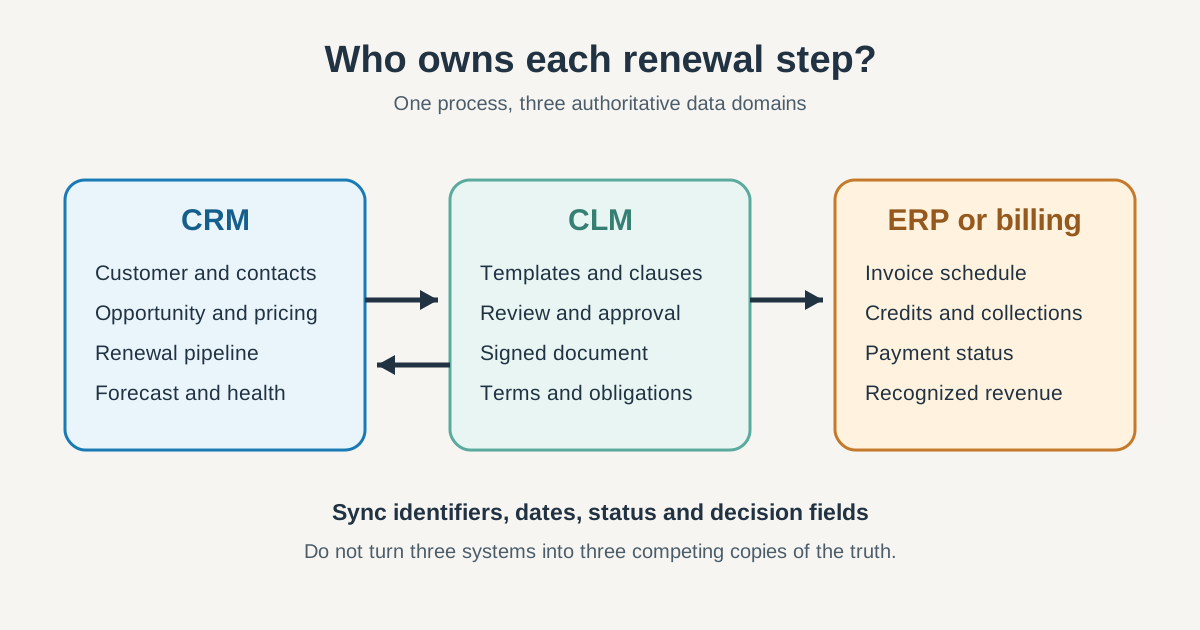
In a CLM vs CRM decision, CLM should own the governed contract while CRM owns the customer and the renewal revenue motion. ERP or billing should own invoices and payment. The systems must exchange a small set of authoritative fields, but they should not become competing copies of every contract, customer and financial record.
In this guide, CLM means contract lifecycle management, not customer lifecycle management. That distinction matters because both meanings appear in search results, but only contract CLM governs contract language, negotiation, approvals, obligations and executed agreements.
This ownership distinction matters because renewal work crosses legal, sales, customer success and finance. According to World Commerce & Contracting, weak contracting practices erode an average 8.6% of contract value. The problem is rarely the absence of software. It is unclear ownership at the handoffs between systems and teams.
This guide gives you a stage-by-stage ownership matrix, a minimum sync schema and a practical test for deciding whether CRM alone is enough, whether you need contract lifecycle management software, or whether both systems are required.
CLM vs CRM: What Is the Difference for Contract Management?
Customer relationship management tracks who the customer is and what commercial work should happen next. Contract lifecycle management controls what the parties agreed, how that agreement was approved and what obligations remain after signature. They overlap, but their primary records answer different questions.
| Question | CRM answers | CLM answers |
|---|---|---|
| Who is the customer? | Accounts, contacts and relationship history | Counterparty identity on an agreement |
| What are we trying to sell or renew? | Opportunity, products, pricing and forecast | Draft commercial terms and approved deviations |
| What did both parties sign? | Contract status and document link | Executed document, versions, clauses and audit trail |
| What must happen next? | Sales tasks, customer engagement and renewal stages | Notice dates, obligations, approvals and amendments |
| What revenue do we expect? | Pipeline amount, probability and close date | Signed value and relevant payment terms |
This is a responsibility boundary, not necessarily a product boundary. Salesforce Contracts documentation includes templates, negotiation, versions, obligations, e-signature and AI extraction inside a CRM platform. These AI capabilities do not remove the need for governance. One vendor can provide both CRM and CLM software, but every contract record and workflow still needs a named authority.
How Should CLM and CRM Divide the Contract Lifecycle Management Workflow?
The revenue system should lead from opportunity through commercial intent, the contract system should lead from drafting through governed execution, and ERP should lead invoicing and payment. Throughout the contract lifecycle, shared stages still need one primary owner and a defined return path.
| Stage | Primary system | What crosses the handoff |
|---|---|---|
| Opportunity and qualification | Revenue system | Account, contacts, products, amount and owner |
| Quote and initial pricing | Revenue system or CPQ | Approved commercial inputs for contract creation |
| Contract request and drafting | Contract system | Opportunity ID and approved contract template |
| Contract review and negotiation | Contract system | Status and material commercial changes back to sales |
| Contract approval | Contract system | Approval state, approver and timestamp |
| Signature and contract execution | Contract system or e-signature | Executed status, signed value and document link |
| Contract storage | Contract system | Stable contract ID and selected metadata |
| Obligation management | Contract system | Customer-impacting obligations and exceptions |
| Renewal deadline | Contract system | Reviewed notice date, end date and auto-renew flag |
| Renewal opportunity | Revenue system | Owner, amount, stage, probability and close date |
| Renewal pricing and uplift | Revenue system, constrained by signed terms | Proposed pricing and any required amendment |
| Invoice and payment | ERP or billing | Invoice and payment status back to CRM |
The arrows matter as much as the boxes. A signed contract that never updates CRM leaves sales working from stale terms. A notice date that stays inside the contract repository never becomes an owned renewal. A closed renewal that never reaches billing produces a clean forecast and a missing invoice.
What Should CLM Software Own in Contract Management?
CLM should own contract language, document versions, approval evidence, signatures, amendments, obligations and the executed record. These are governed artifacts where traceability matters more than sales convenience.
A modern CLM system uses contract lifecycle management software to govern the work surrounding the document:
- Contract intake and routing based on contract type, value or non-standard language
- Standardize contract creation and contract drafting with approved templates and clause libraries
- Contract negotiation, redlining and version control
- Legal, finance and compliance approval workflows
- E-signature orchestration and an auditable executed copy
- Contract storage, search and retention
- Renewal clauses, notice periods and obligation tracking
- Amendment history and links between related agreements
Legal teams use the CLM system to manage contracts and approved deviations. The sales team should see contract status without editing governed data. This can streamline the contract process while preserving a seamless handoff between legal and sales.
The governed repository should remain the authority for the exact wording. This lets teams centralize contracts without copying the full contract into every connected system. The revenue record can hold a reviewed summary such as notice_period_days = 90, but it should not become the place where someone casually rewrites the notice clause. If an amendment changes the clause, the repository records the legal change and publishes the new structured value.
The DocuSign CLM datasheet combines document generation, workflow, e-signature and a searchable repository. That CLM solution supports the contract process and contract workflow. It is different from creating the follow-on revenue opportunity and managing the customer conversation.
What Should CRM Own in Customer Relationships and Renewals?
CRM should own the account, relationship history, renewal opportunity, commercial owner, proposed pricing, customer health and forecast. These records turn a contract date into visible work with an amount, stage and next action.
The CRM system makes customer relationships operational. It connects customer data, customer interactions and engagement history with visibility into deal progress, so the sales team can act before the renewal deadline rather than search the contract repository after it.
For customer renewals, the minimum useful commercial record is not a reminder. It is a renewal deal containing:
- Customer and decision-maker associations
- Renewal owner and supporting team
- Expected amount and renewable line items
- Proposed uplift and term
- Pipeline stage, probability and close date
- Risk, usage and customer-health context
- Next activity and escalation status
- CLM contract ID and executed-document link
This is why a contract alert alone does not solve renewal management. Legal may know that notice is due in 90 days, but finance cannot forecast an alert and a sales manager cannot inspect its stage. Effective contract management turns that deadline into visible, owned work. Our contract management automation guide explains the broader workflow rule: the trigger should create durable work, not only send a notification.
The commercial workspace also connects contract events with customer behavior and improves contract visibility. Support issues, product usage, stakeholder changes and previous pricing discussions belong next to the account, not in the legal document record.
Which Contract Data Should CLM and CRM Integrate?
Synchronize identifiers, trigger dates, status and decision fields. Do not synchronize every field merely because an API makes it possible. The core best practice is to share enough contract data for action without creating another disputed source of truth.
World Commerce & Contracting reports that contract-related data in a typical organization is spread across 24 different systems. An integration should reduce ambiguity, not create copy number 25.
Use this minimum schema as a starting point:
| Field | Authority | Direction | Why it crosses systems |
|---|---|---|---|
account_external_id | Revenue system | Revenue to contract | Connects the agreement to the customer |
opportunity_id | Revenue system | Revenue to contract | Preserves commercial lineage |
contract_id | Contract system | Contract to revenue and ERP | Stable key for every downstream event |
contract_status | Contract system | Contract to revenue | Shows draft, approval, signed or terminated |
effective_date | Contract system | Contract to revenue and ERP | Starts service and billing logic |
contract_end_date | Contract system | Contract to revenue | Supports renewal planning |
notice_date | Contract system | Contract to revenue | Triggers action before the legal deadline |
auto_renew | Contract system | Contract to revenue | Changes the renewal path |
signed_contract_value | Contract system | Contract to revenue and ERP | Reconciles signed value with forecast and billing |
renewal_opportunity_id | Revenue system | Revenue to contract | Connects the next commercial cycle |
document_url | Contract system | Contract to revenue | Avoids duplicating the signed file |
invoice_status | ERP or billing | ERP to revenue | Gives the commercial team financial context |
The notice date deserves special treatment. It is calculated from the end date and notice period, and it may be the real decision deadline for an auto-renewing agreement. See our guide to evergreen contracts and auto-renewal clauses for the clause mechanics.
How should AI contract review and obligation tracking work?
AI-assisted contract review should run against the governed document set, normally inside the CLM platform or an intelligence service attached to it. Reviewed outputs can then update structured commercial fields that drive renewal work.
AI-powered contract extraction is useful for finding dates, clauses, contract obligations and pricing terms in a legacy contract portfolio. Teams can use AI to reduce manual contract review when hundreds of existing contracts need classification. It does not remove the need to verify high-impact fields. A mistaken notice date can trigger a perfectly automated workflow after the real deadline has passed.
Use three controls:
- Keep the source document and its version attached to every extracted value.
- Require human review for key contract fields such as renewal dates, notice periods, liability terms, pricing escalators and termination rights.
- Send only reviewed structured fields into the revenue system, with an extraction status and review timestamp.
Do not run separate AI extraction against different copies of the same agreement. That creates two confident answers to one legal question. Contract intelligence should strengthen the document authority, not blur it.
Which management software should own e-signature, billing and payment?
E-signature should update the governed contract record; billing and payment should remain authoritative in ERP or the billing platform. The revenue team should receive the status needed for customer work and forecasting, rather than treating its workspace as the financial ledger.
The clean execution path is:
- CLM sends the approved version for signature.
- When the contract is signed, the completed signature locks the executed version and changes contract status.
- CLM publishes the signed value, dates and billing terms.
- ERP or billing creates the invoice schedule and records payments.
- The account team receives executed, invoice and payment status.
Some CRM platforms include quotes, invoices, subscriptions and payment tools. HubSpot’s object documentation shows how these records can coexist on one data platform. The source-of-truth rule still depends on your operating model. If finance posts adjustments and recognizes revenue in an ERP, the ERP remains authoritative even when CRM shows a convenient copy.
For the broader handoff, see our guide to CRM and ERP integration.
When Should You Use CRM Alone, a CLM Solution, or Both?
Use CRM alone for standardized agreements, add CLM when legal governance becomes complex, and integrate both when the revenue team needs active opportunities based on governed contract events. Choose the contract management system according to the work, not the length of a vendor feature list.
When is CRM alone enough for contract renewals?
CRM alone is usually enough when customer agreements use standard language, legal review is light, contract volume is manageable and the main problem is missed renewal work. In that situation, manual contract management plus an owned renewal workflow may be adequate. Buying full CLM software may add a repository without improving the revenue process.
Use it alone when all or most of these statements are true:
- Contracts are generated from one or two approved templates.
- Non-standard contract negotiation is rare.
- The signed document can remain in controlled file storage.
- You mainly need dates, owners, renewal deals, tasks and reports.
- Obligations are simple enough to represent as a few reviewed fields.
- Legal does not need a clause library or complex approval audit trail.
For HubSpot teams, HubSpot contract management covers the practical property, workflow and reporting options. HubSpot’s current documentation also confirms that workflows can create CRM records and associate line items, although availability and behavior depend on subscription and workflow design.
When is a contract lifecycle management platform necessary?
CLM becomes necessary when document complexity, contract risk or post-signature obligations are the bottleneck. The strongest buying signals are not the number of renewals. They are the number of negotiated versions, approval paths, clause deviations and obligations that must be proven later.
Use CLM when you need several of these capabilities to reach the best contract outcome:
- High-volume contract creation from controlled templates
- Clause-level deviation and fallback language
- Parallel or conditional contract approval
- Redlining and negotiation history
- Search across a large contract portfolio
- Formal obligation management and compliance evidence
- Complex amendments, addenda and linked agreements
- Retention policies and permission-controlled contract repositories
- AI extraction from a substantial legacy contract collection
Before buying, separate the pre-signature and post-signature problems. Our contract management software comparison groups tools by the work they actually perform, rather than treating every management platform as equivalent.
When should you integrate both systems?
Use both when legal needs governed contract management and the revenue team needs an active renewal pipeline. Implementing a CLM integration is justified when the same dates, value changes and status events would otherwise be re-entered by different teams.
Start with event-driven handoffs rather than a full two-way mirror:
- Revenue opportunity reaches contract request stage: create the governed request.
- The request reaches approved or sent-for-signature status: update its commercial status.
- The agreement is signed: send its ID, dates, value and document link to revenue and billing systems.
- Notice date enters the planning window: create or update the renewal opportunity.
- A material amendment is signed: update affected commercial and billing fields.
- An obligation becomes at risk: alert the responsible team and expose the status beside the account.
Define failure handling before launch. Every critical sync needs an idempotent external ID, a visible error queue, a retry rule and a named owner. Otherwise the integration hides manual contract processes behind a green automation icon.
For the field-level design, event payload, retry rules and replay process, use our implementation guide to integrating CLM and CRM.
How Do You Integrate CLM and CRM Without Duplicate Contract Data?
Implement the boundary before the connector: name the authority for each field, map the events that cross systems, and test exceptions before automating the happy path. Software cannot settle an ownership dispute the business has not resolved.
Use this implementation checklist:
- Inventory the customer, contract, opportunity, quote, obligation, invoice and payment records.
- Assign one authoritative system to every shared field.
- Define stable external IDs before mapping descriptive fields.
- Map the smallest payload required for each business event.
- Decide whether each flow is real-time, scheduled or manual with approval.
- Add validation for missing dates, unknown accounts and conflicting values.
- Test a new agreement, amendment, early termination, auto-renewal and failed payment.
- Add monitoring, retry limits and an accountable exception owner.
- Reconcile a sample of signed contracts against CRM and billing every month.
- Measure whether the integration creates earlier, more accurate renewal work.
Salesforce’s implementation guidance similarly starts with contract types, stages, source systems and data quality before advanced AI or analytics. When implementing a CLM or contract management platform, the principle applies regardless of vendor: governance first, automation second.
Which contract performance metrics prove effective contract management?
Measure the handoffs, not only contract cycle time. Faster contract creation is useful, but contract analytics should show when executed terms become accurate commercial work and accurate billing.
Track these metrics before and after implementation:
- Percentage of signed contracts linked to the correct CRM opportunity
- Percentage with reviewed end date, notice date and owner
- Renewal opportunities created before the notice window
- Difference between signed contract value, CRM amount and billed value
- Forecast accuracy for renewable revenue
- Contract amendments reflected across systems within the agreed SLA
- Obligation exceptions reaching the responsible customer team
- Sync failures by event, age and owner
The most revealing measure is reconciliation variance. Select a monthly sample and compare the executed agreement, CRM renewal record and billing schedule. If they disagree, identify which handoff failed rather than asking teams to fix all three records by hand.
Frequently Asked Questions
What is the difference between CLM and CRM?
The customer system manages relationships, opportunities and forecasts. The contract platform manages governed language, approvals, signatures, obligations and document history.
Should CLM or CRM own the renewal date?
The governed contract record should own the reviewed date and notice terms. The revenue workflow should consume that date to create and manage the renewal opportunity.
Can CLM and CRM be one platform?
Yes. A platform can provide both capability sets. You still need separate authority rules for contract evidence and revenue operations.
Does AI change which system owns contract data?
No. AI can extract or summarize contract information, but the reviewed output still belongs with the governed contract record. CRM receives the subset needed for commercial work.
Where should renewal pricing be managed?
CRM or CPQ should manage the proposed price and forecast. CLM should enforce signed contract terms and record the final agreed amendment or renewal contract.
What is the first integration to build?
Start with the signed-contract event: send the contract ID, status, effective date, end date, notice date, value and document link to CRM. Then use the notice date to create an owned renewal opportunity.
CLM and CRM are complementary, but integration alone does not make them coherent. These contract lifecycle management best practices give contract evidence, revenue work and billing truth explicit owners, then synchronize only what each team needs to act.
Ready to transform your contract management? SWOTBee designs renewal operations around the CRM your revenue team already uses while preserving the contract and finance controls legal and finance need.


