
This article is part of our guide to who should run your renewals.
A focused HubSpot implementation for a mid-market team typically takes 6 to 12 weeks elapsed. A clean single-hub setup can be done in 3 to 4 weeks. A multi-hub rollout with integrations and a messy data migration runs 3 to 6 months. The variable that moves the timeline most is not the HubSpot configuration, it is the state of the data you are bringing and how quickly your team can make decisions. This guide breaks the implementation timeline down by phase and by scope, and covers what actually causes CRM implementations to run long.
HubSpot Implementation Timeline by Scope
There is no single answer because “implementation” covers wildly different projects. Find the row that matches what you are actually doing.
| What you are implementing | Realistic elapsed time |
|---|---|
| Single hub, clean data, no integrations | 3 to 4 weeks |
| Sales Hub for a mid-market team, some cleanup | 6 to 8 weeks |
| Sales plus Marketing Hub, standard integrations | 8 to 12 weeks |
| Migration from Salesforce or another CRM | 10 to 16 weeks |
| Multi-hub with ERP or billing integration | 3 to 6 months |
| Adding renewals to an existing HubSpot | 1 to 3 weeks |
That last row is worth noticing. Adding a capability to a working instance is a different order of project from a new CRM implementation, and it is often mistaken for one.
The Phases, and Where the Time Goes
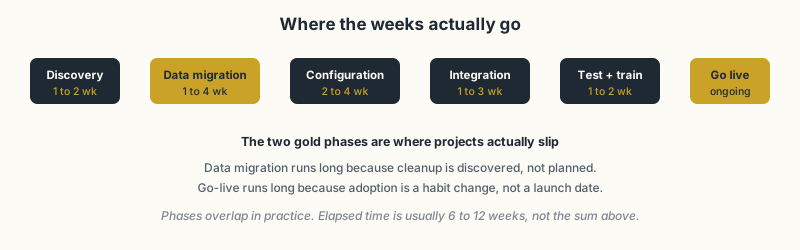
Discovery, 1 to 2 weeks. Documenting the sales process you actually run, not the one on the org chart. This phase is where an implementation partner earns most of its value, and where DIY projects most often skip a step they later repeat.
Data migration, 1 to 4 weeks. Extracting, cleaning, mapping and importing your existing customer information. This is the phase that breaks schedules, covered below.
Configuration, 2 to 4 weeks. Pipelines, deal stages, properties, workflow automation, permissions and dashboards. Genuinely predictable work once discovery is done, which is why quoting it accurately requires discovery to come first.
Integration, 1 to 3 weeks. Connecting billing, ERP, support or product data. Highly variable: a standard connector is days, a bidirectional sync with custom objects is weeks.
Testing and training, 1 to 2 weeks. Running real scenarios before go-live and getting the team competent in the new CRM.
Go-live and iteration, ongoing. The date the system starts being used, not the date the project ends.
Phases overlap in practice, which is why elapsed time is usually less than the sum.
Estimate Your Own Timeline
Rather than guessing which row above applies, build the number. Start with a base and add for each condition that is true of you.
| Weeks | |
|---|---|
| Base: one hub, clean data, no integrations | 3 |
| Each additional hub | +2 |
| Migrating from another CRM | +4 |
| More than 10,000 contact records | +1 |
| Nobody can name the current data owner | +2 |
| Each integration beyond a native connector | +2 |
| Custom objects required | +2 |
| More than 3 people must approve decisions | +2 |
| No internal project owner with 5+ hours a week | +4 |
| Go-live during your busiest quarter | +3 |
Add them up. That total is closer to reality than any vendor estimate, because vendors quote configuration time and this counts decision time.
Two rows deserve attention because they are the ones people leave off their own estimate.
“No internal project owner with 5+ hours a week” is the largest single adder, and it is the one most often assumed away. An implementation without a named internal owner does not run slowly, it stalls, and the +4 is optimistic.
“More than 3 approvers” costs more than it looks. Every configuration decision that needs consensus adds a round trip, and there are dozens of them. This is why an implementation at a 40-person company frequently finishes faster than the same scope at a 400-person one.
If your total comes out above 12 weeks, consider phasing rather than compressing. Getting one hub live and used beats getting three configured and ignored.
What Makes a CRM Implementation Run Long
Four things account for nearly every overrun, and only one is technical.
- Data quality discovered late. Nobody plans for cleanup because nobody knows how bad the data is until the mapping starts. Duplicate companies, contacts with no owner, deals in stages that no longer exist. Running a short data audit before scoping is the single highest-value thing you can do to make a timeline realistic.
- Decisions waiting on people. Configuration stalls on questions only the business can answer: what counts as a qualified lead, who owns an account after close, which stages are real. Each unanswered question is idle time.
- Scope growing during the build. Marketing Hub gets added mid-project, or someone asks for a custom object. Reasonable requests, but each resets part of the plan.
- Adoption treated as a launch date. Go-live is when the work of adoption starts. Budgeting nothing for the weeks after go-live is how implementations get declared finished while the team quietly keeps using spreadsheets.
HubSpot Onboarding Is Not an Implementation
Worth separating, because the two are often quoted against each other.
HubSpot onboarding is the programme HubSpot sells with a subscription, typically 30 to 90 days depending on tier. It is enablement: a specialist teaches you the platform, answers questions and points at best practices. Genuinely useful, and not the same as somebody configuring your business process in the tool.
An implementation is the configuration and migration work itself, done for you against your process.
Teams that buy onboarding expecting implementation lose a quarter discovering the difference. Both are legitimate purchases as long as you know which one you bought.
Adding Renewals to an Existing HubSpot
If HubSpot already runs your new business and the gap is renewals specifically, this is a small project rather than an implementation. There is no migration, no hub rollout and no team-wide behaviour change, because the team is already in the CRM daily.
The work is a dedicated renewal pipeline, the properties that hold contract terms, automation that creates renewal deals ahead of time, and reporting. One to three weeks of focused effort, with data cleanup again the main variable if renewal dates currently live in a spreadsheet.
For the routes available and how to choose between them, see HubSpot renewal setup help. For the build detail itself, the renewal pipeline guide covers the mechanics.
Frequently Asked Questions
How long does a HubSpot implementation take? A focused Sales Hub implementation for a mid-market team is typically 6 to 12 weeks elapsed. A single-hub setup with clean data can be done in 3 to 4 weeks. A multi-hub rollout with integrations and messy data migration runs 3 to 6 months.
What takes the longest in a CRM implementation? Data migration and adoption, not configuration. Cleanup is almost always discovered rather than planned for, and adoption is a habit change that continues well after go-live.
How long does HubSpot onboarding take? HubSpot’s own onboarding programmes typically run 30 to 90 days depending on tier. That is platform enablement rather than a full implementation: it teaches you the tools rather than configuring your process in them.
Can we implement HubSpot ourselves? Yes, for a straightforward single-hub setup with a clean data source and someone who can own it. The common failure is not capability, it is that the owner has a full-time job already and the project stalls half-configured.
How long does it take to add renewals to an existing HubSpot? One to three weeks, because you are adding a pipeline, properties and automation to a working instance rather than migrating anything. It is a much smaller project than a new CRM implementation.
Do we need a HubSpot implementation partner? Worth it when you are migrating from another CRM, integrating with an ERP or billing system, or rolling out multiple hubs at once. Less necessary for a clean single-hub start.
SWOTBee builds renewal operations inside HubSpot for mid-market B2B teams, usually in weeks rather than months, because it is an addition rather than a migration.
Get your 1-page renewal leakage estimate →
No call needed. Prefer to talk it through first? Book a free 30-minute discovery call →


