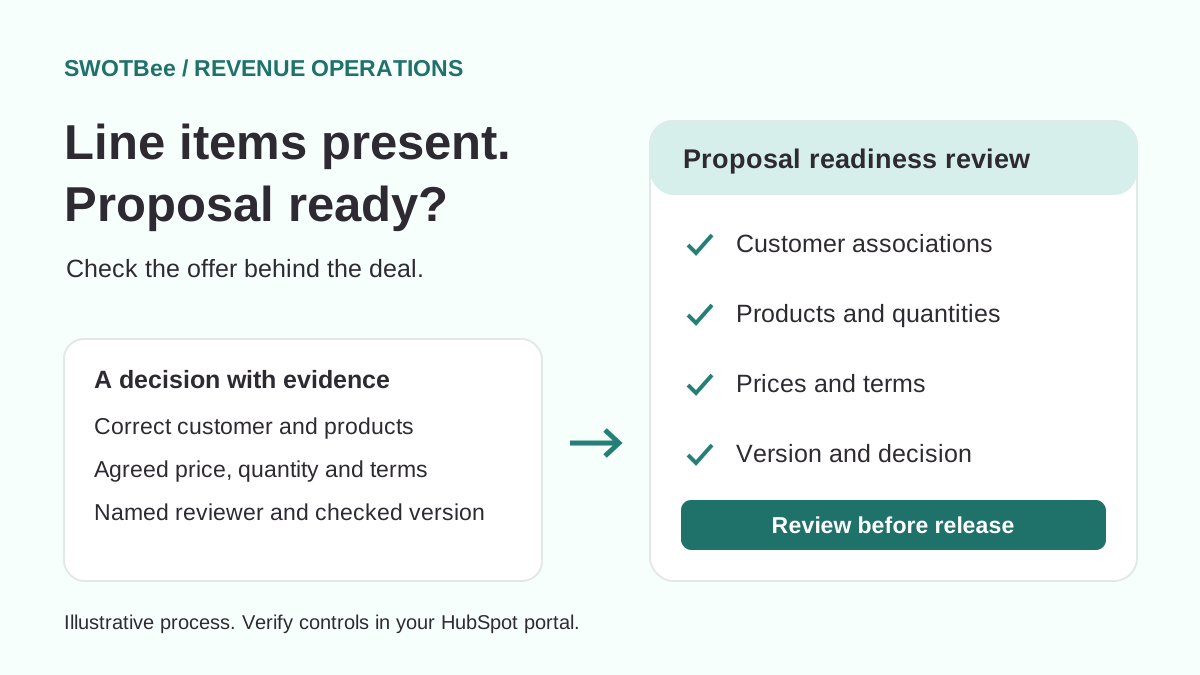
Check HubSpot line items against the proposed sale before creating a proposal: the correct products, quantities, prices, terms and customer associations. For complex deals, assign a RevOps reviewer and a clear correction route. Pair that process with the controls your portal supports, then test how users, workflows and integrations can move the deal.
This is the handoff before HubSpot quote-to-cash: deciding whether the commercial data is ready to become a customer-facing commitment. A deal can have products attached and still contain the wrong price, buyer or billing frequency.
The practical output is a review record someone else can inspect. Download the proposal readiness checklist, or use the checks below without entering an email address.
Can you require line items in HubSpot?
Requiring a deal property does not make associated line items mandatory. In HubSpot CRM, a property requirement checks a field on the deal; it does not establish that the products and customer records needed for a proposal exist and are correct. A rep entering “yes” in a readiness field cannot substitute for examining those records.
That distinction prompted Pete Cleary’s HubSpot Community discussion. Contributors explored workflow responses, predefined products and human review. SwotBee’s Sharmila Gopirajan described a RevOps checkpoint before proposal creation for complex sales.
This guide develops that review approach into a reusable operating template. The worked example is illustrative, not a measured client case study or a claim that these settings were tested in your portal. HubSpot’s pipeline guide explains conditional stage properties; the checklist here addresses the commercial evidence behind a readiness decision.
Should you alert, automate, move back or review?
Choose the response according to how predictable the sale is and what happens if incorrect data reaches a proposal. Sales teams should start with the least burdensome control that manages the actual risk, rather than adding approval steps to every deal in the sales process.
On a small screen, scroll the table sideways to compare all three columns.
| Approach | Good fit | What to check before adopting it |
|---|---|---|
| Notify sales reps and their manager | Early-stage gaps or sales processes with legitimate backward movement | Someone owns the alert and follows unresolved exceptions |
| Add a predefined product | Product and quantity are known from reliable inputs | Repeat enrollment cannot add unwanted duplicate products |
| Move the deal back | A simple process where a return is an agreed correction | Return destination, repeated enrollment and reporting effects are understood |
| Review before proposal creation | Variable products, pricing or customer relationships need judgment | Reviewer capacity, backup cover and release responsibilities are explicit |
| Native deal approval | Formal sign-off is needed and the account has the required access | Approval conditions and reviewer responsibilities match the commercial checks |
According to HubSpot’s guide to adding line items to deals, the native action can add line items to deals using existing products in deal-based workflows. It does not edit or replace existing line items already associated with a deal.
Use the product library to identify the agreed product, then verify quantity, price and billing terms against the offer. If workflow automation will automatically add a standard package, check the enrollment conditions and repeated-run behavior first. A default product is useful when it is the right product; it is not evidence that a variable proposal has been scoped correctly.
What should you check in HubSpot line items before a proposal?
Check the intended customer commitment, not just the presence of a line item. Agree which checks apply to each deal type, and require an explanation for exceptions rather than silently treating blanks as acceptable.
Use these six groups as a starting point:
- Customer: the correct company, buying contact and relevant billing or signing roles are associated. Distinguish buyer, parent company and payer when they differ.
- Products and scope: each promised product or service appears once, with the right quantity and unit. A placeholder product does not establish scope.
- Price: unit price, currency, discount and any required commercial authorization agree with the intended offer. Explain differences between the proposal total and deal amount.
- Timing: one-time charges, recurring frequency, term, start dates and phased changes are represented consistently.
- Ownership: the rep, reviewer and person releasing the proposal are named. Required custom-object associations are checked only where that data model applies.
- Evidence: record the decision, reviewer, time, version reviewed and unresolved issues. Recheck changes before releasing a later version.
For copied renewal deals, review the carried-forward data against the new offer. Our line-item copying guide explains the separate technical task of creating and reconciling target lines. A successful copy is an input to review, not its conclusion.
How should sales teams review line items in HubSpot?
Give the reviewer a request containing inspectable evidence, then record a decision against the version reviewed. A readiness status should help people find work; it should not be presented as an automatic guarantee of data quality.
Use this proposed sequence, adapting the labels to your existing process:
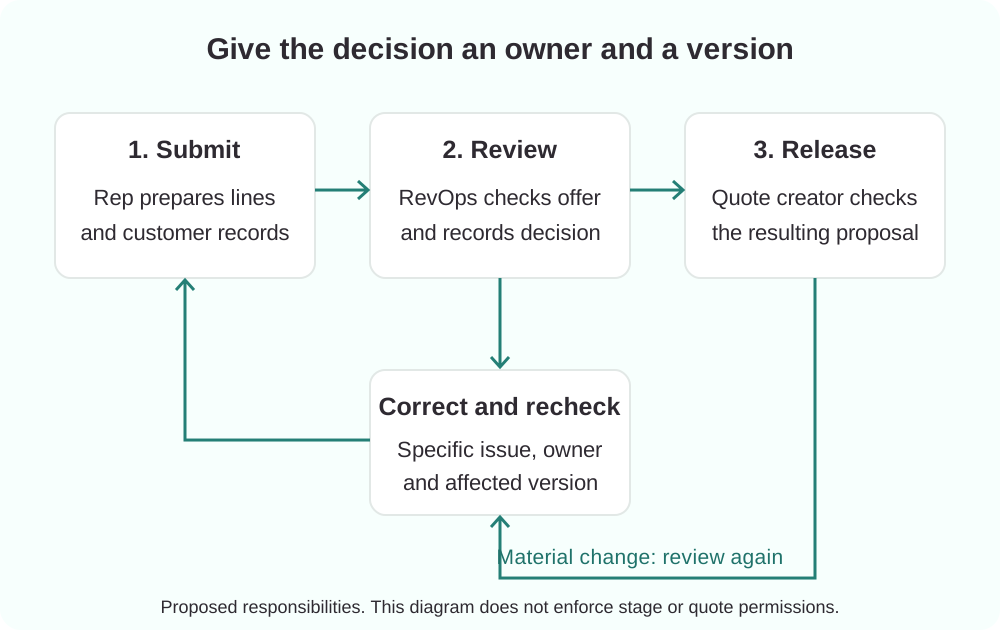
The rep submits the request. Associate the customer records, prepare the intended lines and identify exceptions. Use a real “Ready for proposal review” milestone if it reflects your process, or manage the request through a task or review status.
RevOps inspects the evidence. Open the associated records and compare them with the intended proposal. Return a specific correction such as “Confirm the billing contact and change support quantity from 10 to 12,” with an owner. Keep the record available for correction under the chosen access model.
The designated person creates or releases the proposal. Confirm the generated document matches the checked data. Decide separately who can generate, edit and send quotes in your selected quote tool; stage restrictions alone do not establish those permissions.
A material change reopens review. Define the triggers: changing product, quantity, discount, term, currency or customer should normally invalidate the earlier decision. Keep prior evidence and inspect the changed version. If this is manual, assign responsibility explicitly; if automated, test each trigger.
For traceability, a review note can use this template:
Deal / proposal version:
Requested by / requested at:
Reviewed by / reviewed at:
Outcome: Ready / Needs correction / Exception approved
Checks completed / evidence links:
Correction owner / next action:
Exception reason / authorized decision-maker:
Changes that require another review:
These are proposed review fields, not built-in HubSpot property names. Start with a structured note and task if that is sufficient; add custom properties only where filtering, reporting or tested automation needs them.
Which HubSpot controls support the process, and what can bypass them?
Combine a documented review with verified access controls. Avoid describing a restricted stage as a universal block on entering later stages or as mandatory association validation.
HubSpot’s pipeline rules documentation distinguishes stage-skipping rules from editing access in selected stages. It also documents exceptions involving privileged users, workflows and API updates. Some API enforcement depends on passing a user ID, and closed-stage transitions have specific exceptions. Map those routes in your portal instead of assuming every update behaves like a salesperson dragging a card.
For an eligible account, investigate HubSpot’s native deal approvals, currently documented for Sales Hub Enterprise. This is a formal approval mechanism, distinct from ordinary stage editing restrictions. An approval still needs meaningful review criteria; do not assume it checks your line-item details automatically.
Before configuring anything, confirm subscription and seat eligibility, ordinary rep permissions, reviewer access, quote-tool permissions and integration behavior. HubSpot separately documents access to records in restricted stages. Test a normal rep account as well as an administrator account, and write down any route you cannot enforce.
What does a completed review look like?
A completed review ties an explicit decision to the actual offer. It leaves enough evidence for the quote creator to understand what was checked and what must still change.
Consider an illustrative service deal containing a one-time implementation fee and annual support for 12 locations. The deal has two lines, but support quantity is 10, the currency is wrong and the associated contact is an operational user rather than the agreed buying contact.
A presence-only check passes. The readiness review returns three corrections to the rep. After the customer relationship and commercial values are confirmed, RevOps records the checked version and the designated quote creator compares the generated proposal with it.
If the customer then asks for 15 locations, the earlier decision no longer covers the offer. Recheck the affected quantity, total and terms before release. The point is a repeatable decision with evidence, not a permanent “approved” label attached to a changing deal.
How do you protect forecasting and avoid a review bottleneck?
Use stages for meaningful sales milestones, and measure the review queue separately. Adding a stage changes the process model; decide deliberately whether it belongs in probability-weighted and stage-conversion reports.
Do not create an extra holding stage solely to park every data problem. If “Ready for proposal” and “Proposal created” are genuinely distinct milestones, define their entry and exit criteria and calibrate probabilities against your own outcomes. If they are not, a review status or task may be clearer.
Name a primary reviewer and backup. Agree a response target that your team can support, and track waiting requests, age of the oldest request, correction reasons and requests reopened after changes. Treat those as proposed operational measures, not promised performance gains.
Test the reporting effect on representative deals before changing the live pipeline. Avoid automatic move-backs merely to keep a queue looking clean: that can obscure the work still waiting for someone to resolve.
What should pass before you enable the process?
Test the intended route and the exception routes with representative users and synthetic deals. Record expected and observed results; a process diagram does not prove enforcement.
At minimum, exercise these cases:
- No line items, one placeholder line, and complete correct lines.
- Wrong quantity, discount, currency, frequency or term despite a non-empty list.
- Missing or incorrectly associated customer records.
- Ordinary rep attempts to skip review, create a deal beyond it or move directly to a closed stage.
- Workflow and integration updates, including API routes with and without user context where applicable.
- Reviewer absence, requests needing correction and an authorized commercial exception.
- Products or customer details changed after review; a revised proposal must receive the required recheck.
- A generated quote that differs from the reviewed data, plus the resulting correction and release decision.
The downloadable checklist includes a review form and rollout test log. Run this in a test environment first. Release the control only when the process owner accepts the observed behavior, including remaining exceptions.
Frequently asked questions
Can a required checkbox prove a deal has line items?
No. A manually completed checkbox records what a user asserts. Inspect the actual associated lines and the commercial details that matter to your offer. If a calculated or automated indicator is used, test its update timing and failure behavior too.
Do we need a new pipeline stage?
Only if it represents a meaningful milestone. Use the existing proposal handoff where possible, or a review task/status when adding a stage would confuse forecasting. Document how rejected requests return for correction without preventing the rep from fixing them.
Can a standard package remove the need for review?
It can reduce manual entry when product and quantity are predetermined. Confirm the price, customer and timing, and protect against duplicate additions on repeat enrollment. Route deviations to a person who can make the commercial decision.
Does deal approval validate the associations automatically?
Do not assume so. Formal approval routes a decision to reviewers. Define what they must inspect and how a later change receives another review. Subscription, permissions and the actual configuration determine the available controls.
Review your proposal handoff
Start with the checklist on a representative deal and identify the first point where someone must guess. That is a useful place to improve the data or ownership before adding automation.
If the review crosses complex pricing, quotes or billing systems, discuss your HubSpot proposal handoff with SwotBee. Bring the intended offer, current stages and the update routes your team uses. We can help map what should be checked, who owns the decision and how to verify the result.