This article is part of our complete guide to HubSpot and NetSuite integration.
The most critical challenge in connecting HubSpot and NetSuite sits one layer below the integration tool itself: the two systems hold different data models and different opinions about how objects relate. HubSpot is built for flexible relationship management, while NetSuite is a strict financial and operational database. Mapping data between them without careful planning routinely produces silent errors, duplicate records, and broken workflows. These seven pitfalls cause most failed integrations, and each one is avoidable once you know where to look. The common thread is the integration method matters less than how you map the fields in HubSpot to the fields in NetSuite, and which system owns each one.
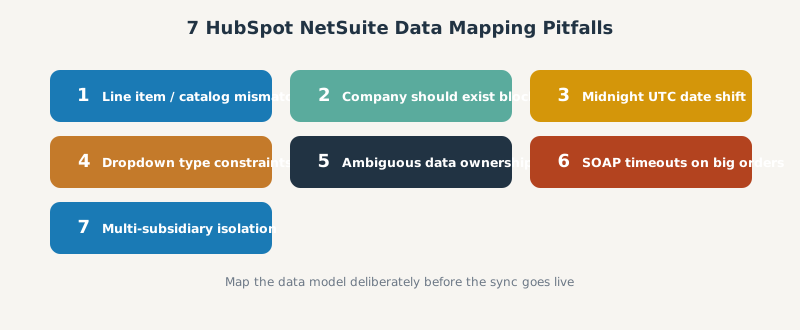
Field mapping is the foundation of any HubSpot NetSuite integration, and getting it wrong undermines every connector choice and workflow you build on top. Whether you integrate with the native NetSuite sync connector, Celigo, or a custom API integration, the data model decides whether the sync helps your sales and finance teams or quietly corrupts their customer data. Clean mapping across both systems is what gives you accurate data, a single source of truth, and the scalability to grow, while poor mapping causes the sync conflicts and bi-directional overwrites below.
1. Line Item and Product Catalog Mismatches
Syncing line items between HubSpot Deals and NetSuite Opportunities or Sales Orders is the most notoriously fragile part of the integration.
- Architectural differences. In HubSpot, line items are independent objects associated with deals through a unique
hs_object_id. In NetSuite, opportunity and sales-order line items are tightly coupled child records governed by strict tax, currency, and pricing calculations. - Update versus replace behavior. HubSpot updates its line items in place, whereas NetSuite SuiteScript often treats sublist updates as delete-and-recreate operations. If your integration compares line items by array position, any reordering breaks the sync and causes partial overwrites, missed updates, or duplicates.
- No stable external ID. Because there is no native, stable line-level external ID that both platforms respect, updates frequently fail after the initial creation.
The fix is to match line items by a stable key rather than position and to map products by SKU to active NetSuite items. The engineering detail lives in our custom NetSuite CRM integration guide, and if you manage deal line items by hand, our HubSpot clone deal line items guide covers the property mechanics.
2. The Company Should Exist Sync Block
This is a frequent timing conflict in high-velocity sales. Reps often create a Deal in HubSpot directly from a Contact before the parent Company record has finished syncing to NetSuite.
When the Deal tries to sync, NetSuite rejects the payload with a “Company should exist” error because the parent financial entity is not in its database yet. The error stalls the pipeline and forces an administrator to wait for the company to sync, then manually edit the Deal to re-trigger synchronization. Sequence the sync so companies land before their deals, and you avoid the block entirely. We cover the workaround in the HubSpot to NetSuite integration setup guide.
3. Timezone Date Shifts: The Midnight UTC Bug
When you map custom date-picker fields such as contract start dates or event dates, the date often shifts backward by one day on arrival in NetSuite.
The cause is that HubSpot stores date-picker fields without a time component, defaulting under the hood to midnight Coordinated Universal Time (00:00:00 UTC). When NetSuite interprets that timestamp from a westward time zone such as Eastern Standard Time, it subtracts the offset and pushes the recorded time back to the previous evening, so November 1 becomes October 31 at 19:00. Overcoming this requires mapping to DateTime fields, a NetSuite script that adds a day, or intercepting the payload in a middleware layer.
4. Dropdown Mismatches and Strict Type Constraints
The native connector enforces strict field-type matching and simply grays out incompatible mappings with a “This field can’t be mapped” warning.
Certain NetSuite fields, particularly those on invoices or custom picklists, cannot map directly to HubSpot dropdown properties. Teams then fall back on a clunky workaround: map the NetSuite dropdown into a plain-text staging field in HubSpot, then build a HubSpot workflow to read the text and set the correct dropdown option. That adds maintenance overhead and risks data corruption whenever the dropdown options drift out of alignment, so keep picklist values identical on both sides wherever you can.
5. Ambiguous Data Ownership and Bidirectional Overwrites
A two-way sync sounds appealing, but it creates conflict records and data drift unless you define clear ownership rules first.
By default the logic falls back to “last write wins” when both systems update the same field, which can quietly kill legitimate updates. And if you let HubSpot and NetSuite run a live sync without strict deduplication logic (exact email matches or normalized domains), you will generate duplicate customer records within the first week. Best practice is to assign one owner per object: HubSpot owns front-office relationship data (contacts and deals) while NetSuite owns the financial truth (invoices, payments, and realized revenue), and sync direction follows ownership. This is the same source-of-truth discipline we stress in the integration pillar.
6. API Limitations and SOAP Timeouts
NetSuite imposes strict concurrency limits and server-side validation that can break bulk actions triggered by HubSpot.
When deals closed in HubSpot create a large NetSuite sales order with many complex child items, NetSuite must synchronously run tax calculations, pricing logic, and validation. Native connectors often cannot extend their timeout thresholds to wait for that work, so they hit NetSuite’s SOAP API timeout and the sales-order creation fails silently or throws an error. This is a common use case where the native connector breaks and a sales rep is left wondering why the order never appeared. The durable fix is small batches and asynchronous processing rather than one heavy synchronous call, which we detail in the custom NetSuite CRM integration guide.
7. Multi-Subsidiary Isolation Challenges
For global businesses running NetSuite OneWorld across multiple legal subsidiaries, native mapping is highly problematic. The native HubSpot NetSuite connector is subsidiary-blind: it cannot run separate, parallel syncs for one object type across different subsidiaries. Basic connector tiers force a single hardcoded subsidiary filter, so routing global data accurately requires custom middleware or a database-driven sync engine. If subsidiaries matter, factor this into your connector choice from day one.
Getting HubSpot NetSuite Data Mapping Right
Every pitfall above traces back to one principle: map the data model deliberately before you turn on the sync. A few best practices prevent almost all of these failures:
- Document field mapping first. List every field in HubSpot and NetSuite you intend to sync, including each custom field, and decide direction and ownership before building. Custom field mappings on the native connector require a paid HubSpot Data Hub subscription, so scope them early.
- Match on stable keys. Use email and normalized domain for entities and a stable line key for products, never array position, so updates land on the right record and you avoid duplicates and manual data entry.
- Sequence dependent records. Sync companies before deals, and products before the orders that reference them, so NetSuite never rejects a payload for a missing parent.
- Handle custom records explicitly. The native connector cannot sync custom NetSuite record types, so plan an iPaaS such as Celigo or a custom integration where those matter.
- Test in a sandbox. Run the full mapping in a sandbox, validate a sample of records, then promote, so the integration process never debuts on live data.
Do that, and the connector you choose, native, iPaaS, or custom, has a clean foundation to run on, and your sales teams and finance teams share one trustworthy set of customer data.
Frequently Asked Questions
Why is HubSpot NetSuite data mapping so hard? Because the two systems use different data models. HubSpot is flexible relationship management; NetSuite is a strict financial database. Mapping objects without planning causes silent errors, duplicates, and broken syncs.
What causes duplicate customers in a HubSpot NetSuite sync? Running a live two-way sync without deduplication rules. Match on exact email or normalized domain and assign one system of record per object to prevent duplicates within the first week.
Why do my dates shift by a day in NetSuite? HubSpot stores date-picker fields at midnight UTC, so NetSuite in a westward time zone rolls them back a day. Map to DateTime fields or correct the offset in a script or middleware.
Why does my deal fail with a “company should exist” error? The deal tried to sync before its parent company reached NetSuite. Sequence the sync so companies land first, then re-trigger the deal.
Can the native connector handle multiple NetSuite subsidiaries? No. The native connector is subsidiary-blind and uses a single subsidiary. Multiple subsidiaries need custom middleware or a database-driven sync engine.
Fighting a live sync problem right now? We catalogued the six most-reported HubSpot NetSuite sync failures and their fixes, including which ones a config change can solve and which need an integration layer.
SWOTBee maps HubSpot and NetSuite at the data-model layer first, so the integration holds up instead of silently corrupting records. We define ownership, match keys, and structure before a single field syncs.
Get your 1-page renewal leakage estimate →
No call needed. Prefer to talk it through first? Book a free 30-minute discovery call →