This article is part of our Complete Guide to Building a Renewal Pipeline in HubSpot.
Renewal risk scoring is a customer health score applied to your renewal deals, so you can identify at-risk renewals early and act before the contract end date. In HubSpot, you combine product usage, support tickets, NPS, and engagement into a single health score on the company record, then surface that score on every upcoming renewal. The result: your customer success team sees renewal risk weeks or months early, instead of discovering churn the day a customer says no.
Most churn is not a surprise to the data; it is a surprise to the team. The signals were there in product usage, customer sentiment, and support tickets. Renewal risk scoring turns those scattered customer health signals into one number that drives renewal conversations.
Done well, this is one of the highest-leverage things you can build in HubSpot CRM. It connects customer data from across HubSpot Service Hub and the deal record so that every contract renewal carries a clear customer health status, and it gives HubSpot customer success teams a repeatable way to reduce churn rather than react to it.
What Is Renewal Risk Scoring?
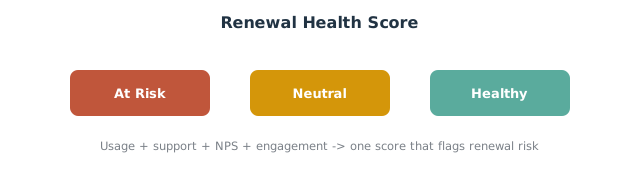
A customer health score is a single score that summarizes how healthy a customer relationship is. Renewal risk scoring is that health score viewed through one lens: how likely is this account to renew?
The difference matters. A general customer health score tracks the overall customer experience. A renewal risk score focuses on renewal likelihood and is attached to the upcoming renewal, so renewal managers and CSMs can prioritize the accounts most likely to churn. For the underlying workflow build, see our guide to health scores and churn-prevention workflows; this article focuses on applying that score to renewals.
The Signals That Predict Renewal Risk
A health score is only as good as its inputs. These are the customer health signals that best predict churn risk for a B2B renewal:
- Product usage and customer engagement. Declining logins or feature usage is the earliest churn signal. Falling usage data is the clearest sign an account is drifting.
- Support tickets. A spike in support tickets, or unresolved escalations, signals friction and retention risk.
- NPS and customer sentiment. A low or falling NPS, or negative customer feedback, flags accounts where the customer relationship is weakening.
- Customer outcomes. Whether the customer is achieving the goals they bought your product for. Accounts not hitting customer goals rarely renew at full value.
- Relationship coverage. A single champion who goes quiet (or leaves) is a major account risk.
Group these into a health score model so each account gets a single health score and a health status (for example, Healthy, Neutral, At Risk).
How to Build a Customer Health Score in HubSpot
Here is how to set up and customize customer health scores in HubSpot so they feed renewal risk.
- Create the scoring properties. Add deal and company properties for the inputs you can measure: product usage, support ticket count, NPS, last engagement date. If you use Service Hub, pull support and feedback data directly; tools like HubSpot’s Service Hub centralize customer support and customer feedback in one place.
- Define the health score model. Decide how each signal contributes to a single score. A simple weighted model (usage 40%, support 20%, NPS 20%, engagement 20%) is enough to start.
- Calculate the score with a workflow. Use a workflow to set an Account Health Score property based on the inputs, and update it on a schedule so the score stays current as customer behavior changes.
- Set a health status. Map score ranges to Healthy, Neutral, or At Risk so the team reads it at a glance.
- Surface it on the renewal. Copy the account health score onto the renewal deal so it appears in the renewal pipeline and the Customer Success workspace.
This keeps tracking customer health in one place and turns insights into action on the deals that matter.
Why Renewal Risk Scoring Reduces Churn
Building a customer health score is not a reporting exercise; it changes the renewal process. When the renewal team can see customer churn risk early, three things happen.
First, you intervene while there is still time. A renewal flagged “At Risk” 90 days out can still be saved with a focused success plan; the same account discovered at the contract end date usually cannot. Early visibility is the entire point of a dedicated renewal motion.
Second, you allocate effort correctly. CSMs have limited hours. A renewal risk score lets them spend those hours on the accounts where a successful renewal is genuinely in doubt, while healthy accounts move through a lighter-touch renewal process. This is the difference between firefighting and customer success management.
Third, you build an evidence base. Every quarter you compare predicted risk against actual outcomes, and the model gets sharper. Over time, the score becomes the shared language between sales and customer success for what a healthy customer looks like and where customer satisfaction is slipping. Many teams bring in HubSpot experts at this stage to connect Service Hub data, usage data, and the renewal pipeline cleanly, because the value compounds once the customer data flows automatically.
Detecting At-Risk Renewals Early
The point of scoring is early warning. These are the key indicators of renewal risk and how to detect them early in HubSpot:
- Health score drop near an upcoming renewal. A falling score within 90 days of the renewal date is the highest-priority signal.
- Usage decline over consecutive months. Trend matters more than a single reading.
- Open escalations with no resolution. Filter renewal deals for accounts with open high-priority support tickets.
- No recent contact. An at-risk account with no logged activity is a relationship gap.
Build a dashboard view filtered to “upcoming renewal AND health status is At Risk” so customer success managers see retention risk the moment it appears. Catching account risk early is what separates a healthy customer book from a churn problem.
Turning Risk Scores Into Action
A score that nobody acts on is theatre. Wire the score into your renewal motion:
- Route at-risk renewals to a save play. When a renewal deal is At Risk, create a task for the CSM and escalate to a manager, rather than sending the standard renewal reminder.
- Adjust the outreach. Pull at-risk accounts out of the standard renewal email sequence and into a human-led conversation.
- Feed forecasting. Use renewal likelihood to weight your renewal forecast so the number reflects real renewal risk, not just stage.
This is where sales and customer success align: the score tells everyone which renewal conversations need a person, not an automation.
Best Practices for a Renewal Risk Model
- Start simple, then refine. A rough single health score that the team trusts beats a perfect model nobody updates. Refine weights as you learn which signals actually predicted churn.
- Use leading, not lagging, signals. Product usage predicts; a cancelled contract confirms. Weight leading customer health signals highest.
- Review scores in renewal conversations. Make the health status part of every renewal review so it drives action.
- Validate against outcomes. Each quarter, check whether At Risk accounts actually churned. If not, your model needs tuning.
- Keep it customer-centric. The goal is better renewal outcomes through real customer success management, not a vanity metric.
Tracking Renewal Risk on a Dashboard
Build a renewal risk dashboard that shows account health across the book: count of renewals by health status, renewal amount at risk, and renewal rate by health segment. Combining this with your NRR and GRR reporting shows leadership not just what renewed, but how much revenue was at risk and saved. Over time, tracking renewal likelihood by customer segment reveals which success strategies improve renewal and expansion.
Frequently Asked Questions
What is a customer health score and why does it matter for renewals? It is a single score summarizing the health of a customer relationship. For renewals it predicts renewal likelihood, so you can identify at-risk renewals early and intervene before the contract end date.
What metrics should be in a HubSpot customer health score? Product usage, support ticket volume, NPS or customer sentiment, engagement recency, and whether the customer is achieving their goals. Weight leading indicators like usage highest.
How do I set up customer health scores in HubSpot? Create scoring properties, define a weighted health score model, calculate it with a workflow, map ranges to a health status, and copy the score onto the renewal deal.
How does HubSpot help detect renewal risk early? By scoring customer health continuously and surfacing it on upcoming renewals, so a falling score near the renewal date triggers a task before churn happens.
How is renewal risk scoring different from lead scoring? Lead scoring ranks prospects by buying intent; renewal risk scoring ranks existing customers by churn risk. Both use HubSpot’s scoring tools, but the inputs and goals differ.
Renewal risk scoring is simple to start and easy to overbuild: the win is a score the team trusts and acts on. SWOTBee builds customer health scoring and renewal automation for mid-market companies across Energy, Manufacturing, and SaaS.
Get your 1-page renewal leakage estimate →
No call needed. Prefer to talk it through first? Book a free 30-minute discovery call →