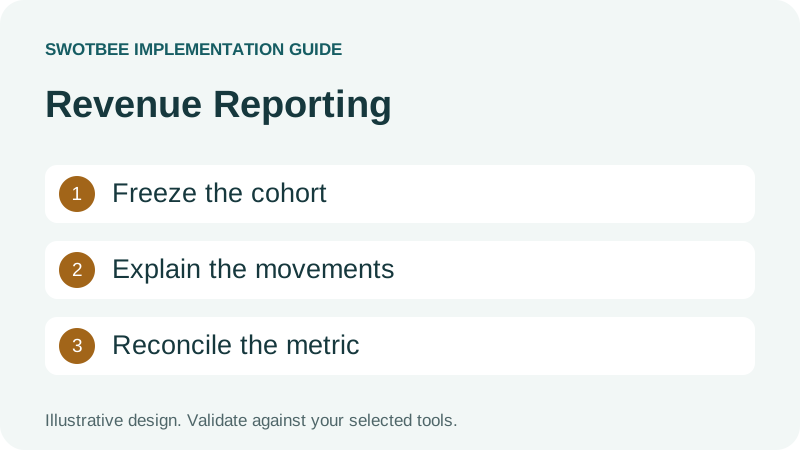
This guide supports our HubSpot renewal pipeline pillar. It focuses on reporting definitions, agreement coverage and reconciliation.
HubSpot ARR reporting becomes useful when recurring commitment, retention movements and operational renewal work use clearly defined inputs. HubSpot has native Contract retention reporting, a separate Enterprise recurring-revenue tool and custom reporting options. For ARR, define active recurring revenue at the reporting date. For NRR and GRR, also freeze the starting customer cohort and reconcile its movements.
Three things you can take away:
- A metric and cohort definition that separates ARR, NRR, GRR and renewal conversion.
- A worked retention calculation with agreement-level evidence and independently checkable arithmetic.
- A dashboard reconciliation checklist for detecting missing agreements and duplicate counts.
Start here: choose a reporting month, list the customer agreements active at its beginning and write down the recurring revenue basis. Do this before filtering to deals that happened to close during the month.
Download: HubSpot retention reporting workbook (Excel). Calculate fixed-cohort NRR and GRR, keep new-customer revenue separate, define your reporting policy and work through reconciliation checks. Blank templates and a filled example are included. No signup is required.
Which revenue and renewal metrics should you separate?
Separate recurring commitment, customer retention, renewal opportunity outcomes and actual collections. Their denominators and dates answer different business questions.
| Metric | Question answered | Basis to define |
|---|---|---|
| MRR | What monthly recurring commitment is active? | Included agreements and normalized recurring amount |
| ARR | What is the annualized recurring run rate? | Usually defined MRR multiplied by 12; policy exceptions explicit |
| NRR | What revenue did the starting cohort retain after expansion and losses? | Same starting customers across the period |
| GRR | What starting revenue remains without expansion? | Starting revenue less contraction and churn |
| Renewal conversion | What share of resolved renewal opportunities was won? | Won and lost opportunity counts in a defined period |
| Due-cohort renewal outcome | What happened to agreements scheduled to renew? | Agreements due, including unresolved outcomes |
| Cash collected | What did customers actually pay? | Payment/settlement date and financial authority |
A $24,000 two-year commitment is not automatically $24,000 ARR. If it represents a flat $1,000 monthly recurring service, the annualized run rate is $12,000. A one-time onboarding charge is excluded from that recurring amount. Ramps and variable charges need an explicit normalization policy.
Use the renewal metrics guide for broader definitions. This article applies them to HubSpot records and acceptance checks, rather than presenting universal performance benchmarks for every industry.
Which native HubSpot recurring revenue reporting route should you use?
Compare the reporting tool’s inputs with your actual agreement book. A native report can be appropriate, but its presence does not establish coverage of externally billed or differently modeled agreements.
HubSpot’s Contract management documentation describes churn and net revenue retention reporting based on Contract renewals. The revenue analytics suite is another reporting surface for revenue records. Check available report types, access and record coverage in the portal.
Separately, the recurring-revenue analytics tool requires Sales Hub Enterprise or Service Hub Enterprise. Its dedicated recurring-revenue deal properties are not calculated from associated product or quote values. Do not assume adding line items populates that tool’s inputs.
| Route | Input to inspect | Coverage acceptance question |
|---|---|---|
| Contract retention reporting | Native Contracts and renewal data | Are all intended agreements represented with correct history? |
| Enterprise recurring-revenue analytics | Dedicated recurring-revenue deal properties | Are values and inactive dates/reasons maintained correctly? |
| Custom report or dataset | Chosen objects, snapshots and movement inputs | Do cohort totals reconcile without join duplication? |
| Controlled external calculation | Exported starting cohort and movements | Is the method reproducible and reconciled back to CRM? |
HubSpot’s custom report builder guide lists Professional and Enterprise access across several products and report permissions. Dataset and formula choices have their own conditions. Avoid both blanket claims that HubSpot cannot calculate retention and blanket promises that every portal can produce any required formula.
How do you configure native Contract revenue reports?
Choose whether you need booked revenue or effective recurring revenue before building the report. HubSpot’s Contract reporting distinguishes those dates; a booking is not automatically active monthly recurring revenue.
According to HubSpot’s revenue reporting documentation, Contract reporting has beta conditions. Contracts require Revenue Hub unless the account has the Direct Create, Edit, and Renew HubSpot Contracts beta; a Super Admin can enroll in Revenue Reporting from Contracts. Change and renewal quotes separately require a Revenue Hub subscription and seat.
For custom revenue reports, start at Reporting > Reports, create a custom report and select the required primary source. Add Contract Revenue (Booked) or Contract Revenue (Scheduled) as another source. Booked events represent line items per contract change; scheduled events represent line items per billing month. Check the available fields and aggregation before saving a chart.
Use a booking-date report to explain sales commitments. Use effective revenue to track MRR changes when service value begins. Do not sum scheduled monthly rows as if each were a separate annual contract.
How do you build an ARR and MRR dashboard that finance can check?
Write a report specification before selecting a chart. Define the recurring revenue basis, reporting period, customer population and reconciliation source so the dashboard answers a reproducible question.
Use this copyable specification for a SaaS business, MSP or other B2B recurring service. The labels below are design requirements, not promised native field names or a tested formula configuration.
| Report | Grain and date | Value and filters | Acceptance check |
|---|---|---|---|
| Active MRR and ARR | Agreement at the reporting boundary | Included recurring commitment; one currency basis | MRR reconciles; ARR uses the declared annualization policy |
| Booked revenue | Commercial change at booking date | Approved new or changed commitment | Booking differs from effective start where appropriate |
| MRR movements | Unique movement at its effective date | New, expansion, contraction and churn | Starting MRR plus movements reconciles to ending MRR |
| NRR and GRR | Fixed starting customer cohort | Starting recurring revenue and same-cohort movements | New customers excluded; example returns 100% and 85% |
| Renewal forecast | One next-term opportunity | Due period, stage and expected amount | Pending opportunities are visible; forecast is not active ARR |
If you use HubSpot’s revenue analytics suite, open Reporting > Reports > Revenue, choose a report, set its available filters and inspect its definition. Customize the view and save it to the dashboard. Subscription reports include new and churned subscription counts and values; those inputs do not automatically represent every externally billed agreement.
For a finance review, start with a customer whose agreement has both recurring service and a one-time fee. Show how the fee is excluded from MRR, how a delayed service start affects the relevant period and how a renewal forecast differs from an active commitment. Bring the workbook’s independent calculation to the review.
A paid invoice shows collection, not accounting revenue recognition or customer retention. Keep those definitions separate from the dashboard’s recurring commitment and cohort measures.
When should you use revenue snapshots instead of only current values?
Use snapshots when the available records cannot reproduce the starting customer cohort and historical recurring value for your reporting policy. A mutable current total is insufficient to explain past NRR or GRR.
Define one customer-period snapshot with customer ID, period boundary, included agreement IDs, starting MRR, movement IDs and ending MRR. Store a new period without overwriting the prior accepted value. If you implement this in a HubSpot custom object, verify the required entitlement and workflow support; an external controlled dataset is another route to evaluate.
For example, a customer starts with $1,000 MRR, increases to $1,200 and ends at $900 after a service reduction. Keeping only $900 cannot show the $200 expansion and $300 contraction. Preserve effective movements and source evidence so customer success and finance can explain the result.
Choose native reporting when its population, definitions and history fit the requirement. Choose a prepared snapshot model when they do not. Do not duplicate native revenue data into a custom model without defining which source resolves disagreements and how late changes are restated.
How do you calculate NRR and GRR from a fixed cohort?
Freeze the starting cohort and recurring revenue, then classify movements affecting those customers during the period. New customers acquired during the period do not enter its retention numerator.
ChartMogul’s GRR definition excludes expansion; its NRR definition includes expansion. Use one revenue basis, currency policy and period in both calculations.
For an illustrative monthly customer cohort, start with $10,000 MRR across agreements active on October 1. During October, starting customers expand by $1,500, contract by $500 and churn $1,000. New customers add another $2,000 MRR, which is excluded from October retention.
| Component | Included amount | Inclusion rule |
|---|---|---|
| Starting MRR | $10,000 | Active starting customer cohort |
| Expansion | $1,500 | Effective movement from starting customers |
| Contraction | $500 | Reduction in starting cohort revenue |
| Churn | $1,000 | Starting revenue lost under the agreed churn policy |
| New-customer MRR | $2,000 excluded | Not in the starting customer cohort |
GRR = (10,000 - 500 - 1,000) / 10,000 = 85%
NRR = (10,000 + 1,500 - 500 - 1,000) / 10,000 = 100%
Ending MRR from the starting cohort = 10,000
Ending MRR including new customers = 12,000
These are example results, not SwotBee customer outcomes or target benchmarks. A 100% NRR result here coexists with $1,500 of losses because expansion offsets them. Show GRR and its loss components alongside NRR so the expansion does not hide the underlying movement.
An unchanged renewal is continuity, not an additional $1,000 expansion just because another deal closed. If an existing customer adds an agreement, decide whether your metric is customer-based NRR or agreement-only retention. Customer NRR can include that new agreement as expansion; an agreement-only policy might exclude it. Name that difference explicitly.
Why should the starting cohort not be only closed renewal deals?
Closed renewal deals describe resolved opportunities. They do not necessarily describe every customer generating recurring revenue at the beginning of the period.
Imagine three active agreements at month start. One renews in October, one continues until March and one cancels mid-term. A filter for October Closed Won renewal deals could include only the first. It would omit continuing revenue and possibly the cancellation, producing a different denominator from customer-cohort NRR.
Use a due-date cohort for the operational question of agreements scheduled to renew. Keep pending outcomes visible rather than silently discarding them. Use a fixed active customer cohort for revenue retention. Use resolved opportunities for won-versus-lost conversion. Each is useful when named correctly.
For example, 8 wins and 2 losses from 10 resolved opportunities produce 80% resolved-opportunity conversion. If 12 agreements were due and 2 remain pending, also show the pending count. Calling 80% the completed outcome of all 12 due agreements would conceal unfinished work.
This corrects a common reporting shortcut: summing Previous Contract Value only on renewal deals closed this quarter is not automatically the starting portfolio MRR or ARR. It may support a named renewal-event analysis, but should not be relabeled customer-cohort NRR.
What agreement-level revenue data do you need in HubSpot CRM?
Preserve identity, effective dates, a recurring value basis and movement history. A mutable company total alone cannot explain which of its agreements changed.
Use this specification as a starting point. These are reporting labels, not a mandatory set of native HubSpot property names.
| Input | Purpose | Acceptance rule |
|---|---|---|
| Customer identity | Customer cohort membership | Stable entity; duplicates reviewed |
| Agreement identity | Separate simultaneous commitments | One key per agreement and term |
| Active-from/to dates | Starting and ending coverage | Effective dates, not default sales dates |
| Recurring amount and basis | Comparable MRR or ARR | Currency, term and one-time exclusions explicit |
| Starting snapshot | Reproducible denominator | Frozen value at the reporting boundary |
| Movement ID/type/date | Expansion, contraction and churn | One effective movement counted once |
| Prior and resulting value | Movement calculation | Reconciles to the agreement state |
| Source and review status | Traceable evidence | Exceptions do not become silently accepted data |
An MSP customer might hold support A-101 and backup A-102. If backup churns while support expands, a single latest company deal amount loses the explanation. Preserve both movements, aggregate to the customer under your metric policy and retain agreement-level drill-down.
Use renewal properties for operational fields and renewal automation for maintaining the next opportunity. Workflows can maintain inputs, but their completion count is not a reconciliation of the whole agreement book.
How do you prevent duplicate counts in multi-object reports?
Choose the reporting grain before joining objects. One agreement linked to several deals, invoices or line items can appear several times after a join.
For example, A-101 has $1,000 MRR and three invoices. A join that repeats its value once per invoice yields $3,000. Neither a correct chart label nor a valid association prevents that error.
Start with one row per agreement snapshot or one row per uniquely identified movement, depending on the report. Compare distinct agreement counts and sums before adding invoices, contacts or line items. A count-distinct setting does not automatically correct a repeated revenue sum.
Build a deliberate duplicate test: one agreement, two contacts, three invoices and two related deals. The starting MRR must remain $1,000. If the report cannot preserve that grain with the available controls, use an appropriate prepared dataset or independently reconciled calculation rather than presenting the multiplied result.
The custom report builder documentation explains multi-source reports, not a universal no-duplication guarantee. Validate your actual data sources and aggregation behavior before making a dashboard the finance reference.
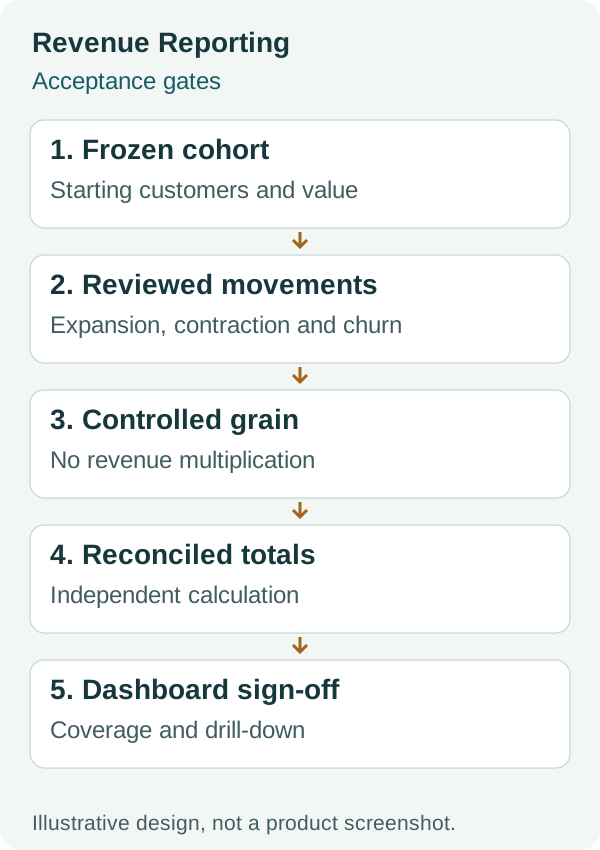
This is a reporting acceptance model, not a screenshot or proof of a particular native formula configuration.
What should your HubSpot revenue dashboard show?
Separate operational work from retention measurement and finance reconciliation. Each panel should have a defined date basis, owner and drill-down.
Use three views rather than one ambiguous revenue total:
- Operations: upcoming notice deadlines, renewal dates, owner gaps, pending decisions and workflow exceptions. Use agreement dates to find work that needs action.
- Retention: starting cohort, expansion, contraction, churn, ending cohort revenue, NRR and GRR. Show the period, currency policy and coverage beside the result.
- Reconciliation: missing agreements, missing movements, duplicate identities and differences from the designated commercial or financial source.
Review a headline metric alongside its component table. If NRR changes, the reviewer should identify which effective movements changed it. If coverage is incomplete, show the excluded population instead of describing the chart as company-wide retention.
Do not use an invoice payment date as the effective date of commercial expansion without an agreed reason. Cash timing can differ from service commitment. Use the quote-to-cash pillar for finance handoff design and QuickBooks or Stripe for their specific reconciliation boundaries.
How should you reconcile and correct a revenue report?
Reconcile record counts, recurring amounts and movements against the designated authority for the same period. Correct missing evidence or classification at its source before editing a chart to look plausible.
Keep a reconciliation worksheet with reporting period, source extract time, agreement count, starting value, movements, ending value, exceptions and reviewer. Store the calculation method with the result so a later reviewer can reproduce it.
For the $10,000 example, inspect whether starting-cohort movements total to $10,000 ending MRR, and whether the additional $2,000 is correctly classified as new-customer revenue. Independently calculate 85% GRR and 100% NRR before comparing the dashboard.
When late data arrives, use a documented restatement policy. An October cancellation entered in November might require revising October’s result. Preserve what changed, who approved it and which period was restated. Do not silently rewrite a prior board figure without explaining the difference.
Keep exchange-rate effects separate from commercial movement if your policy requires constant-currency retention. Do not add USD, GBP and EUR values directly. A company currency conversion setting should be checked against the policy and historical dates rather than assumed to solve all cohort comparisons.
What should pass before you share the dashboard?
Share the dashboard when another reviewer can reproduce its denominator, movements and result. Copy these checks into your reporting release review.
- ARR/MRR, retention, renewal conversion and collections have distinct definitions.
- The starting customer cohort is frozen and complete for the claimed scope.
- New customers are excluded from the same-period retention calculation.
- Same-customer new agreements follow the declared customer or agreement policy.
- Recurring amounts exclude one-time charges and use a consistent currency basis.
- Unchanged renewals do not create false expansion.
- Churn and contraction have effective dates and reviewed source evidence.
- The worked example produces 85% GRR and 100% NRR.
- Joined contacts, invoices and deals do not multiply agreement revenue.
- Pending due renewals are visible separately from resolved conversion.
- Native and external agreement coverage is reconciled and exclusions disclosed.
- A second reviewer can drill down from a metric to its source movements.
- Corrections and late movements follow an agreed restatement policy.
Frequently asked questions
Does HubSpot have native NRR reporting?
HubSpot documents Contract-based churn and net revenue retention reporting. Check its record coverage and definitions against your agreement book. Custom reporting may still be needed for externally controlled agreements or different cohort policies.
Is Deal Amount the same as ARR?
Not necessarily. Deal Amount can represent a total commitment or another commercial basis. Define recurring normalization, term, one-time exclusions and currency before using a value as ARR.
Can I calculate NRR from renewal deals closed this quarter?
That filter can support a named renewal-event analysis, but it does not automatically represent all customers active at the period start. Customer-cohort NRR requires a fixed starting cohort and its effective expansion, contraction and churn movements.
Why is GRR lower than NRR?
GRR excludes expansion while NRR includes it. In this guide’s example, losses reduce GRR to 85%, while $1,500 expansion returns NRR to 100%. Show both so expansion does not hide losses.
Do I need Data Hub for retention reporting?
Not universally. Native Contract reporting, Enterprise recurring-revenue analytics, custom reports and datasets have different access conditions. Verify the specific reporting route, formulas and data inputs your model needs.
Why do revenue totals increase when I add invoices to a report?
The join may repeat agreement revenue for each invoice. Check the reporting grain and compare totals before and after adding associated objects. Correct aggregation or prepare a suitable dataset rather than assuming a distinct count fixes the sum.
Review your renewal reporting
Bring a metric definition, one reporting period and two agreements from the same customer to a discovery conversation. Use the example and checklist first to identify whether the gap is data coverage, configuration, integration or a different calculation policy.


