This article is part of our complete guide to HubSpot and NetSuite integration.
To migrate NetSuite CRM to HubSpot, you run a pre-migration audit, map the data model, extract and clean the data, resolve duplicates, rebuild your automations, then validate after go-live. Migration means moving your front-office CRM work off NetSuite and into HubSpot, usually while keeping NetSuite for finance, connected by an ongoing sync. Done in this order, you move without losing data or pipeline. This playbook walks through each stage.
Many teams reach this point after weighing the platforms in our NetSuite CRM vs HubSpot comparison and deciding HubSpot should own the go-to-market motion.
Preparing to Migrate NetSuite to HubSpot: The Pre Migration Audit
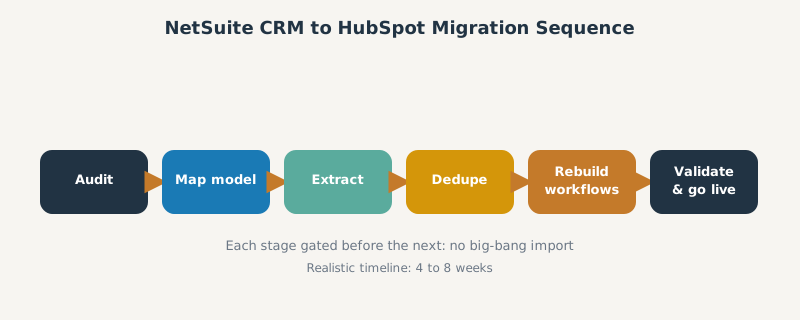
Migration is mostly preparation. Before moving anything, audit what you have in NetSuite: a full field list per object, total record volume, data-quality issues (bad formats, special characters), and every active workflow and funnel stage. This audit is what makes the rest of the project predictable.
Defining Critical Sales Operations Data Requirements
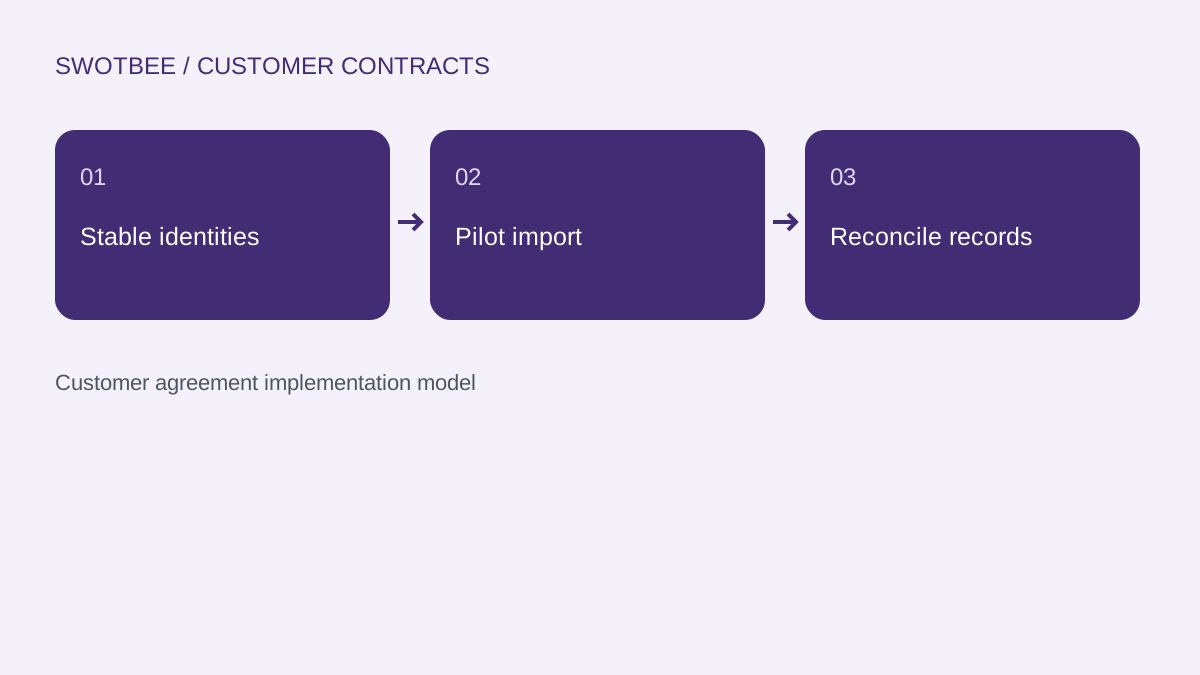
Decide what the sales operation actually needs on day one in HubSpot: which contacts, companies, deals, and historical activity are essential, and which can be archived. Standardize identifiers (a “Customer ID” must mean the same thing everywhere) so records reconcile cleanly. Trimming and standardizing now prevents migrating mess into a clean system.
Mapping the Data Model: Entities, Contacts, and Opportunities
The core challenge is a structural mismatch. NetSuite revolves around one Customer record that represents a lead, prospect, or customer at different stages. HubSpot splits that into separate Contact, Company, and Deal objects. Map NetSuite entities to HubSpot companies, individuals to contacts, and opportunities to deals, deciding deliberately how one NetSuite record becomes several HubSpot records. The same object-mapping discipline from our HubSpot NetSuite data mapping guide applies here.
Reconciling Custom Field Differences
Custom fields rarely line up one to one. Formula, lookup, and derived fields do not transfer unless you also bring their source fields, so map the source data, not the calculated output. Custom NetSuite record types will not move through a native connector, so plan those separately.
Step by Step Execution: Moving Data Without Loss
With the model mapped, execute the move in controlled stages rather than one big dump.
Extracting Clean Data from NetSuite
Extract with NetSuite saved searches exported to CSV for standard volumes. Above roughly 100,000 rows, SuiteQL hits a hard query cap, so use SuiteAnalytics Connect (ODBC or JDBC) instead. Do not build the pipeline on SOAP, which NetSuite is retiring. Clean the extract before import: fix formats, standardize values, and flag bad records.
Resolving Duplicates Before Import
Deduplicate before, not after, the import. Match on email for contacts and a normalized company name or domain for companies, and merge duplicates in the extract so you do not carry them into HubSpot. Resolving duplicates up front is far cheaper than cleaning them out later.
Rebuilding Automations and Workflows in HubSpot
Workflows do not migrate, they get rebuilt. NetSuite SuiteFlow and SuiteScript logic has no export path into HubSpot’s automation engine, so use the audit to document every trigger, condition, and action, then reconstruct them as HubSpot workflows. Rebuild your quote-to-cash stages in HubSpot deal pipelines, and if NetSuite keeps billing, connect the two with the HubSpot to NetSuite integration setup. Be aware that HubSpot stamps imported activity with the import date, so preserve original dates in custom properties such as “Original Created Date” to keep historical context.
Go Live and Post Migration Validation
Never call a migration done at import. Validate it.
Confirming Pipeline Velocity and Revenue Accuracy
Reconcile record counts per object, then field-sample 50 to 100 records to confirm relationships, owners, and deal stages came across correctly. Run business-owner acceptance testing, set a data-freeze window, and run a final delta sync within an hour or two of cutover using idempotent upserts so nothing created during the freeze is lost. Then confirm pipeline velocity and revenue accuracy in HubSpot reporting match what you saw in NetSuite. A realistic timeline is four to eight weeks depending on complexity.
Frequently Asked Questions
What does it mean to migrate NetSuite CRM to HubSpot? It means moving your front-office CRM data and processes (contacts, companies, deals, and activity) out of NetSuite into HubSpot, usually while keeping NetSuite for finance and connecting the two with a sync.
Why migrate from NetSuite CRM to HubSpot? Teams migrate for ease of use, marketing automation, faster time to value, and higher sales adoption, while leaving accounting, inventory, and revenue recognition in NetSuite.
What data can be migrated from NetSuite to HubSpot? Contacts, companies, deals or opportunities, products, and historical activity. Formula and lookup fields and custom records need special handling, and imported activity carries the import date unless you store original dates.
How long does a NetSuite to HubSpot migration take? Typically four to eight weeks depending on data volume, custom fields, and the number of workflows to rebuild.
Do I still need NetSuite after migrating CRM to HubSpot? Usually yes, for finance. Most teams migrate CRM to HubSpot and keep NetSuite for billing and operations, connected by an ongoing integration.
SWOTBee migrates mid-market teams from NetSuite CRM to HubSpot without losing pipeline or history. We audit, map, dedupe, and rebuild so go-live is a clean cutover, not a scramble.
Get your 1-page renewal leakage estimate →
No call needed. Prefer to talk it through first? Book a free 30-minute discovery call →