CRM and ERP integration is the process of connecting your CRM (the front-office system for sales, marketing, and service) with your ERP (the back-office system for finance, inventory, and operations) so that customer, order, and financial data sync between them instead of being re-keyed by hand. Done well, it gives every team one source of truth, automates the deal-to-cash handoff, and removes the manual data entry that slows growth. This guide covers what CRM and ERP integration is, how it works, the benefits, the methods, the challenges, and the best practices.
This is the umbrella pillar for integration on swotbee.com. For the most common real-world pairing, see our detailed HubSpot and NetSuite integration guide.
If your CRM is HubSpot, start with our HubSpot ERP integration guide: it applies everything in this article to HubSpot specifically, covering which ERPs connect natively, how HubSpot’s data model maps to ERP objects, and the connector options for NetSuite, SAP, Dynamics, and the other major ERP platforms. This page stays platform-neutral; that one is the HubSpot playbook.
What Is CRM and ERP Integration?
A CRM (customer relationship management) system manages customer-facing work: leads, deals, marketing, and support. An ERP (enterprise resource planning) system manages the back office: finance, invoicing, inventory, and supply chain. CRM and ERP integration connects the two so a record created or updated in one flows to the other automatically.
Without integration, the same customer, order, or invoice gets entered twice, once by sales in the CRM and once by finance in the ERP, which wastes time and creates conflicting data. With an integrated ERP and CRM, the customer relationship and the financial and operational data behind it stay in sync, giving the business a single source of truth.
How Does CRM and ERP Integration Work?
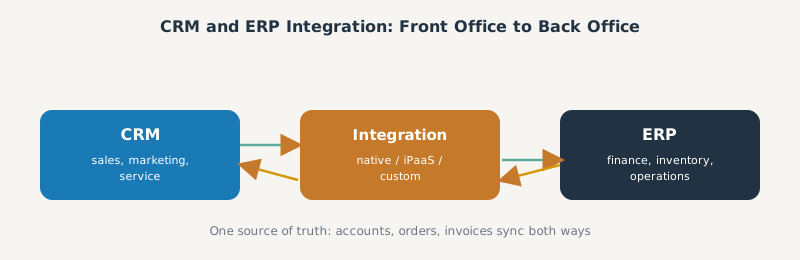
At a high level, an integration maps objects between the two systems and keeps them consistent. A CRM event (a won deal, a new account) triggers a create or update in the ERP; an ERP event (an invoice, a shipment, updated inventory levels) flows back to the CRM. The core mappings are usually:
- CRM accounts and contacts to ERP customers.
- CRM deals or orders to ERP sales orders.
- ERP invoices, payments, and inventory back into the CRM for visibility.
The integration runs in real time for fast-moving records and in scheduled batches for heavier operational data, so both systems hold up-to-date information without overwhelming the ERP. Assigning one system of record per object (customers and financials in the ERP, deals and marketing in the CRM) is what keeps the sync clean.
The Benefits of CRM and ERP Integration
Integrating ERP and CRM systems pays off across every team:
- One single source of truth. Sales, finance, and service work from the same customer data instead of conflicting records.
- Less manual data entry. Records sync automatically, so no one re-keys the same order twice and data-entry errors drop.
- Faster deal-to-cash. A closed deal becomes a sales order and invoice without a manual handoff, improving cash flow.
- Real-time visibility. Sales teams see inventory levels, order status, and payment history; finance teams see the pipeline.
- Better customer experience. Unified data means accurate quotes, faster fulfillment, and informed service.
- Cleaner reporting. Revenue reporting reconciles because the front office and back office agree.
For mid-market companies especially, these benefits compound: the integration removes the operational drag that fragmented tools create as the business scales.
Common Use Cases and Examples
CRM and ERP integration shows up in a few recurring patterns:
- Quote-to-cash automation. Turning a CRM quote into an ERP order, invoice, and payment, covered in our quote-to-cash guide.
- Order-to-cash visibility. Flowing order status and receivables back to the customer record, covered in our order-to-cash process guide.
- Inventory visibility for sales. Surfacing ERP stock and pricing inside the CRM so reps quote what can ship.
- Subscription billing sync. Keeping recurring revenue aligned between a CRM renewal motion and ERP invoicing.
The most common real-world example is connecting HubSpot (CRM) with NetSuite (ERP), which we cover end to end in our HubSpot NetSuite integration pillar.
Integration Methods: Native, iPaaS, and Custom
There are three main ways to integrate CRM and ERP systems:
| Method | Best for | Trade-off |
|---|---|---|
| Native connector | Simple, standard objects | Limited mapping, breaks at scale |
| iPaaS (integration platform) | Most mid-market RevOps | Subscription cost, some setup |
| Custom API | Complex schemas, high volume | Build time and maintenance |
A native connector is fastest to turn on; an iPaaS such as Celigo or Workato is the mid-market default because it balances power and maintenance; a custom integration gives total control for complex needs. For the detailed comparison in a real pairing, see our HubSpot NetSuite connector comparison.
CRM vs ERP: What Is the Difference?
It helps to be precise about ERP vs CRM before integrating them. CRM software manages the front office: customer relationships, customer interactions, sales, and marketing. ERP software manages the back office: finance, inventory management, supply chain management, and operations. The difference between ERP and CRM is one of focus, the customer versus the business operation, which is exactly why connecting your CRM and ERP is so valuable: it unifies two halves of the same business. Some suites bundle both, but most mid-market companies run a best-of-breed CRM and a separate ERP solution and connect them with an integration solution.
Types of CRM and ERP Integration
Beyond native, iPaaS, and custom, it helps to understand the technical integration patterns:
- Point-to-point integration directly connects two systems. Simple for one link, but it becomes brittle as you add more integrated systems.
- Integration platform (iPaaS) sits in the middle and manages data integration across systems, the modern integration platforms most mid-market teams use to connect CRM and ERP software.
- Custom data integration uses the APIs on the ERP side and the CRM side to build a tailored sync.
Whichever pattern you choose, plan for security and compliance, since the integration moves financial and customer data across both systems.
Challenges of Integrating CRM and ERP Systems
The hard part of CRM-ERP integration is rarely the connector; it is the data. Common challenges:
- Object and data-model mismatches. The CRM and ERP model customers and orders differently, which breaks naive field mapping. We catalog these in our data mapping guide.
- Duplicate records. Without strong match keys and deduplication, a live sync creates duplicate customers fast.
- Source-of-truth conflicts. If both systems can edit the same field, you get data drift unless ownership is defined.
- API limits and timeouts. ERPs govern API access tightly, so high-volume syncs need careful architecture.
Planning for these up front is the difference between an integration that holds up and one that quietly corrupts data.
Best Practices for a Successful CRM and ERP Integration
To integrate your CRM and ERP successfully:
- Define the system of record per object before you build, and let sync direction follow ownership.
- Map the data model first, including custom fields, rather than turning on a sync and hoping.
- Set match keys and deduplication rules so you update the right record instead of creating duplicates.
- Use a hybrid sync cadence: real time for deals and contacts, batch for orders and invoices.
- Test in a sandbox and reconcile record counts before going live.
- Monitor the integration with dashboards and alerts so failures surface early.
Follow these and the integration becomes a durable backbone for the business, not a fragile bridge.
Frequently Asked Questions
What is CRM and ERP integration? It is connecting your CRM (sales, marketing, service) with your ERP (finance, inventory, operations) so customer, order, and financial data sync automatically between them, giving one source of truth.
What are the benefits of integrating CRM and ERP systems? One source of truth, less manual data entry, faster deal-to-cash, real-time visibility into inventory and payments, a better customer experience, and reporting that reconciles across teams.
How does CRM and ERP integration work? The integration maps objects between the systems (accounts to customers, deals to sales orders) and syncs them, real time for fast-moving records and batch for heavier data, with one system of record per object.
What are the methods for CRM and ERP integration? A native connector, an iPaaS (integration platform) such as Celigo or Workato, or a custom API build. The right choice depends on data volume, complexity, and the maintenance you can sustain.
What are the biggest challenges of CRM-ERP integration? Data-model mismatches, duplicate records, source-of-truth conflicts, and ERP API limits. The data layer, not the connector, is where most integrations succeed or fail.
SWOTBee integrates CRM and ERP systems for mid-market companies, most often HubSpot and NetSuite, so your front office and back office finally share one source of truth. We handle the data model, not just the connection.
Get your 1-page renewal leakage estimate →
No call needed. Prefer to talk it through first? Book a free 30-minute discovery call →