This article is part of our Complete Guide to Building a Renewal Pipeline in HubSpot.
Co-terming means aligning multiple contracts or subscriptions for the same customer onto a single renewal date, so they all renew together instead of on scattered end dates. In HubSpot, you co-term by issuing a change quote that shortens or extends line items to a common contract end date, with the partial term prorated, then managing the consolidated renewal in your renewal pipeline. This guide explains what co-terming is, its benefits, and how to set it up.
When a customer buys more over time, each purchase can land on its own renewal date and billing cycle. The result is three or four renewal cycles a year for one account, each tracked separately and manually. Co-terming collapses those into one renewal, which is easier for the customer and far easier for SaaS teams to manage renewals as a single key contract per account.
Whether a subscription renews automatically or you handle each renewal as a deal, co-terming gives you one centralized source of truth for committed revenue instead of scattered contract lengths and expiration dates.
What Is Co-Terming (and Its Benefits)?
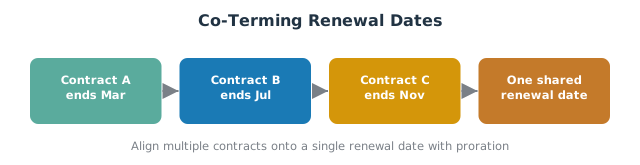
Co-terming (short for co-termination) sets multiple line items or subscriptions to expire on the same date. Instead of a mid-term add-on creating a new, separate renewal, the add-on is aligned to the existing contract end date.
The benefits:
- One renewal, not many. A single renewal date per customer instead of scattered ones across the year.
- Less admin. Your customer success team manages one renewal conversation, one renewal quote, and one contract per cycle.
- Cleaner forecasting. Contract value and renewal terms live on one record, so committed revenue is easy to read.
- Better customer experience. The customer signs once a year, not every time they add a seat.
How Co-Terming Works in HubSpot (Proration)
When a customer makes a mid-term contract change (adding seats or a new product), you align it to the existing renewal date using a change quote. HubSpot handles the partial term with proration:
- Existing line items are shortened or kept to the common contract end date.
- New line items are added on the change quote for the remaining portion of the term.
- Changes are prorated daily based on the number of days remaining in the billing term, so the customer only pays for the time left until the shared renewal date.
If a deal is enrolled in the connected CPQ (or the payments beta process where enabled), you can automatically create contracts from accepted quotes, so the contract record reflects the co-termed dates and the next billing aligns to one renewal time. Because changes are prorated daily based on the days remaining in a billing term, new line items added on change quotes only charge for the partial period. The same change quotes and contracts flow also lets you terminate contracts or export contracts when you need to, keeping contract management in one place across the customer lifecycle.
Setting Up Co-Termed Renewals in Your Pipeline
To manage co-termed renewals cleanly:
- Make the renewal deal the source of truth. One renewal deal per customer in your dedicated renewal pipeline holds the consolidated contract value and renewal date.
- Align all line items to the single contract end date when you issue the renewal quote.
- Record the co-termed renewal date as the deal’s Renewal Date so every downstream automation reads one date.
- Use one renewal date property across the account so tracking renewals does not splinter again.
This is the same single-date discipline built into the renewal pipeline template.
Automating Co-Term Tracking
Co-terming only stays clean if new purchases keep aligning to the shared date. Use workflows to handle it:
- Default new deals to the existing renewal date. When a mid-term deal is created for an account that already has a renewal, set its end date to the account’s co-termed date rather than a fresh 12-month term. Tie this into renewal deal creation so co-termed deals are created automatically at the right deal stage in your deal pipeline, not in your new business pipeline.
- Fire reminders off the single date. Start outreach 60 to 120 days before the renewal date using your renewal reminders, so one alert covers the whole account.
- Flag drift. Alert RevOps when a new contract is created with an end date that does not match the account’s co-termed renewal date, so it can be corrected before the next renewal.
Letting workflows handle alignment prevents the slow return to scattered, last-minute renewals.
Best Practices for Co-Terming
- Co-term at the next renewal, not retroactively. The simplest moment to align dates is when the main contract renews.
- Be transparent about proration. Show the customer how the prorated amount was calculated from the days remaining; it builds trust during contract negotiation.
- Keep one source of truth for committed revenue. The renewal deal and contract record should always agree on the co-termed date and value.
- Decide your policy for mid-term changes. Default to co-terming add-ons; only create a separate renewal when there is a real commercial reason.
Frequently Asked Questions
What is co-terming in the context of renewals? Co-terming aligns multiple contracts or line items for one customer to a single, shared renewal date, so they renew together rather than on separate end dates.
How do I co-term contracts in HubSpot? Issue a change quote that aligns line items to the common contract end date, let HubSpot prorate the partial term, and record the shared renewal date on a single renewal deal.
How does proration work when co-terming? HubSpot prorates changes daily based on the number of days remaining in the billing term, so the customer pays only for the time left until the shared renewal date.
Why should I co-term renewals? It reduces multiple renewal cycles to one per customer, simplifies forecasting, and gives both your team and the customer a single renewal to manage.
Where should the co-termed renewal date live? On the renewal deal in your renewal pipeline, as the single Renewal Date property that all reminders and automations read from.
Running an MSP? Agreement renewals with seat true-ups, uplifts, and co-term visibility are their own discipline. See how we automate agreement renewals for MSPs in HubSpot.
Co-terming is simple in principle and fiddly in practice: proration, mid-term changes, and keeping one source of truth. SWOTBee sets up co-termed renewals and contract automation for mid-market companies across Energy, Manufacturing, and SaaS.
Get your 1-page renewal leakage estimate →
No call needed. Prefer to talk it through first? Book a free 30-minute discovery call →