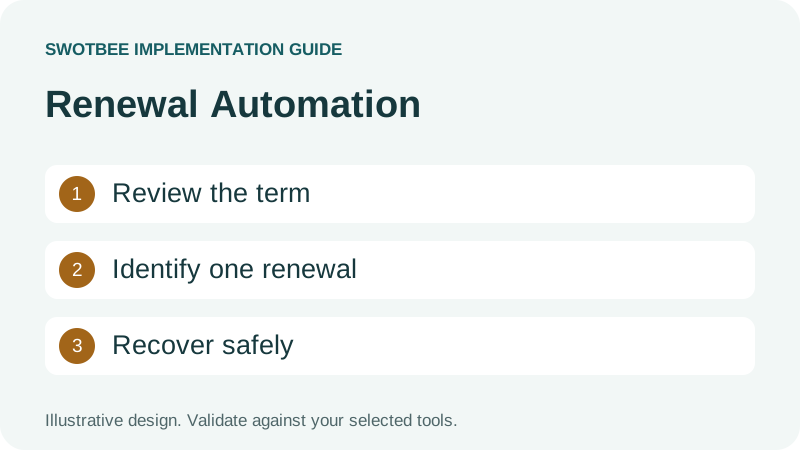
This guide supports our HubSpot renewal pipeline pillar. It owns the automation specification, rather than the wider pipeline design.
HubSpot renewal automation should create or identify one next-term opportunity for the right customer agreement, with reviewed dates, a responsible owner and a safe retry path. Native Contract renewals and deal-based workflows can both serve that job. Choose the record authority first, then test enrollment, associations, line items and duplicate prevention.
Three things you can take away:
- A workflow specification for triggers, required inputs and ownership.
- A duplicate and re-enrollment design that separates each agreement and term.
- A failure and recovery test plan you can use before activation.
Start here: choose two agreements belonging to the same customer. Specify which next-term deal each should create, the intended renewal date and the responsible owner.
Download: HubSpot renewal automation workbook (Excel). Define your trigger, agreement-plus-term identity, ownership and recovery rules using the blank specification, filled example and test plan. No signup is required.
Should you use native Contracts or a deal workflow?
Use the native Contract path where it covers your agreed commercial lifecycle; use a deal workflow for an externally controlled or differently modeled agreement process. A hybrid portfolio needs explicit routing so both paths do not create the same renewal.
HubSpot’s renewal quote documentation describes quotes associated with deals and the next Contract created after acceptance. Renewal quotes require Revenue Hub Professional or Enterprise, a Revenue Hub seat and the relevant Contract permissions. Direct Contract creation or renewal has separate beta conditions; record access alone does not establish quote access.
For setup and import decisions, use the native Contracts guide. This article concentrates on the deal-based automation requirements after the architecture choice.
| Agreement population | Proposed authority | Renewal route to test |
|---|---|---|
| Native commercial Contract | Contract lifecycle | Supported renewal deal and quote path |
| External customer agreement | Reviewed agreement record or designated source deal | Deal workflow using approved term data |
| Mixed portfolio | Explicit route per agreement | One creator per next-term opportunity |
Do not classify all historical agreements as excluded from native Contracts. Import and direct-entry paths exist with their own conditions. Conversely, a native Contract record does not prove that the notice clause or service coverage has been reviewed.
What access do renewal deal workflows require?
Check the required workflow object and actions against the portal’s subscription and permissions. Do not reduce the question to whether the company owns Sales Hub.
HubSpot’s Create record documentation lists several Professional and Enterprise products, including Sales, Service, Data, Smart CRM and Revenue Hub. It documents property copying, ownership and associations. Specific actions or transformations can have additional access requirements.
Prepare an access check containing: deal-based workflow availability, Create record action, required property types, owner assignment, associations, date transformation, schedule support and any external code or app dependency. A visible workflow editor is insufficient if a required action is unavailable to the operator.
Keep the first test small and reversible. Use an agreed test arrangement with customer messaging and invoicing excluded until those paths have their own approval. Where a sandbox is available, verify that its users and configuration match the intended test. A sandbox feature in HubSpot does not guarantee that an external connector supports sandbox connections.
What should your renewal workflow specification contain?
Specify the eligible source, the next term and the evidence required before creation. Closing a deal as Won is only one possible trigger; it is not a substitute for a reviewed agreement date.
Copy this illustrative specification. Its labels are design fields, not an exact list of native property names.
| Specification entry | Example |
|---|---|
| Agreement identity | A-101, separate from the customer’s other agreement A-102 |
| Source authority | Reviewed external SOW linked to source deal 501 |
| Eligible population | External renewal route, active agreement, approved next-term date |
| Creation event | Agreed planning window reached and no next-term deal identified |
| Next-term key | A-101:2027-01-01 |
| Target | Renewal pipeline, planning stage, opportunity for A-101 only |
| Responsible owner | Named account manager with a fallback reviewer |
| Required evidence | Current term end, notice deadline, expected recurring value and source link |
| Failure route | RevOps exception with source ID, reason and next action |
Define whether you create the future opportunity at initial acceptance or nearer its planning window. Both can work if reporting and responsibilities are explicit. Creating it early does not justify advancing it automatically into negotiation six months later.
Use renewal properties for the field model and pipeline stages for stage definitions. Keep those detailed owners rather than repeating their entire configuration here.
Which dates should control the workflow?
Use the reviewed agreement’s dates for service and renewal decisions. A deal’s Close Date records a commercial event and may differ from effective date, term end or notice deadline.
An agreement accepted on November 15 may start on January 1, end on December 31 and require cancellation notice by October 2. A workflow based on November 15 plus 365 days would create a different schedule. It could miss the actionable notice window even if a renewal deal appears.
Document four dates separately: effective date, current term end, next-term start and reviewed notice deadline. Decide which triggers planning, customer outreach and escalation. A notice deadline is a reviewed obligation, not an automatically trustworthy subtraction from an unreviewed PDF.
If a calculation is needed, define calendar-month behavior and test the chosen supported transformation. February 29 and month-end starts deserve explicit cases. Adding 365 days is not a general solution for annual customer agreements.
For alerts and variable notice periods, link to the renewal reminder guide. This workflow should consume a validated deadline and preserve its source, rather than acting as legal clause interpretation.
How do you automate renewals step by step in HubSpot?
Build the renewal workflow from the agreed specification, then test one agreement before enabling the full population. The sales team or customer success team should receive an identified opportunity and a clear next action.
Use HubSpot’s record-creation documentation for the available actions and the re-enrollment guide for repeat behavior. This is a setup sequence to adapt, not a claim that every portal includes the same controls:
- Select the eligible source object and limit enrollment to the agreed external renewal route.
- Require a reviewed contract end date, next-term identity and responsible owner. Use the planning event defined in your specification.
- Check the next-term key and any recorded target. Use the tested lookup or integration route where simple branches cannot provide the required duplicate control.
- Configure Create record with the intended renewal pipeline, initial deal stage, owner, approved properties and associations.
- Preserve the new target identity through a supported route and create the responsible person’s review task or notification.
- Inspect the target’s dates, lines and customer context. Test a repeated event and a missing-input case before wider enrollment.
Keep customer messaging as a separately reviewed step. Creating a planning opportunity does not authorize sending an automatic renewal email, accepting new terms or starting an invoice.
Why is renewal automation in HubSpot not producing the expected deal?
Check enrollment, action access, required data and the existing target before recreating anything. The workflow history should identify which step needs correction.
| Symptom | First check | Safe next action |
|---|---|---|
| Agreement never enrolled | Object, route and date criteria | Correct eligibility and test that source |
| First year works, second does not | Approved new term and supported re-enrollment | Test the next cycle without erasing history |
| Deal exists without expected lines | Create record configuration and line-item method | Repair the intended target, not another deal |
| Two renewal deals appear | Concurrent creators and repeated events | Review the same next-term key and reconcile duplicates |
| Owner receives no task | Owner access and configured task/notification | Assign the exception and verify the next action |
After correcting the failed step, test the same source again with the account’s actual permissions. Confirm whether a target already exists before allowing creation to run.
How do you prevent duplicate renewal deals?
Identify a renewal by agreement and next term, not customer name alone. Then demonstrate that a repeated trigger resolves to the existing opportunity instead of creating another one.
The next-term key A-101:2027-01-01 distinguishes this renewal from A-102:2027-01-01 at the same company. Preserve the target deal ID once it exists. Decide which implementation checks for an existing key and which system owns creation.
| Event | Expected result |
|---|---|
| First eligible trigger for A-101 | One target opportunity linked to A-101 |
| Same trigger repeated | Existing target identified; no second opportunity |
| A-102 enters the same window | Its own target opportunity |
| A-101’s reviewed date changes | Agreed update or replacement policy, with history |
| Two integrations trigger together | One creator succeeds; duplicate attempt is held or reconciled |
A checkbox such as Renewal Created can help routine workflow routing, but it is not proof of an atomic uniqueness guarantee. If two creators can act concurrently, use a supported lookup or integration design that handles that race, then test it. Do not describe an untested property branch as guaranteed duplicate prevention.
Use the infinite-loop troubleshooting guide for the separate problem of renewal deals enrolling into their own creation workflow. A new-business pipeline filter can prevent that loop while still leaving repeated-source duplicates unresolved.
How should re-enrollment work across multiple years?
Treat each completed term as a distinct commercial event. Re-enrollment should support an intentional next cycle, not restart creation whenever a convenient property changes.
HubSpot’s re-enrollment guide says records cannot re-enroll while already enrolled and that trigger eligibility depends on the object and operator. Re-enrollment restarts workflow actions. A relative-date trigger does not necessarily fire merely because the calendar reaches that date.
Choose one repeat model: a fresh term record enters the workflow, or the existing agreement gains an approved next-term identity. In either model, preserve the previous target and completion evidence. Avoid clearing a safety flag simply to make the workflow run again.
For a daily planning-window check, verify a supported schedule-based enrollment design rather than relying on an unchanging date property to re-enroll. According to HubSpot’s schedule enrollment documentation, monthly, weekly and daily recurrence requires Data Hub Professional or Enterprise. Check the account time zone and filters as well as the available schedule controls.
Test year two after year one succeeds. Confirm that the next deal has a new term identity, correct prior-agreement association and updated commercial inputs, while the year-one history remains intact.
What needs copying to the renewal opportunity?
Copy approved next-term inputs and selected associations; do not assume creating a deal clones the customer’s full commercial history. Distinguish a current baseline from the eventual negotiated renewal.
Set a planning amount from an explicitly chosen basis, such as current recurring commitment. Preserve a prior-term snapshot for reporting. A new negotiated amount should not overwrite the source agreement’s historical value.
The Create record guide supports adding product-based line items and configuring associations. That is different from copying every source line with its negotiated discounts, recurrence and custom fields. Validate the chosen line-item solution against the agreement; do not claim the native action has no line-item support.
Use the line-item cloning guide where a copying approach is appropriate, and test that its current behavior fits your quote path. Do not move the original accepted quote onto the renewal deal without checking association behavior: a quote belongs to one deal at a time.
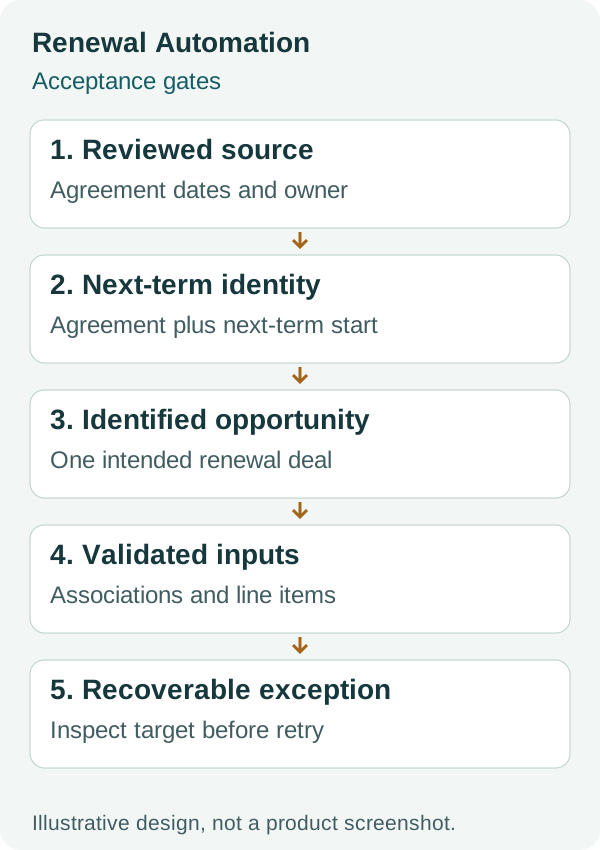
The diagram shows acceptance gates. It does not establish that a particular workflow action provides a database lock or copies a complete agreement.
How should ownership and stage changes work?
Assign work to the person responsible for the agreement and let stage changes represent actual progress. Elapsed time alone is a better reason for a task or risk alert than for claiming negotiation has started.
Route ownership from an agreement-level responsibility where customers have several service lines. A company owner may be a fallback, but should not silently replace the specialist who manages a particular agreement.
Create a review task after target creation and define the fallback when the owner is missing or inactive. The review should verify dates, amount, coverage and contact before customer outreach. Use renewal ownership guidance for the responsibility split.
Separate automation health from customer renewal risk. A failed record association needs an operations exception. A correct deal with a dissatisfied customer needs the commercial renewal process. Combining both as Overdue obscures the next action.
What should you test before enabling renewal automation?
Test successful creation, repeated triggers and recoverable failures with visible expected results. Keep target identity and the original agreement as the evidence for each case.
- Two agreements on one company create separate next-term opportunities.
- A repeated event reuses the intended target rather than creating another.
- Renewal targets do not enroll into new-business creation rules.
- Dates follow the agreement, including month-end and leap-year cases.
- Missing dates, owner or source evidence produce an assigned exception.
- Native and external routes cannot both create the same term opportunity.
- Line items preserve quantity, price, discounts, recurrence and term as required.
- Company, contacts and prior-term associations match the intended agreement.
- A failure after deal creation resumes from that target instead of starting over.
- Year two retains the first term’s evidence and uses a new next-term key.
- A date change while records are waiting follows a documented update policy.
- Operational monitoring identifies unresolved exceptions and their age.
For recovery, record the source agreement, next-term key, created deal ID, failed action and next safe action. Inspect whether creation already succeeded before replaying it. Do not delete a partially created target merely to make a green workflow history.
Reconcile the resulting opportunities with the renewal reporting guide. A workflow’s success count alone does not establish coverage of every active agreement.
Frequently asked questions
Can HubSpot create renewal deals automatically?
Yes, supported workflows and native Contract renewal paths can create renewal opportunities. Verify the required object, actions, subscription and permissions. Configure one creator per agreement and next term, then test duplicates and associations.
Does creating a deal copy all its line items?
Do not assume a complete clone. HubSpot documents adding product-based line items in the Create record action. Copying an existing agreement’s negotiated lines and custom details is a separate requirement that needs a tested solution.
Why does a date-based renewal workflow not run again?
Re-enrollment depends on supported triggers and their changes; reaching a calendar date does not universally re-enroll a record. Check the workflow history and selected triggers. A supported scheduled check may fit a recurring planning-window job better.
Should I use Close Date plus 365 days for renewals?
Not as a general rule. Close Date may differ from the agreement start date, and 365 days does not represent every calendar-year term. Use reviewed term dates and test the supported date calculation against the agreement.
How do I recover when a renewal workflow fails halfway?
Identify the next-term key and inspect whether a target deal already exists. Resume the failed step against that target where supported, rather than replaying creation blindly. Record the reason, owner and acceptance result.
Review your renewal automation
Bring two agreements from one customer, your current workflow and one failed or repeated event to a discovery conversation. Use the specification and checklist above first; they help make the configuration or integration requirement concrete.


