This article is part of our Complete Guide to Building a Renewal Pipeline in HubSpot.
HubSpot lets you create a renewal quote directly on a renewal deal, carry over the line items from the original contract, and apply a renewal uplift, a discount, or a multi-year term before you send it. This guide covers how to build renewal quotes for your customers, how to structure a price increase at renewal, and how to automate the quote so it is ready when the renewal date approaches. (This is about quoting your own customers, not about HubSpot’s own subscription cost.)
A renewal quote is where revenue is won or lost. Get the renewal pricing, contract term, and presentation right and renewals close quietly; get them wrong and a routine renewal turns into a negotiation you did not plan for. The same quote also has to reflect your pricing model and the total cost of ownership the customer signed up for, so the deal pipeline, the quote, and billing never drift apart.
How to Create a Renewal Quote in HubSpot
You build a renewal quote on the renewal deal in your renewal pipeline, so the quote, the deal, and the contract term all stay linked.
- Open the renewal deal in your dedicated renewal pipeline.
- Create a quote from the deal and pull in the existing line items so the new contract mirrors the current term. Carrying line items over (rather than rebuilding them) is the same discipline used when you clone a deal with its line items.
- Set the new contract term and renewal date so billing and the renewal deal agree.
- Apply the renewal uplift or discount at the line-item level (covered below).
- Send for e-signature and, on acceptance, move the deal to Renewal Confirmed.
Keeping the quote on the deal means your renewal amount, line items, and term length are always consistent with the renewal pipeline template.
Applying a Price Increase (Renewal Uplift)
A renewal uplift is a planned price increase applied at renewal. The most common reasons for a price increase at renewal are inflation indexing, expanded usage or seats, and bringing a legacy discount back toward list price.
To apply it cleanly in HubSpot:
- Adjust at the line-item level, not as a vague lump sum, so the customer sees exactly what changed.
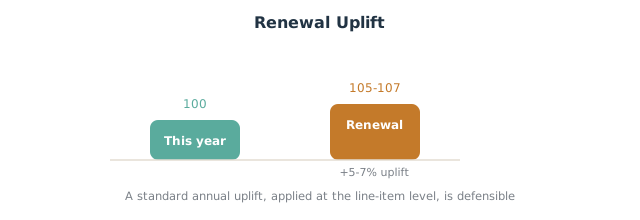
- Use a standard uplift percentage (for example, a 5 to 7 percent annual increase) so renewals are predictable and defensible.
- Show the value, then the price. Lead the renewal conversation with outcomes delivered this year, then present the new price. A justified uplift lands; an unexplained one triggers a negotiation.
If the customer pushes back, you have room to negotiate: trade a smaller increase for a longer contract length, or hold the price in exchange for a multi-year commitment. Framing the renewal around ROI, rather than line-by-line cost, keeps the conversation on value and makes the new price easier to accept.
Discounts, Downgrades, and Multi-Year Terms
Not every renewal goes up. HubSpot quotes handle the full range:
- Discounts. Apply a percentage or fixed discount on line items for at-risk or strategic accounts. Record the discount reason so renewal pricing stays governed and not ad hoc.
- Downgrades. When a customer reduces seats or tier, reflect the downgrade on the renewal quote and adjust the renewal amount so your forecast stays accurate.
- Multi-year terms. Multi-year pricing (a discount in exchange for a 24 or 36 month term) locks in revenue and reduces churn risk. Set the contract term on the deal so the next renewal date is calculated correctly.
Billing, Seats, and Term Structure
Renewal quotes also have to reflect how you bill. Decide these on the quote so the new contract and your billing system agree:
- Billing frequency. Whether the customer will pay monthly or annually changes the billing cycle and the total cost the customer sees. State the billing period clearly on the quote.
- Seat-based pricing. If your pricing model is seat-based, confirm the seat count at renewal and reflect any tier upgrades or reductions so the renewal amount is right.
- Term length. A longer contract length usually earns a better rate; a 120-day notice period before the end of the term is common for enterprise deals, so build that into the renewal date.
- Commerce Hub for billing. If you collect payment in HubSpot, Commerce Hub can tie the accepted quote to the actual invoice, so the deal, quote, and billing all match for year 2 and beyond.
Getting the term structure right is what makes the next renewal predictable: the existing contract defines when you start outreach, what the customer pays, and whether they want to renew at the same terms or change them.
Auto-Renewal Terms and Notice Periods
If your contracts auto-renew, the quote and the deal should record the auto-renewal terms: the renewal date, the notice period, and what happens at the end of the term. Make the auto-renewal terms explicit on the renewal deal so a renewal is never disputed later, and so a customer who does not want to renew can give notice within the agreed window. Clear end dates also let your automation know when to start outreach.
Automating Renewal Quotes
You do not have to build every quote by hand. With a workflow you can:
- Pre-create a draft renewal quote when a renewal deal enters the window, with last year’s line items and a default uplift already applied.
- Notify the deal owner to review and send, tying into your renewal reminders.
- Attach the quote to the renewal email so the renewal email sequence delivers it at the right moment.
Automation removes the blank-page problem: the rep edits a near-complete quote instead of starting from scratch.
Best Practices for Renewal Price Increases
- Be consistent. A standard annual uplift applied to every renewal is easier to defend than case-by-case pricing.
- Quantify ROI. Tie the price to value delivered so the increase reads as fair.
- Give notice early. Surface the new price 90 days out, not at the last minute.
- Govern discounts. Require a reason and approval for anything beyond a set threshold so margin does not erode quietly.
- Keep the quote and deal in sync. The renewal amount on the deal should always match the accepted quote, or your forecasting breaks.
Frequently Asked Questions
How do I create a renewal quote in HubSpot? Open the renewal deal, create a quote, pull in the existing line items, set the new contract term, apply any uplift or discount, and send it for signature.
What is a renewal uplift? A planned price increase applied at renewal, usually a fixed percentage, to account for inflation, expanded usage, or moving off a legacy discount.
Can I automate renewal quotes in HubSpot? Yes. A workflow can pre-create a draft quote with last year’s line items and a default uplift when the renewal enters its window, leaving the rep to review and send.
How do I handle a downgrade at renewal? Reflect the reduced seats or tier on the renewal quote and update the renewal amount so your forecast and reporting stay accurate.
How should I present a price increase to a customer? Lead with the value and outcomes delivered, then present the new price at the line-item level so the change is transparent and defensible.
Running an MSP? Agreement renewals with seat true-ups, uplifts, and co-term visibility are their own discipline. See how we automate agreement renewals for MSPs in HubSpot.
Renewal quoting is where margin quietly leaks: inconsistent uplifts, ungoverned discounts, and quotes that drift from the deal. SWOTBee builds renewal quoting and pricing automation for mid-market companies across Energy, Manufacturing, and SaaS.
Get your 1-page renewal leakage estimate →
No call needed. Prefer to talk it through first? Book a free 30-minute discovery call →