This article is part of our Complete Guide to Building a Renewal Pipeline in HubSpot.
This is a ready-to-use HubSpot renewal pipeline template you can copy directly into your HubSpot CRM. It gives you the deal stages, the custom properties, a deal naming convention, and the automation checklist for a separate renewal pipeline, so you do not have to design one from scratch. Copy each table below into your HubSpot portal and you have a working renewal pipeline setup in an afternoon.
A dedicated renewal pipeline keeps renewals out of your sales pipeline so new business deals and contract renewals never get mixed up. That separation is what makes tracking renewals, forecasting churn, and protecting recurring revenue reliable. It is also the simplest way to handle renewals: rather than squeezing renewals in the same pipeline as new business, you create a renewal pipeline that is purpose-built for renewals management. For the full reasoning, see why renewals belong in their own pipeline; this page is the template itself.
This deal pipeline setup is aimed at a B2B SaaS business with annual contracts, but it works for any recurring-revenue model. Once installed, renewal deals are created automatically from your closed won deals, so every successful renewal flows through one consistent process and lost deals are tracked just as clearly.
Renewal Pipeline Stages (Copy This)
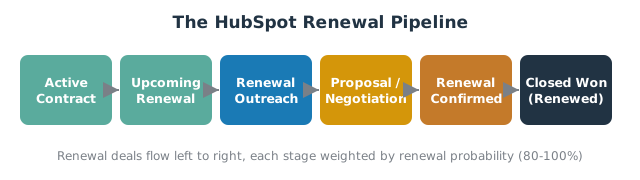
Create a new pipeline in HubSpot called “Renewals” and add these deal stages. This is a proven B2B SaaS structure for annual contracts; for alternative models, see the renewal pipeline stages guide.
| # | Deal Stage | What it means | Deal probability |
|---|---|---|---|
| 1 | Active Contract | Renewal deal created, renewal date in the future | 90% |
| 2 | Upcoming Renewal | Inside the renewal window (90 days out) | 90% |
| 3 | Renewal Outreach | CSM has started the conversation | 90% |
| 4 | Proposal / Negotiation | Terms and renewal amount under discussion | 75% |
| 5 | Renewal Confirmed | Verbal or signed agreement | 95% |
| 6 | Closed Won (Renewed) | Renewal closed won | 100% |
| 7 | Closed Lost (Churned) | Renewal closed lost | 0% |
Renewal Deal Properties (Copy This)
Add these custom properties to your renewal deals. For setup detail and field types, see the 15 custom properties guide.
| Property | Type | Purpose |
|---|---|---|
| Deal Type | Dropdown (New Business / Renewal / Expansion) | Separates renewals from new business deals |
| Renewal Date | Date picker | Drives reminders and forecasting |
| Contract Start Date | Date picker | Marks the contract start |
| Contract End Date | Date picker | The end date the renewal protects |
| Contract Term | Number (months) | 12, 24, 36 |
| Renewal Amount | Currency | The renewal value (ARR / MRR base) |
| Renewal Year | Number | Increment per renewal cycle |
| Account Health Score | Dropdown / number | Feeds churn risk and renewal status |
| Deal Owner | HubSpot user | The CSM or account manager who will manage the renewal |
Deal Naming Convention (Copy This)
Consistent deal names keep the deal record readable across the sales team:
[Company Name] - Renewal [Year] - [Renewal Amount]
Example: Acme Ltd - Renewal 2027 - £48,000
Automation Checklist (Copy This)
These are the workflows that make the template run itself. Each links to the full build:
- Auto-create the renewal deal when a new business deal is closed won, so HubSpot automatically creates a renewal deal in the renewal pipeline. See renewal deal creation.
- Set the renewal date to close date plus contract term when the deal is created.
- Create a task and notification for the deal owner when a renewal enters the window. See renewal reminders and alerts.
- Enroll the contact in a renewal email sequence at 90 days. See renewal email sequences.
- Create next year’s deal when a renewal is closed won, without triggering an infinite loop.
- Report on renewal rate and churn with a dashboard. See NRR, GRR and renewal rate reporting.
How to Install This Template in Your HubSpot Portal
Follow these steps to install the template in your HubSpot portal and automate renewal tracking from day one:
- Create a new pipeline. In a new HubSpot setup, go to Settings > Objects > Deals > Pipelines > Create pipeline, named “Renewals,” and add the deal stages above. This is your dedicated HubSpot deal pipeline for renewals.
- Create the properties. Settings > Properties > Deal properties. Add each property and create a property group called “Renewal” to keep them together.
- Build the workflows from the automation checklist (Sales Hub Professional or Enterprise required).
- Move existing renewals. Bulk-edit open renewal deals into the new pipeline and set Deal Type to “Renewal.”
- Test with one deal before going live, so you confirm a renewal deal is created and the right tasks fire.
Renewal Pipeline Template Best Practices
- Keep renewals and expansions structured. If you sell upsells, decide whether renewals and expansions share one pipeline or separate ones. See structuring renewals, expansions and downgrades.
- One pipeline, one purpose. Do not put new business deals and renewal deals in the same pipeline; keep one for new business and one for renewals, because mixing them breaks forecasting and renewal rate metrics. Using a separate pipeline to automate renewal motions is the single biggest win in this template.
- Make the renewal date mandatory. A renewal deal without a renewal date is invisible to automation.
- Assign a clear deal owner. Every renewal needs one person accountable for the outcome.
Frequently Asked Questions
How do I set up a renewal pipeline in HubSpot? Create a separate “Renewals” deal pipeline, add the deal stages and custom properties from the template above, then build the automation checklist to create renewal deals and reminders automatically.
Should renewals be in the same pipeline as new business deals? No. A dedicated renewal pipeline keeps forecasting clean and lets you measure renewal rate, NRR, and churn separately from new business.
What stages should a HubSpot renewal pipeline include? A simple, proven set: Active Contract, Upcoming Renewal, Renewal Outreach, Proposal, Renewal Confirmed, then Closed Won or Closed Lost.
Who should own renewal deals in HubSpot? Usually the CSM or account manager responsible for the account, so the deal owner is the person who will manage the renewal end to end.
How far in advance should renewal deals be created? Create the renewal deal as soon as the original deal is closed won, and start outreach 90 days before the renewal date.
A template gets you 80% of the way; the last 20% is the automation that makes it run without babysitting. SWOTBee installs full renewal pipelines, properties, and workflows for mid-market companies across Energy, Manufacturing, and SaaS.
Get your 1-page renewal leakage estimate →
No call needed. Prefer to talk it through first? Book a free 30-minute discovery call →