This article is part of our complete guide to HubSpot and NetSuite integration.
A HubSpot NetSuite sync keeps records consistent between HubSpot (your CRM) and NetSuite (your ERP), so contacts, companies, deals, orders, and invoices stay aligned across both systems without manual re-entry. The sync can run one way or two way, in real time or in batches, and the data that syncs is what determines how much manual work it removes. This guide explains what data syncs between HubSpot and NetSuite, the methods, the common sync issues, and how to keep the sync reliable.
For the full strategy and setup, start with our HubSpot NetSuite integration pillar.
Why Sync HubSpot and NetSuite?
The reason to integrate HubSpot and NetSuite is simple: the same customer, deal, and order data lives in both systems, and keeping it aligned by hand is slow and error-prone. A reliable sync means a sales rep sees invoice and payment status from NetSuite inside HubSpot, finance gets a clean sales order the moment a deal closes, and nobody re-keys a record. The benefits are less manual data entry, faster deal-to-cash, and one consistent view of the customer.
What Data Can Be Synced Between HubSpot and NetSuite?
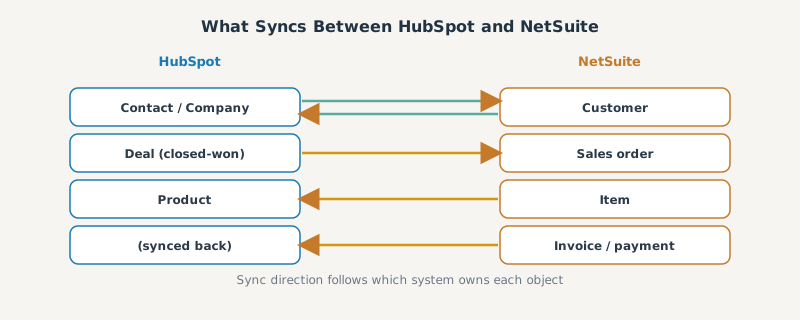
The core records that sync between HubSpot and NetSuite:
| HubSpot record | NetSuite record | Typical direction |
|---|---|---|
| Contact | Contact / customer | Two-way |
| Company | Customer (entity) | Two-way |
| Deal | Opportunity / sales order | HubSpot to NetSuite |
| Product | Item | NetSuite to HubSpot |
| Invoice / payment | Invoice | NetSuite to HubSpot |
A closed-won HubSpot deal can create a sales order in NetSuite, and invoice and payment status can flow back into HubSpot so sales has full context. A common use case is creating NetSuite sales orders from a HubSpot deal record while pushing customer data and invoice records from NetSuite to HubSpot, so the data flow runs both ways. Which records you sync, and in which direction, is a setup decision driven by which system owns each object: a HubSpot contact and HubSpot company map to NetSuite accounts, and the record in NetSuite stays aligned with HubSpot’s CRM.
One-Way vs Two-Way Sync
The HubSpot NetSuite sync can run in two modes:
- One-way sync pushes data in a single direction (for example, HubSpot deals into NetSuite). It is simpler and avoids conflicts.
- Two-way sync keeps records aligned in both directions, which is powerful but requires a clear system of record per field to avoid data drift.
The rule that keeps a two-way sync clean: assign one owning system per object and let sync direction follow ownership, not convenience.
Methods to Sync HubSpot and NetSuite
There are three ways to run the sync, covered in depth in our connector comparison:
- Native connector. The HubSpot marketplace NetSuite app handles standard objects and is fastest to start.
- iPaaS (Celigo, Workato). Middleware for more control, conditional logic, and reliability at scale, like the Workato approach.
- Custom integration. A build for complex records and high volume, covered in our custom integration guide.
Most “real-time” needs are met by an iPaaS, since the native connector polls on a schedule rather than syncing instantly.
Common HubSpot NetSuite Sync Issues
Sync problems are predictable, and most trace back to data mapping:
- The “company should be present” block. A deal will not sync until its associated company has synced first.
- Duplicate records. Without match keys and deduplication, the sync creates duplicate customers.
- Date shifts. HubSpot stores dates at midnight UTC, so they can roll back a day in NetSuite.
- Sales-order failures. Complex orders can hit NetSuite API timeouts.
We catalog these and their fixes in our HubSpot NetSuite data mapping guide.
How to Keep the Sync Reliable
To keep a HubSpot NetSuite sync reliable:
- Set match keys and deduplication rules so records update instead of duplicating.
- Sequence dependent records (companies before deals, products before orders).
- Use a hybrid cadence: real-time for contacts and deals, batch for products and invoices, to respect NetSuite API limits.
- Monitor the sync with a dashboard and alerts so failures surface early.
- Test in a sandbox before changing the live sync.
Done this way, the sync runs quietly in the background and your two systems simply agree. For the step-by-step build, see our HubSpot to NetSuite setup guide.
Frequently Asked Questions
What data syncs between HubSpot and NetSuite? Contacts, companies, deals (as opportunities or sales orders), products, and invoices or payments. A closed deal can create a NetSuite sales order, and invoice status can flow back into HubSpot.
Is the HubSpot NetSuite sync one-way or two-way? It can be either. One-way is simpler and avoids conflicts; two-way keeps records aligned in both directions but needs one system of record per field to prevent data drift.
Is the HubSpot NetSuite sync real time? The native connector polls on a schedule, so it is near-real-time at best. For true real-time sync, an iPaaS such as Celigo or Workato is the usual choice.
Why is my HubSpot NetSuite sync failing? Most failures are data-mapping issues: the “company should be present” block, duplicate records, midnight-UTC date shifts, or API timeouts on complex sales orders.
How do I keep the sync reliable? Set match keys and deduplication, sequence dependent records, use a hybrid real-time and batch cadence, monitor with alerts, and test changes in a sandbox first.
Fighting a live sync problem right now? We catalogued the six most-reported HubSpot NetSuite sync failures and their fixes, including which ones a config change can solve and which need an integration layer.
SWOTBee builds and maintains reliable HubSpot NetSuite syncs, the mappings, match keys, and monitoring that keep your CRM and ERP in agreement. No duplicates, no silent failures.
Get your 1-page renewal leakage estimate →
No call needed. Prefer to talk it through first? Book a free 30-minute discovery call →