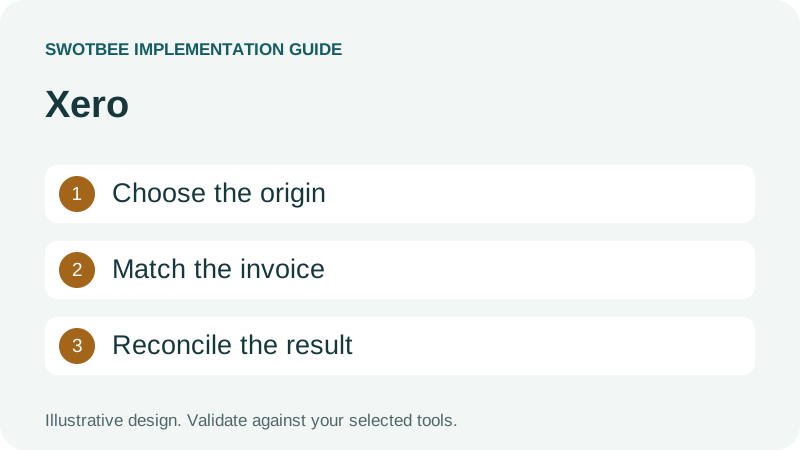
This guide supports our HubSpot quote-to-cash pillar. It focuses on the customer invoice and reconciliation handoff to Xero.
HubSpot Xero integration can synchronize contacts, products, invoices and invoice payments through Xero by HubSpot Data Sync. Current documentation supports configurable directions, including bidirectional invoices. The practical setup decision is which system creates and edits each invoice, how the correct customer is identified in HubSpot CRM and how finance reconciles the result.
Three things you can take away:
- A connection and ownership worksheet for selecting the required route.
- A filled invoice reconciliation example with identifiers, amounts and exception rules.
- A sync acceptance checklist covering tax, timing, history and recovery.
Start here: choose one invoice for a customer with two agreements. Identify its creating system, legal payer, agreement reference, expected CRM destination and next safe correction if it does not sync.
Download: HubSpot Xero reconciliation workbook (Excel). Calculate an invoice balance, compare it with Xero, document creation and editing ownership, and record acceptance tests. Blank templates and a filled example are included. No signup is required.
Which HubSpot Xero connection should you use?
Choose by the required financial handoff and the actual publisher of the app. The name Xero integration alone does not identify the product, direction or supported fields.
HubSpot’s Xero Data Sync guide describes the HubSpot-built connection. Its documentation currently supports contacts, products, invoices and payments. Custom field mappings require Data Hub Starter or higher; installation requires the appropriate administrative or marketplace permissions.
The HubSpot marketplace listing lists Quotes as unsynced and still contains older Operations Hub terminology. Use the current setup guide for the Data Hub mapping requirement and verify the options actually available in your portal. Invoice sync is not a quote-object sync.
An existing portal may contain another app, middleware flow or historical integration. Inventory its publisher, connected Xero organisation, enabled objects, directions and billing instructions before adding a second one. Do not infer the current HubSpot-built app’s limitations from an older review of a different connector.
| Required job | Route to evaluate | Evidence to request |
|---|---|---|
| See Xero-issued customer invoices in CRM | Inbound invoice sync | Customer identity, invoice status and CRM association |
| Issue HubSpot invoices and reconcile in Xero | Outbound or bidirectional invoice sync | Origin-aware editing, tax and payment behavior |
| Turn accepted terms into a complex finance instruction | Verified app, middleware or API route | Supported fields, schedule and safe retries |
| Show project or agreement-level financial context | Exact association and reporting design | Invoice linked to its intended agreement, not merely a company |
These are evaluation paths, not claims that every connector satisfies each job. Keep accounting requirements with finance. A connected contact does not demonstrate a quote-to-invoice workflow, and a visible invoice does not demonstrate correct payment allocation.
What does Xero Data Sync synchronize?
The documented connection supports several commercial and financial objects, but their rules differ. Configure and test each object instead of treating bidirectional sync as permission to edit anything anywhere.
The official Xero setup guide documents contact/product directions, invoice directions and payments applied to invoices. It instructs setup in the order contacts, products, then invoices because invoice dependencies must exist in Xero.
That sequence suggests a useful diagnostic. If an invoice fails, first inspect whether its customer and required product data exist in the target. Repeating the invoice sync will not resolve a mismatched customer identity.
Treat the invoice as its own record. A deal describes an opportunity; a legal agreement defines reviewed terms; a commercial Contract represents a commitment; an invoice requests payment. One record’s status is not interchangeable with the others.
Use the contract architecture guide when the agreement identity is unclear. Keep this article focused on Xero invoice setup and reconciliation rather than repeating the full architecture comparison.
How do you connect HubSpot and Xero Data Sync?
Install the identified native app, confirm the Xero account and configure contact and product sync before invoices. Review the selected direction and matching policy before allowing records to move between the CRM and accounting software.
Follow HubSpot’s Xero connection guide:
- Find Xero by HubSpot (Data Sync) in the HubSpot Marketplace and install it with the required permissions.
- Authorize the intended Xero connection, then open Xero under Settings > Integrations > Connected Apps.
- Configure contact sync in CRM syncs: direction, conflict authority, field mappings and record filters.
- Configure product sync and verify the items required by the first invoice.
- Configure invoices using the approved direction and eligibility filters, then review and save the sync.
Keep the initial sample narrow enough to inspect. Confirm its legal payer and service items before testing the invoice. For Xero to HubSpot visibility, check the inbound invoice and status. For outbound invoicing, use an approved invoice created in HubSpot and follow its editing restrictions.
The connection is not a demonstration that every quote, subscription or project association syncs. Check each required handoff separately before expanding the selected population.
When do you need a custom integration rather than native sync?
Evaluate a custom integration when a specific required operation fails the native fit check. Keep the supported native connection if it meets the requirement; another route introduces its own mapping, support and recovery responsibilities.
For example, a service business may need an approved agreement reference attached to the exact invoice context, or a reviewed milestone schedule passed to its accounting process. First inspect current mappings and configuration. Then document the unresolved field, event or association rather than treating the whole HubSpot Xero integration as inadequate.
| Route | Choose when | Verify before selection |
|---|---|---|
| HubSpot-built Data Sync | Documented objects and rules satisfy the handoff | Directions, filters, mapping access and origin rules |
| Specialist app or middleware | A documented additional action meets a real gap | Publisher, exact operations, error handling and plan limits |
| Custom integration | Requirements need supported API operations and maintained logic | API permissions, identities, deployment owner and recovery |
Ask for a demonstration using INV-204 and both customer agreements. The same invoice must reconcile after a normal update and after a controlled failure. A custom integration should not silently create a second invoice because the first response was delayed.
How do Invoice Stack and Zapier compare with the native app?
Compare the exact invoicing job, not just whether a product says it can integrate Xero. Invoice creation from a HubSpot deal, synchronization of an existing invoice and a workflow-triggered update are different requirements.
The Invoice Stack listing in the Xero App Store describes creating invoices from HubSpot deal information while retaining Xero as the source of truth after creation. It lists tracking categories, repeating invoices and read-only credit notes. Treat those as provider-described capabilities to test, not proof that the native app has the same coverage.
Zapier’s HubSpot and Xero listing offers another automation route. Select the actual supported trigger and action, then verify the fields, credentials and task usage. A Zap is not automatically a replacement for invoice/payment reconciliation or bidirectional sync.
For INV-204, give every route the same requirement: correct legal payer, $1,200 subtotal, $700 allocated payment and $500 outstanding balance. Add the exact reference and tracking requirement if finance needs them. Record what each route demonstrates and what remains excluded. Do not run competing invoice-creation flows while testing alternatives.
How should you assess HubSpot Xero integration reviews and costs?
Use reviews to identify questions to test, then compare the current app’s support and commercial terms with your requirements. An older review may refer to a different connector, geography or version.
Before purchasing, separate HubSpot subscription and mapping access, Xero account access, connector licensing, middleware usage and implementation support. Confirm whether a trial permits your required objects and whether ongoing maintenance is included. Avoid choosing from an advertised starting price if your actual workflow needs another plan or a custom route.
Recent reviews can help uncover issues such as customer matching, historical coverage or payment visibility. Reproduce the relevant case using a controlled sample. A review that says synchronization is seamless does not establish that your customer has the correct invoice association or that credit notes and refunds are supported in the required direction.
Use the workbook to keep this comparison auditable: requirement, selected route, expected result, observed result, owner and unresolved gap. That is more useful to finance than a feature list with no tested invoice evidence.
Who should create and edit the invoice?
Give every invoice a creation authority and a correction authority. Two-way synchronization does not remove origin-specific editing restrictions.
Record who may correct amounts, payment allocations and accounting codes. CRM visibility lets sellers answer customer questions; it does not authorize them to change finance’s records.
HubSpot’s documentation requires HubSpot-origin invoices to be edited in HubSpot; external changes can cause sync failure. Its outbound filters exclude drafts and restrict eligible origin and timing. Confirm the exact rules in the current configuration before expecting an old or externally originated invoice to flow back to Xero.
Use this policy template:
| Decision | Example policy | Acceptance evidence |
|---|---|---|
| Invoice creation | Xero issues invoices for existing service agreements | No duplicate invoice generated from Closed Won |
| CRM visibility | HubSpot receives invoice information | Intended invoice can be found beside the customer context |
| Commercial changes | Reviewed agreement change authorizes the next finance action | Changed quote alone does not rewrite an issued invoice |
| Financial corrections | Finance follows invoice-origin rules | Corrected amount and status reconcile after sync |
| Payments | Chosen collection authority records the payment | One collection, correct invoice allocation |
If moving invoice creation to HubSpot, reverse the relevant ownership entries and test them explicitly. Do not leave an old recurring invoicing flow active for the same agreement while piloting a new one.
Record who can approve credits, refunds and write-offs. These actions can affect the ledger and must not be inferred from a renewal deal’s Closed Lost stage. Ask finance how each should appear in CRM, then verify the chosen connector’s supported route.
How do you reconcile an invoice to the right agreement?
Use stable invoice and customer identifiers plus an agreement reference. Matching by company name or total alone fails when a customer has more than one service or invoice.
Here is a filled example you can adapt. It is an illustrative specification, not a tested native field mapping or a SwotBee delivery result. Amounts are USD before tax.
| Reconciliation entry | Expected value |
|---|---|
| Agreement | A-101, monthly support |
| Other agreement to exclude | A-102, separate implementation project |
| Origin | Xero |
| Xero customer identity | C-42, verified legal payer |
| Source invoice identity | INV-204, preserve the actual Xero InvoiceID |
| Invoice content | $1,000 support plus $200 approved service addition |
| Expected subtotal | $1,200 |
| Payment example | $700 allocated to this invoice |
| Expected outstanding balance | $500, before other adjustments |
| CRM evidence | Intended invoice and agreement context; latest checked status |
If another invoice for A-102 also totals $1,200, the amount is not a matching key. If two customer entities use one billing contact, email alone may not establish the correct legal payer. Put ambiguous matches into review rather than choosing the most recent deal.
Xero’s invoice API reference documents invoice identifiers, statuses and fields such as Reference. That API surface does not prove the native HubSpot connector maps every field or association. Check the connector’s mappings before selecting a custom route.
For a project-level association requirement, ask the demonstrator to show INV-204 beside A-101 and prove that A-102 remains unaffected. A company-level invoice list is useful visibility but does not satisfy that narrower acceptance test.
How do Xero and HubSpot handle tax, currency and product coding?
Check the actual tax method and accounting coding before enabling outbound invoices. A matching gross total can hide a wrong tax treatment or revenue account.
The HubSpot Xero documentation currently lists six supported currencies and excludes HubSpot automated sales tax from outbound sync. It also describes imported Xero tax rates and separate re-import behavior after changes. Verify your required currency and tax arrangement against those current limits.
Build a finance test with an approved tax-exclusive example, a tax-inclusive example where relevant and a non-taxable line. Record expected subtotal, tax and total independently. Compare the actual target invoice with finance’s expected result, including rounding.
For product coding, specify the service SKU, Xero item and intended accounting treatment. A recurring support SKU and onboarding SKU might need different revenue accounts. Do not assume a default account meets both requirements.
Xero’s item mapping documentation explains how item codes can support standardized transaction lines. This is useful for designing the requirement; verify whether the selected connector exposes the mapping you need.
If a required dynamic account, tracking category or purchase-order reference is unavailable in the chosen route, record that exact gap. Avoid jumping from one missing mapping to a claim that the entire integration is unusable.
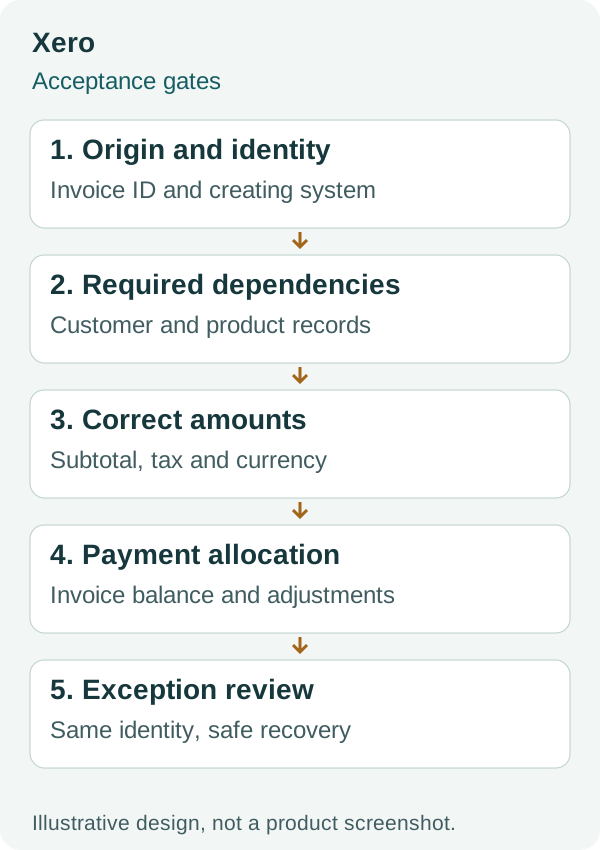
This diagram is a conceptual review sequence. It does not represent a guaranteed native deal association or a tested accounting configuration.
Is Xero to HubSpot sync real-time, and what happens to history?
Treat invoice visibility as a timed process with a defined historical boundary. A short delay, an excluded old record and an actual failure need different responses.
The official guide describes Xero changes being detected every 30 minutes and HubSpot changes within a few minutes. It also limits payment history to payments created after connection. Set an observation window consistent with the documented connector rather than promising real-time synchronization.
Before the initial sync, count the eligible source records and define a cutover date. List historical invoices you need for customer visibility, payments excluded by the boundary and agreements still billed by an existing process. Do not turn historical document backfill into a new invoice creation instruction.
Use a historical sample containing one open invoice, one paid invoice and one corrected invoice. Agree the expected records and statuses before syncing. If historical payment coverage is incomplete, label that in reporting instead of implying the CRM balance represents the entire ledger.
A scheduled invoice plan belongs to the billing authority. Seeing past invoices in HubSpot does not prove that future invoices will be generated. Use the Stripe connection guide if the wider design also includes existing Stripe subscriptions or payment processing.
What should you do when an invoice does not sync?
Identify whether the record is ineligible, delayed or failing, then correct the cause at its authority. Recreating the invoice as a first response risks a second financial obligation.
Inspect the sync status and capture the source invoice ID, target ID if present, origin, customer, last source change, eligibility and error. Check dependencies and origin-aware editing before replaying the process.
Use this recovery sequence:
- Confirm the source invoice exists and that its status is eligible.
- Check the intended Xero organisation and matching customer/products.
- Look for an existing target using the stable source identity.
- Correct the actual field or origin issue with finance approval.
- Use a supported retry or on-demand sync and observe the result.
- Reconcile amounts, status and associations before closing the exception.
Fees and adjustments need their own check. The HubSpot guide identifies a credit-card fee sync limitation. Compare invoice totals with settlement and fee entries separately; a paid invoice does not mean the bank deposit should equal its face value.
For an API implementation, Xero’s response documentation explains record-level validation errors. A successful HTTP request is not enough if an individual invoice was rejected. Retain the error with its invoice identity and a named resolver.
What should pass before you enable the invoice handoff?
Enable the agreed route when finance and operations can verify the normal result and repair an exception without duplicate invoicing. Copy this checklist into your pilot.
- The exact app, publisher and connected Xero organisation are recorded.
- Each object has an approved direction and conflict policy.
- Custom mapping access is verified where required.
- Customer and product dependencies are established before invoice tests.
- Invoice creation and editing authority follow the selected origin rules.
- INV-204 reconciles to $1,200 subtotal and the intended agreement.
- The $700 payment example leaves the expected $500 balance.
- Two agreements and two similar-value invoices remain distinct.
- Required tax, currency, item/account and reference behavior pass.
- Drafts, older records and payment-history exclusions are understood.
- A failed sync is corrected and retried against the same invoice identity.
- Credits, fees and refunds have approved handling or explicit exclusions.
- Another system cannot create or collect the same invoice accidentally.
Keep a finance sign-off row for each test. Where the chosen connection does not meet a requirement, record the next configuration or integration task instead of promising complete synchronization.
Frequently asked questions
Is HubSpot Xero integration only one way?
Not as a blanket current claim. HubSpot’s Data Sync documentation supports configurable directions, including bidirectional invoices. Confirm the app, object, filters and origin-specific editing rules; older connector advice may describe a different product or version.
Can I turn a HubSpot quote into a Xero invoice?
Specify the quote-to-invoice creation path separately from invoice synchronization. Confirm which system issues the invoice, which accepted terms it uses and whether the resulting invoice is eligible for the chosen sync. Do not infer creation from contact sync.
Can Xero invoices be linked to specific HubSpot deals?
Treat the deal or agreement association as an explicit acceptance requirement. Verify the actual connector behavior with stable invoice and agreement identities. Company-level visibility alone does not establish correct project-level matching.
Do custom field mappings require a paid HubSpot plan?
The cited Xero Data Sync guide requires Data Hub Starter or higher for custom field mappings. Check the exact fields and supported mapping direction before selecting the configuration.
Why do invoice totals and bank deposits differ?
Payments, processing fees, refunds and other adjustments can produce a different settlement amount. Reconcile the invoice, payment allocation and settlement separately. Verify the chosen connector’s scope instead of assuming every fee or adjustment syncs.
Discuss your Xero handoff
Bring one invoice, its agreement reference and your finance ownership policy to a discovery conversation. The worksheet and checklist above help define the requirement before deciding whether configuration or additional integration is needed.


