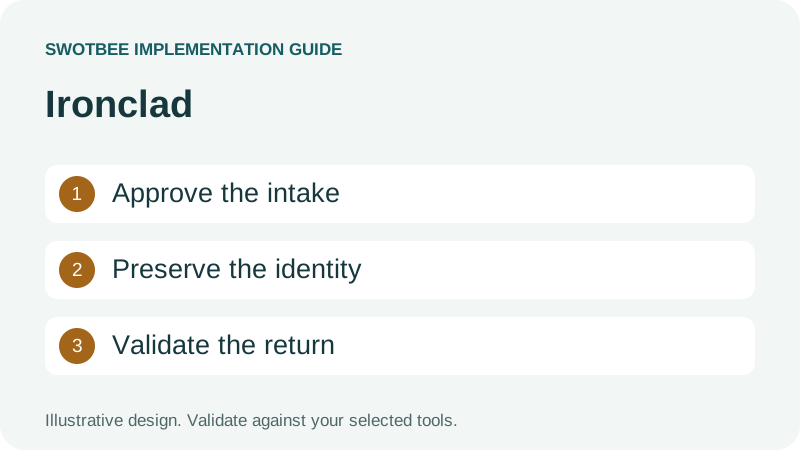
This guide supports our HubSpot contract document integration pillar. It focuses on an Ironclad customer-agreement workflow and its CRM return.
Ironclad HubSpot integration can use the third-party MATIC Ironclad Connector for HubSpot or a custom middleware/API route. Ironclad describes MATIC workflow launch and agreement visibility in CRM; its separate Tray.io example is explicitly custom. Compare the actual routes, then verify account access, customer-agreement inputs, CRM return and support ownership.
Three things you can take away:
- A responsibility and access map for deciding what the integration must do.
- A filled workflow-to-CRM specification for returning the right agreement data.
- An acceptance and recovery checklist covering repeated events, permissions and completed documents.
Start here: choose a customer agreement that requires legal review. Write down its originating deal, approved template, reviewers and the exact fields HubSpot needs after completion.
Download: Ironclad HubSpot integration workbook (Excel). Map intake and CRM return fields, document access requirements, and record acceptance and recovery tests. Blank templates and a filled example are included. No signup is required.
Is there a native Ironclad HubSpot connector?
Ironclad lists a third-party MATIC connector for HubSpot. That is a packaged route to evaluate, distinct from a first-party native app and from the custom Tray.io integration example. Confirm the actual publisher and scope before accepting installation or synchronization claims.
According to Ironclad’s HubSpot integration page, the MATIC Ironclad connector can launch workflows, pass HubSpot information and show in-progress workflows and signed agreements in CRM. The page describes configuration without code and explicitly identifies third-party integrations. It does not establish universal licensing, arbitrary legal-field writeback or automatic commercial Contract creation.
Ironclad’s HubSpot integration guide demonstrates launching a workflow from CRM, returning signing/completion status and sending the executed document back. It uses Tray.io as representative middleware and allows other API-capable approaches. It explicitly qualifies the example as custom.
Ask who maintains the connection, which operations are included and who handles recovery. A demonstration alone does not answer those support and entitlement questions.
| Proposed route | Evidence needed before selection |
|---|---|
| MATIC Ironclad connector | Third-party publisher, current supported actions, account conditions and support scope |
| Middleware connector | Current authentication, exposed operations, limits and workflow ownership |
| Custom API implementation | Supported endpoints/events, deployment owner, tests and recovery runbook |
Do not conclude that no other integration route exists simply because the official example is custom. Evaluate the actual offering and current documentation. Equally, do not sell the example as a one-click supported integration.
How should you evaluate the MATIC Ironclad connector for HubSpot?
Use MATIC’s documented route as a candidate for launching customer contract workflows and providing CRM visibility. Ask the demonstrator to prove the required intake and return against your own agreement example before selecting it.
For the consultancy SOW used here, open HubSpot deal 501, choose the approved legal template and verify the required customer data. After launch, confirm that the workflow is identified against A-101. After completion, inspect the signed agreement and each required CRM field. A visible document alone does not prove that the effective date or final amount returned to the correct record.
Use these selection questions with the provider:
- Which Ironclad workflows and HubSpot record types are supported?
- Which fields can pass in each direction, and which require additional configuration?
- What account access, authentication, licensing and installation work is required?
- Who handles failed launches, lost access, retries and connector updates?
Keep the workbook’s blank specification and acceptance plan for this assessment. Its filled mapping is a requirement to demonstrate, not a promise about MATIC’s field coverage. If the packaged connector covers the job, avoid rebuilding it merely because the custom example is available. If it leaves a required gap, document that gap before adding custom automation.
What belongs in the contract workflow rather than the CRM?
Keep contract lifecycle management, clause review and executed legal evidence with the agreed legal process. HubSpot CRM should receive the selected commercial and operational facts that the sales and service teams need.
Legal ops might require an exception reviewed before signature; sales might need visibility into that review; finance might need the final billing instruction. Those are separate requirements. Contract management automation should preserve their sequence rather than treating a deal stage as legal approval.
For example, deal 501 may request a non-standard service clause while agreement A-102 at the same company follows standard terms. Return the review status to the intended agreement context. A company-level Legal Approved flag would conceal which contract workflow was reviewed and could mislead another seller.
Define a three-part handoff: the legal workflow retains the agreement version, CRM retains the intended relationship and approved facts, and the billing authority acts only on its accepted instruction. This supports the customer contract lifecycle without turning every signing event into a financial action.
Can you connect HubSpot and Ironclad through Zapier?
Zapier lists an Ironclad and HubSpot integration, including a template for updating deals from Ironclad workflow events. Evaluate its specific triggers and actions against your requirements; a template does not establish a complete contract lifecycle integration.
Use Zapier’s official integration listing to inspect the proposed automation. Confirm the destination HubSpot deal, supported event, authentication, task limits and failure handling. Test whether a repeated event updates the same intended record. Do not infer executed-document transfer, MATIC’s CRM experience or every legal field from a simple status update.
Choose MATIC, Zapier or custom middleware from the required job, then assign one owner to each event. Running overlapping status and completion flows without a conflict policy can produce contradictory CRM updates.
What should Ironclad and HubSpot each own?
Keep the legal agreement process and commercial CRM process distinct. Specify which system owns each field and event before exchanging updates.
An Ironclad workflow and completed agreement record serve a different role from a HubSpot deal or commercial Contract. A deal tracks a sales or renewal opportunity; a commercial Contract holds selected revenue commitment details; a subscription has a billing or reporting role under its configured path. None replaces the executed legal terms.
Use this responsibility map as an implementation starting point:
| Information | Proposed authority | HubSpot requirement |
|---|---|---|
| Opportunity and sales owner | HubSpot | Initiating deal and responsible team |
| Legal template and review | Ironclad process | Template/version reference and progress visibility |
| Signing completion | Document workflow | Verified status and executed document reference |
| Agreed effective dates and terms | Executed evidence plus designated review | Validated agreement-specific fields |
| Commercial commitment | Chosen CRM/revenue model | Correct agreement or Contract association |
| Invoice creation and collection | Designated billing authority | Approved downstream handoff only |
Assign a conflict rule too. If a sales rep edits a proposed start date in HubSpot while legal review is in progress, decide whether that requests a revision or remains a planning estimate. Do not let a two-way mapping overwrite the final executed date silently.
For the broader record choice, use the HubSpot customer-contract architecture guide. This specialist article should not become a second general CRM-versus-CLM comparison.
What access and authentication must you verify?
For MATIC or another packaged connector, verify the publisher’s installation, licensing and permission requirements. For a custom API route, additionally verify Ironclad API access, the authentication grant, user/resource permissions and required HubSpot scopes. Do not apply the custom walkthrough’s token setup to every route.
The official HubSpot example carries an authentication warning. Ironclad’s OAuth migration documentation explains that access depends on resource scopes and the represented user’s permissions. Client-credentials requests also need the documented user context. A token that works for one administrator does not establish access to every workflow or completed document.
Use Ironclad’s API overview to identify the supported API surface before selecting a middleware recipe. Create an access checklist containing environment, app registration, allowed operations, represented user, authorized scopes, workflow visibility, document access, connection owner and revocation procedure. Verify commercial API and middleware entitlements directly with the account owners; the documentation inspected does not establish a universal plan price or included middleware allowance.
For HubSpot, request the permissions needed for the actual company/contact/deal and file operations. If your target is a commercial Contract or another object, verify that supported route separately. The example’s deal update does not prove arbitrary object writeback.
Keep document access narrow enough for its sensitivity. A completed contract uploaded to a CRM file store needs an agreed visibility policy. A convenient public URL is not automatically an acceptable way to share customer legal terms.
How should customer-agreement intake start?
Launch from approved, complete inputs with a stable originating record. A stage change alone should not establish that legal requirements are ready.
Define the intake gate: correct legal customer entity, agreement type, reviewed commercial inputs, template/version, owner and permitted recipients. Missing data should produce a named review task or exception, rather than an incomplete workflow that legal must reconstruct.
For an illustrative consultancy SOW, the source deal might contain scope, service period and a commercial amount. The workflow additionally needs legal entity details, the applicable template and any approved exceptions. Check which inputs the actual Ironclad workflow schema requires before constructing the launch request.
Use a launch identity such as deal 501, agreement A-101 and template version 3. After successful creation, preserve the returned workflow ID and link. If the launch times out, inspect whether it already created a workflow before retrying. A second workflow for the same draft can send legal reviewers conflicting work.
Do not hard-code Closed Won as the launch condition if that stage means the agreement is already executed in your process. Place intake at the actual reviewed stage, then define which evidence permits the later sales-stage transition.
How do you map an Ironclad workflow to the correct HubSpot record?
Preserve the originating CRM ID and agreement identity through the workflow, then validate them on return. A matching company name or signer email is insufficient when a customer has several agreements.
The following worksheet is illustrative. It is not provider API syntax, a claim of a tested customer portal or a guarantee that each mapping is exposed by a particular middleware connector.
| Specification entry | Filled example |
|---|---|
| Origin | HubSpot deal 501, agreement A-101 |
| Separate agreement | Deal 502, agreement A-102 at the same company |
| Workflow | WF-42, approved SOW template version 3 |
| Returned event | Completion of the intended workflow/version |
| Required fields | Reviewed effective date, final amount and executed-document reference |
| Authority | Executed agreement plus designated review for interpreted terms |
| Validation | WF-42 resolves to A-101/501; A-102/502 remains unchanged |
| Retry | Same event updates the existing accepted result once |
| Exception | Missing or ambiguous originating ID blocks the downstream handoff |
Add the destination object and property to each required field. Separate signing progress from final agreed terms. A Sent for signature status may support operational visibility, but it should not be used as proof of completion.
Where a date needs clause interpretation, retain its source and reviewer. The integration should not treat extracted text as a validated notice deadline without the agreed review policy. See the renewal reminders guide for the operational use of reviewed dates.
What should return after completion?
Return the completion evidence, accessible executed version and approved structured fields needed for the next job. A status update alone may leave renewals or finance without usable data.
The official custom example retrieves the completed workflow and repository record before updating the deal and transferring the executed document. Use that sequence to define your requirements, not as proof that every middleware version currently exposes the same actions.
Prepare a return-field table with source field, destination, format, authority, completion gate and validation rule. For example, effective date must be a valid date for A-101; final price must retain currency and recurrence; document reference must open for the authorized user.
Do not automatically copy all legal metadata to CRM. Select what the sales, service, renewal and finance teams need, and preserve the legal system as the reference for the executed agreement. Keep agreement-specific values off shared company master fields where another agreement could overwrite them.
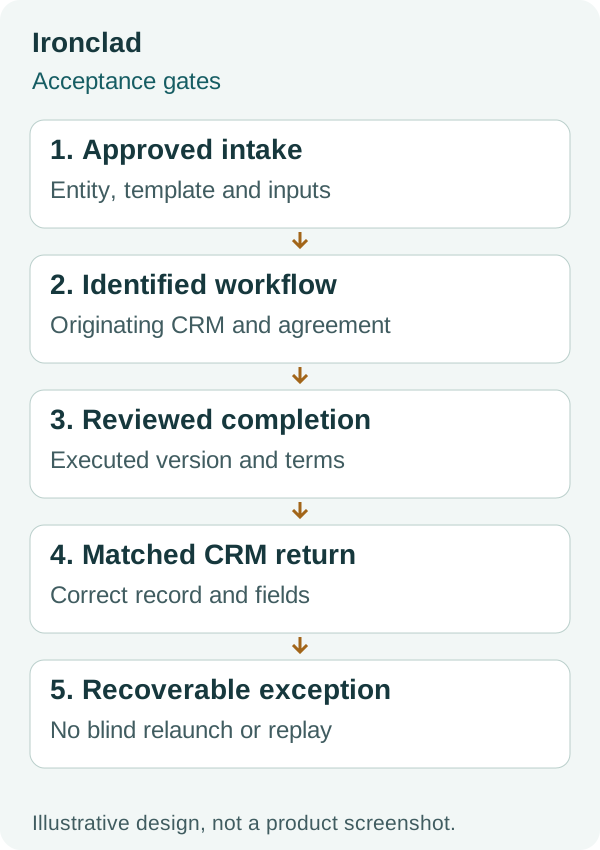
This conceptual diagram shows validation boundaries. It does not imply a native connector or unrestricted two-way synchronization.
If a simpler document-generation job is the real requirement, compare the PandaDoc guide and DocuSign guide. An existing Ironclad legal process and a simple signature tool should be evaluated against their different responsibilities.
How do you handle repeated events and failed updates?
Design recovery around workflow identity, version and event purpose. A safe retry should repair the missing return rather than launch another agreement or repeat a downstream billing action.
Create an exception record with source workflow, originating CRM record, event time, failed step, reason, last accepted state, owner and next safe action. Keep ambiguous matching, revoked access and invalid fields as different errors because their fixes differ.
| Failure case | Recovery requirement |
|---|---|
| Launch response missing | Inspect whether a workflow already exists before relaunch |
| Repeated completion event | Recognize an already processed result |
| Older signing event arrives late | Preserve the accepted completion state |
| Permission revoked | Restore approved access, then retry the failed operation |
| Document transfer fails | Keep transfer incomplete and visible; do not claim full handoff |
| CRM ID absent or wrong | Hold for reviewed matching rather than choosing by customer name |
These are recommended controls for the custom implementation, not a claim that the middleware provides them automatically. Verify event authenticity using the provider’s current supported method and avoid treating an unauthenticated request as a legal completion instruction.
After recovery, inspect the CRM fields and document access, not merely the middleware’s green run status. A delivered webhook does not establish that the agreed destination was updated correctly.
How should historical agreements and amendments be handled?
Scope historical intake separately from new-workflow creation. Preserve prior executed versions and decide whether you need files, metadata, associations or all three.
A historical agreement may have no originating HubSpot deal. Define a reviewed matching process and a separate backfill status. Do not create a fresh signing workflow or invoice merely to make an old agreement visible in CRM.
For amendments, preserve which version controls the current commercial terms. A completed amendment might change service scope, dates or price while leaving the underlying customer identity unchanged. Link its source and effective movement so reporting can explain the change.
The CLM and CRM integration framework covers general field authority and history. For native commercial records, use the Contracts setup guide. Keep those responsibilities explicit rather than assuming an Ironclad repository record automatically becomes a HubSpot Contract.
What should pass before you release the integration?
Release when the approved intake, completion return and recovery paths work for representative customer agreements. Use this checklist as a scope and handover artifact.
- The actual route is identified as a supported app, middleware configuration or custom implementation.
- The selected connector’s access and installation requirements are verified; custom API work also has its OAuth flow, user permissions and resource scopes checked.
- A named owner can renew or revoke each connection appropriately.
- Complete inputs launch the intended template; missing inputs enter review.
- A launch retry does not create a second workflow for the same request.
- WF-42 returns to A-101/501 while A-102/502 stays unchanged.
- Signing progress, completion and CRM handoff acceptance remain distinct.
- Required agreed fields pass type, version and authority checks.
- The executed document is accessible only through the approved visibility policy.
- Repeated and older events do not reverse state or duplicate downstream actions.
- Failed document transfer or revoked access has a tested recovery path.
- Historical backfill remains separate from new signing and billing.
- The handover includes mappings, support ownership, exception queue and retry runbook.
After this gate, pass approved commercial inputs to the quote-to-cash process. Completion of legal workflow does not establish an invoice schedule or payment collection until those are separately configured and accepted.
Frequently asked questions
Is Ironclad HubSpot integration an out-of-the-box connector?
Ironclad describes a third-party MATIC connector for HubSpot, alongside a separate custom Tray.io example. The packaged connector is not evidence of a first-party native app or universal account access. Verify its current publisher, supported operations, entitlement and support scope.
Can HubSpot launch an Ironclad customer-agreement workflow?
Yes, Ironclad describes workflow launch from HubSpot through MATIC and demonstrates a custom middleware route. Verify the selected route’s access, workflow inputs and originating CRM identity. Neither description guarantees that every workflow or account is supported.
Can completed Ironclad agreements update HubSpot fields?
A custom return can update the intended CRM record where the supported APIs, permissions and mappings allow it. Define the exact fields, events and destination, then test matching and validation. Do not assume arbitrary legal metadata returns automatically.
Can I follow the older guide’s bearer-token setup?
Do not treat it as current instructions. The guide flags deprecated authentication, and Ironclad’s current OAuth guidance includes user and resource scopes. Verify the current method before implementing or repairing the connection.
Will the integration create a HubSpot Contract record?
That is a separate commercial-record requirement. The documented example updates a deal and transfers an executed document. Verify the supported Contract route and its entitlement and beta conditions instead of inferring Contract creation from legal completion.
Discuss your Ironclad handoff
Bring the customer agreement type, workflow template and required CRM return fields to a discovery conversation. The responsibility map, worksheet and tests above help define a bounded configuration or integration scope first.


