
This guide supports our HubSpot quote-to-cash pillar. It focuses on configuring and accepting a quote, before the billing and accounting handoff.
HubSpot CPQ helps sales teams build quotes, configure products and calculate prices using HubSpot CRM data. The current quote tool requires Revenue Hub Professional or Enterprise and an assigned Revenue Hub seat. Start with your pricing rules, approval policy and accepted-agreement handoff, then test whether native quoting covers the required customer journey.
Three things you can take away:
- A native-fit worksheet for deciding what belongs in HubSpot and what needs another tool.
- A filled product and pricing example you can adapt to a customer quote.
- A quote acceptance checklist covering approval, signature, commercial records and billing.
Start here: choose one recent customer quote with a recurring charge, one-time fee and approval exception. Write down its expected prices, dates and records before configuring a template.
Download: HubSpot CPQ setup workbook (Excel). Use the blank quote calculator, filled pricing example, native-fit worksheet and acceptance test plan. No signup is required.
What does HubSpot’s CPQ quote tool cover?
CPQ means configure, price, quote. In an implementation, the useful question is whether your product combinations, pricing rules and approval requirements can become an accurate customer-facing quote.
According to HubSpot’s quote creation documentation, current quotes support flat-rate, tiered and ramp pricing, acceptance and billing options. Creation requires Revenue Hub Professional or Enterprise, a Revenue Hub seat and the relevant deal permissions. Legacy quotes have a separate access model; a Sales Hub subscription alone does not establish access to the current CPQ editor.
Record the quote experience your users actually have. A tutorial written for legacy quotes may show different settings and record behavior. Use HubSpot’s Revenue Hub information to check the current product packaging, then verify the assigned seats and permissions in your portal.
This article covers customer sales quotes. It does not cover purchasing from vendors or claim that commercial quote approvals provide a complete legal negotiation system.
Which quoting features should you configure first?
Configure the product library, pricing model, quote template and approvals around your actual offers. Sellers and buyers should be able to understand the same approved scope and price.
According to HubSpot’s CPQ feature guide, the native CPQ solution connects product configuration, branded quotes, approval workflows and buyer acceptance. Use this feature map to decide what to configure first:
| CPQ feature | Implementation decision | Pilot evidence |
|---|---|---|
| Product library and price books | Approved offer, SKU and regional pricing | Correct product and price for the buyer |
| Line item editor | Quantity, discount and recurring billing terms | Each line matches the approved offer |
| Quote templates | Branding, modules and reusable terms | Sales team starts from the intended template |
| Approval workflows | Standard or advanced commercial policy | Required reviewers accept the final version |
| Acceptance and attachments | Signature method and reviewed supporting terms | Buyer accepts the intended documents |
| Engagement tracking | How sales reps use quote activity | Views are visible without implying acceptance |
Tiered products and price books require a Revenue Hub subscription; adding tiered products to quotes requires a Revenue Hub seat. Advanced approvals require Enterprise. Verify those conditions before promising every feature to every seller.
Visibility is useful only when its meaning is clear. A viewed quote is buyer engagement, not a signed contract or committed payment. Define the next sales action for each state rather than treating activity as evidence that the customer agreed.
How do you set up HubSpot quotes step by step?
Start with one test deal, a reviewed quote template and the workbook’s expected prices. Check the output before sellers use the configuration for live customers.
Use HubSpot’s quote creation instructions for the current editor:
- Open the intended deal under CRM > Deals and start a quote from its Quotes card.
- Select the quote template, then review the customer, currency and sender.
- Check the product lines, quantities, pricing model, discounts and term against the approved calculation.
- Add reviewed terms and supporting documents. Choose the permitted acceptance method.
- Submit for the required approvals, then preview the buyer experience before sharing.
Keep the pilot’s expected result beside the editor: $1,000 monthly support plus $1,500 onboarding, or $900 monthly support after the approved support-only discount. Inspect each charge, not just the final quote total.
Record any mismatch as product, price, template, approval or handoff. That makes the correction actionable. For example, a correct total with an incorrect recurrence is a pricing configuration failure even if the preview looks professional.
When should you use a CPQ integration or advanced CPQ solution?
Consider a CPQ integration when a demonstrated pricing or document requirement is not met by your tested native configuration. Select the CPQ system from that requirement, with one authority for the final quote.
Compare three routes: native HubSpot CPQ, a document platform with quoting capabilities, or a specialist CPQ solution. A sales team selling standard support packages may need product and template configuration. A business selling constrained equipment bundles may need a more detailed configuration engine. A consultancy negotiating extensive legal terms may need a separate document workflow. These are evaluation scenarios, not claims that HubSpot lacks a particular feature.
When comparing providers, write down the exact unresolved job, such as validating a bundle, applying a negotiated pricing model or returning an accepted agreement version. Ask each proposed provider to demonstrate it against the same inputs. Include implementation cost, licensing, support ownership and CRM writeback in the comparison.
The document integrations pillar owns the broader signing-platform comparison. Keep this CPQ guide focused on how you configure, price and quote. An integration should not introduce two competing product catalogs or two independent billing instructions for one accepted offer.
Can AI-generated quotes replace pricing and approval checks?
No. Treat an AI-generated quote as a draft to review against approved products, prices and customer terms. A fluent cover letter does not prove that the commercial calculation is correct.
HubSpot documents AI-assisted quote modules and a Closing agent beta in its CPQ guide. Verify the account’s settings and access before including either in the workflow. Check generated scope against the actual offer and ensure the final quote still follows the same approval and acceptance gates. AI assistance is optional; it is not a prerequisite for the workbook or pricing tests in this guide.
How do you decide whether native HubSpot CPQ fits?
Compare representative quotes with required behavior, rather than choosing from a feature count. Native CPQ may cover the process; another document or pricing tool may be justified where a demonstrated requirement falls outside it.
Copy this worksheet into your implementation brief. The labels are requirements, not HubSpot property names.
| Requirement | Example to bring | Evidence needed |
|---|---|---|
| Product configuration | Support package plus optional sites | Allowed combinations and rejected invalid inputs |
| Pricing | Monthly service plus onboarding | Correct recurrence, quantity, discount and currency |
| Approval | Discount above your agreed threshold | Correct reviewer, rejection and resubmission |
| Legal documents | Quote plus reviewed SOW | Correct version, attachment and acceptance policy |
| Commercial handoff | Accepted quote and agreement reference | Intended deal and Contract associations |
| Finance handoff | Approved invoice schedule | Correct billing authority and no second collector |
Mark each row supported, needs configuration, needs integration or unresolved. A missing item in a demonstration is not proof that HubSpot lacks the feature. Ask for the documented configuration and test it against your example.
For example, a consultancy might need three milestone charges and an editable SOW. An MSP might need recurring coverage at different customer sites. Both need a quote that preserves meaning, not merely a total that matches the spreadsheet.
If a separate document platform owns the agreement, use the PandaDoc setup guide or DocuSign setup guide to specify its handoff. Avoid buying two quoting paths for the same requirement without deciding which owns the final commercial terms.
How do you model recurring services and one-time charges?
Give each charge an explicit product identity, recurrence, term and billing start date. Separate the quoted commitment from the amount due on a particular invoice.
Consider this illustrative support agreement. These are example amounts in USD before tax, not a SwotBee customer result or a tested portal configuration.
| Line | Quantity | Unit price | Recurrence | Twelve-month commitment |
|---|---|---|---|---|
| Managed support | 40 users | $25 per user | Monthly for 12 months | $12,000 |
| Onboarding | 1 project | $1,500 | One time | $1,500 |
| Total | Separate units | Separate price bases | Mixed | $13,500 |
Monthly recurring revenue is $1,000, while total contract value is $13,500. The onboarding fee is not recurring revenue. Neither number establishes the first invoice amount until finance specifies billing timing, taxes and collection.
Now introduce an approved 10% discount on support only. Recurring revenue becomes $900 per month, the recurring commitment $10,800 and total commitment $12,300. A blanket discount on the combined total would also reduce onboarding, which is a different commercial decision.
Write a validation row for every price input: source product/SKU, quantity, unit price, discount authority, recurrence, service period and rounding. Test a second currency separately. Do not turn a twelve-month term into twelve one-time products simply to make a total look right.
Complex pricing needs its own examples. Specify when a rate changes and whether it applies to all units or a particular tier. Accurate pricing depends on that distinction, not just choosing a pricing-model label. The required calculation should be reviewable before selecting the corresponding native configuration.
How do you validate different pricing models before using CPQ?
Calculate the expected result independently, then compare each price boundary in the selected configuration. Accurate quotes require agreement on how quantities, tiers and time periods affect the offer.
For an illustrative volume-priced service, 1-50 users cost $25 each and 51-100 users cost $22 each. If the lower rate applies to every user once the threshold is crossed, 60 users cost $1,320 per month. If the first 50 remain at $25 and only the next 10 cost $22, the result is $1,470. Those are different pricing models; the $150 difference must not be hidden by a generic Tiered label.
According to HubSpot’s product pricing guide, volume-based pricing applies one rate to all units, graduated pricing applies rates within each tier, and stair-step pricing sets a flat charge for the reached tier. Tiered products have Revenue Hub and seat requirements. Test quantities 50 and 51, the discount scope and recurring term. The figures above are independent examples, not results from a tested portal.
When replacing manual quoting, preserve the approved calculation and its reviewer as evidence. A professional-looking quote template can still contain the wrong price. Record the pricing model in the product specification so a second seller can reproduce the quote without the original spreadsheet author.
How do HubSpot CPQ approval workflows and pricing rules work?
Turn your commercial policy into explicit triggers, reviewers and resubmission rules. Approving a deal, approving a quote and reviewing legal clauses are related but different decisions.
HubSpot’s quote approval guide distinguishes standard approvals from Enterprise advanced approvals. Standard rules can assign up to ten approvers; advanced rules support sequences. A Super Admin enables approvals. Standard and advanced approvals cannot be active simultaneously.
Use this policy example as a starting point, not a universal recommended threshold:
| Condition | Proposed reviewer | Evidence before sending |
|---|---|---|
| Standard pricing and terms | Your documented standard path | Current inputs validated |
| Discount above 10% | Sales manager | Discount reason and approved scope |
| Non-standard payment schedule | Finance | Approved due dates and payer |
| Changed liability or service clause | Legal policy owner | Reviewed agreement version |
Check which conditions are available in your approval configuration. A legal review might need a separate document workflow even when the quote’s commercial fields are approved.
Test a quote created by a designated approver. The documentation describes an approval exception when the creator is the only approver. Test reviewer absence and an all-approvers rule too. An approval policy that waits for an unavailable person needs an agreed escalation process.
Finally, change an approved price or attachment and demonstrate the required resubmission. The result must match your policy; an approval badge is not evidence that the final version was reviewed.
What should buyers see before accepting a quote?
A buyer-ready quote has the intended legal entity, scope, price, acceptance method and version. Internal approval and actual delivery should remain separate states.
Treat the quote template as the sales team’s starting point, not evidence that every offer is valid. Assign an owner for template changes and distinguish reusable content from customer-specific scope. If the standard support template contains onboarding, verify that sales reps remove or change that line only under the approved pricing policy.
Give sellers a short pre-send record: chosen template version, accepted product configuration, discount approval reference and intended signer. A second reviewer should be able to reconstruct the offer without asking which spreadsheet supplied the price. This is especially useful when sales, legal and finance use different tools in the same sales process.
Use a pre-send review containing six checks: customer and payer, authorized recipient, product scope, commercial totals, agreement version and acceptance method. Where signing is required, verify the signer assignments and any countersigner. Where click-to-accept is suitable, document who approved that method.
HubSpot’s quote creation guide says marking a quote Shared does not necessarily mean it has been delivered. It also documents signable attachments and distinct payment behavior. Test the buyer journey from the actual link, not only the administrator’s preview.
Keep signed legal evidence distinct from a native commercial Contract. An accepted quote can support a commercial lifecycle under configured settings; it does not replace the customer’s MSA or SOW. The customer-contract architecture guide explains those record responsibilities.
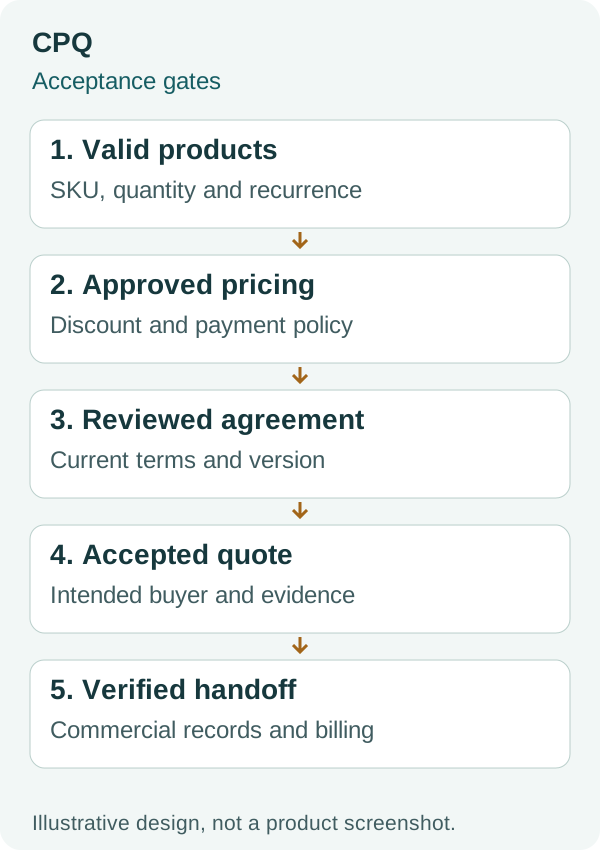
This diagram is a conceptual test sequence, not a HubSpot screenshot. Use the gates to identify exactly where your example becomes incorrect or incomplete.
How do you hand an accepted quote to billing?
Decide which system creates invoices and collects payments before turning on quote billing. Acceptance, committed revenue and payment collection are separate events.
Use the HubSpot quote-to-cash guide to specify the wider handoff. If accounting owns invoice creation, define the supported route to that system and the CRM return. If HubSpot owns billing, demonstrate the invoice schedule and reconciliation before releasing the quote.
The current quote documentation identifies a Connected CPQ, Billing, and Payments beta with specific Contract and subscription behavior. Under its documented automatic Contract setting, the first invoice is sent immediately after acceptance even when its invoice date is in the future. Treat billing activation as a finance decision requiring a reviewed test, not a cosmetic quote setting.
Keep your acceptance test bounded. A no-billing quote validates pricing and signing without proving a billing flow. A successful first invoice does not prove subsequent recurring invoices, cancellation, credits or mid-term changes.
For quote branding, email and legacy-editor settings, refer to HubSpot’s quote setup documentation. Those settings should be verified separately from pricing and acceptance.
For existing payment and accounting tools, see the Stripe connection decision guide and QuickBooks invoice reconciliation guide. Do not run an existing external collection schedule and a new HubSpot billing schedule for the same commitment.
How do you handle revised quotes and renewals?
Keep a clear current version and preserve prior accepted terms. A revised draft should not silently become the basis of an existing customer’s billing or reporting.
Create a version policy: who can amend the quote, what restarts approval, which version the buyer sees and what happens to an earlier link. Test changes to recipient, term, quantity and discount separately.
Do not assume quote line-item IDs remain stable across related deals and quotes. Use a commercial SKU and the appropriate record identifiers in your handoff design. Reconcile the chosen accepted version before treating the deal amount as an agreed commitment.
For native Contract renewals, use the Contracts and renewal quotes setup guide. For externally controlled agreements, preserve their commercial authority and map the next opportunity explicitly. Neither route makes every Closed Won deal a new invoice instruction.
What should pass before you release the quoting process?
Release the process when representative quotes and failure cases produce the approved result. The following checklist can be copied directly into your pilot review.
- Intended creators have the correct quote experience, seats and permissions.
- Recurring and one-time products remain distinguishable in the quote and handoff.
- The $13,500 example and $12,300 discounted variant reconcile independently.
- Missing required inputs prevent delivery or enter a named review path.
- Discount, payment and legal exceptions reach the intended reviewers.
- Post-approval changes follow the agreed resubmission policy.
- The buyer sees and accepts the intended version and attachments.
- Shared, delivered, accepted and paid states remain distinct.
- Expected deal, Contract and subscription associations are checked separately.
- Billing tests cover timing and duplicate collection before activation.
- A named owner can correct a failed quote and repeat the test safely.
Keep a short pilot log with the quote ID, test case, expected result, actual result and reviewer. Leave unresolved rows visible; do not convert them into assumptions because the standard quote works.
For the detailed acceptance work, use accepted mid-term contract changes, and document views versus agreement acceptance.
Frequently asked questions
Is HubSpot CPQ included with Sales Hub?
The current CPQ quote documentation specifies Revenue Hub Professional or Enterprise and a Revenue Hub seat. Legacy quote access is separate. Check the tool, seat and permissions in your portal rather than assuming a Sales Hub tier provides the current editor.
Can HubSpot CPQ handle recurring and one-time charges?
Current quotes support different pricing and billing arrangements. Test your exact recurrence, term, discount and billing timing. A matching total does not prove that recurring revenue or the invoice schedule is correct.
Do I need Enterprise for quote approvals?
Standard approvals are documented for Revenue Hub Professional and Enterprise. Advanced approvals require Revenue Hub Enterprise. Check which policy conditions and reviewer sequences you need before choosing a tier.
Does an accepted HubSpot quote automatically start billing?
It depends on the configured quote and billing path. Connected CPQ, Billing, and Payments has separate beta and settings conditions. Verify the expected Contract, invoice, subscription and collection behavior before sending a billing-enabled quote.
Should I use HubSpot CPQ or PandaDoc?
Compare your required product, price, approval and legal-document workflow. Keep one authority for final commercial terms. Use a separate document platform where the demonstrated requirement warrants it, then define the return to HubSpot.
Discuss your quote handoff
Bring one representative quote, your approval rules and the expected downstream records to a discovery conversation. We can discuss what needs configuration or integration. The worksheets and acceptance checks above are available without booking a call.

